> For the complete documentation index, see [llms.txt](https://docs.snomed.org/llms.txt). Markdown versions of documentation pages are available by appending `.md` to page URLs; this page is available as [Markdown](https://docs.snomed.org/snomed-ct-practical-guides/snomed-ct-extension-guide/3-purpose/3.2-add-content-to-snomed-ct.md).
# Add Content to SNOMED CT
Extensions can be used to add content to SNOMED CT. These additions can address perceived content gaps in SNOMED CT because content is:
* Outside of the defined scope of the International Edition, and has thus been intentionally excluded
* Within the scope of the International Edition, but is not included as it relates to a new clinical knowledge or a previously unreported omission
In some cases, a content gap will be addressed by adding content directly to the International Edition, but in other cases the content will be rejected for inclusion in the International Edition. When content is outside the scope of the International edition, yet required to support national or local needs, this content may be added to an extension *.* For example
* Content relevant to an entire country may be relevant to include in a national extension, for example
* Concepts used for reporting and quality metrics in a specific country or region
* Representation of specific procedural concepts such as a technique that is used nationally for testing purposes
* Concepts that are mandated by government agencies that would otherwise be excluded from the International release by editorial policy
* Content relevant to a specific hospital may be included in a local extension, for example
* Local interface terms or patient-friendly terms, added as extension descriptions which describe existing SNOMED CT concepts
* Concepts representing specific hospital wards or beds
* Content relevant to a specific vendor may be included in a local extension, for example
* System-specific interface terms or codes, added as extension descriptions which describe existing SNOMED CT concepts
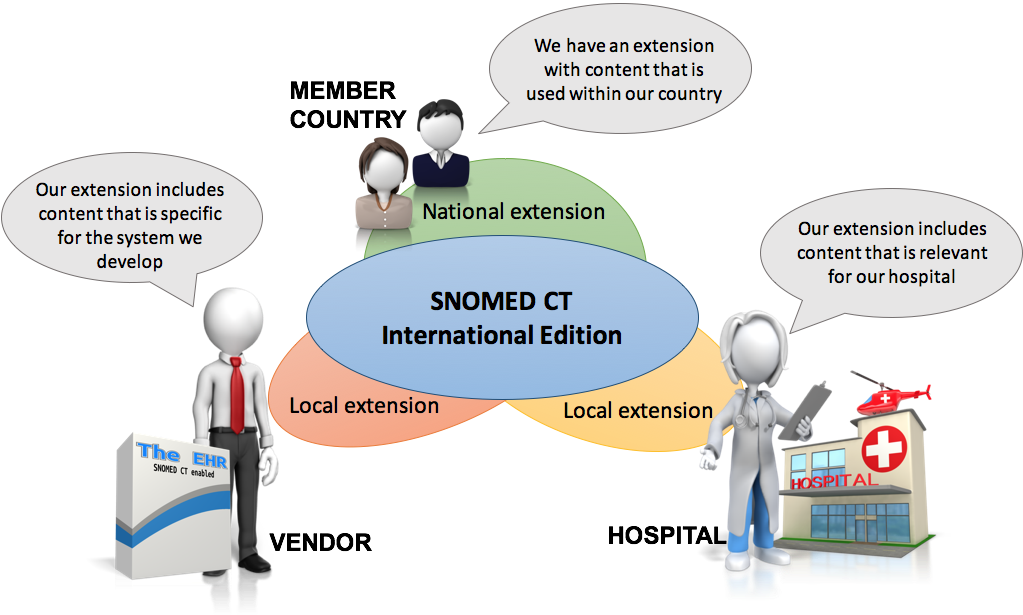
As illustrated in the image below, content can be added to SNOMED CT by inclusion in the International Edition or in relevant extensions. National extensions will add the content relevant for multiple Affiliates (or stakeholders) within a country or member territory, whereas highly specific content, which is only relevant for a specific vendor product or hospital may be added in a local extension.
Extensions can be used to add national or local content to SNOMED CT
In some circumstances, extensions can be used to extend the expressivity of SNOMED CT, for example by expanding the concept model or by specifying additional terminology characteristics and features. SNOMED CT enables the following enhancements to expressivity to be made by adding terminology metadata.
* Creating a new reference set pattern, with new attributes
* Creating a new relationship type, i.e. a new attribute
* Creating a new description type
Once the required metadata has been added, the enhancement can be used within the extension and can be applied to SNOMED CT components in the extension, the International Edition, or any other modules on which the extension depends.
Extending the expressivity of SNOMED CT does not necessarily require the creation of new clinical content in SNOMED CT. However, it does require the addition of concepts within the [| SNOMED CT Model Component|](http://snomed.info/id/900000000000441003) hierarchy of SNOMED CT and in some cases the addition of **reference set members** to one of the metadata reference sets.
{% hint style="info" %}
The [| SNOMED CT Model Component|](http://snomed.info/id/900000000000441003) hierarchy provides technical metadata supporting the SNOMED CT release. Before attempting to extend the expressivity of SNOMED CT, it is essential to understand how the metadata hierarchy is structured and how its concepts function.
Addition of metadata concepts can impact the integrity and consistency of SNOMED CT. For further information, please refer to the rules and advice on the addition of extension concepts to particular hierarchies in Constraints on Concept Requests.
{% endhint %}
## Key Steps
In section [5 Key Steps](/snomed-ct-practical-guides/snomed-ct-extension-guide/5-key-steps.md) we explain the full set of steps for producing any extension. However, not all of these steps are required for all purposes. If producing an extension for the purpose adding content to SNOMED CT, the following key steps are of particular relevance:
* **Create components**
* Principle and process for creating concepts: [Add Concept in an Extension](/snomed-ct-practical-guides/snomed-ct-extension-guide/5-key-steps/5.4-authoring/5.4.2-authoring-concepts/5.4.2.1-add-concept-in-an-extension.md)
* Principle and process for creating descriptions: [Add Description in an Extension](/snomed-ct-practical-guides/snomed-ct-extension-guide/5-key-steps/5.4-authoring/5.4.3-authoring-descriptions/5.4.3.1-add-description-in-an-extension.md)
* If you need to specify defining characteristics for concepts, for example following the creation of a new concept. See section [Add Relationship in an Extension](/snomed-ct-practical-guides/snomed-ct-extension-guide/5-key-steps/5.4-authoring/5.4.4-authoring-relationships/5.4.4.1-add-relationship-in-an-extension.md) for information about the principles and process for creating relationships
* See the [Practical Guide to Reference Sets](https://docs.snomed.org/snomed-ct-practical-guides/snomed-ct-reference-set-guide/) for more information about the different reference set types and their usage
Provide Feedback
---
# Agent Instructions
This documentation is published with GitBook. GitBook is the documentation platform designed so that both humans and AI agents can read, navigate, and reason over technical content effectively. Learn more at gitbook.com.
## Querying This Documentation
If you need additional information that is not directly available in this page, you can query the documentation dynamically by asking a question.
Perform an HTTP GET request on the current page URL with the `ask` query parameter, and the optional `goal` query parameter:
```
GET https://docs.snomed.org/snomed-ct-practical-guides/snomed-ct-extension-guide/3-purpose/3.2-add-content-to-snomed-ct.md?ask=&goal=
```
`ask` is the immediate question: it should be specific, self-contained, and written in natural language.
`goal` is optional and describes the broader end goal you are ultimately trying to accomplish on behalf of the user. GitBook uses it to tailor the answer towards what is most useful for that goal.
The response will contain a direct answer to the question and relevant excerpts and sources from the documentation.
Use this mechanism when the answer is not explicitly present in the current page, you need clarification or additional context, or you want to retrieve related documentation sections.