# Free-text with Natural Language Processing

Except where agreed business processes require structured and standardised recording, using free text fields are often a necessity to support the clinical documentation and established work processes. Free text in Electronic Health Records enables the user to enter information using the terms and phrases of his/her own choice.

With this approach, the clinical user enters the information in a dedicated text box, and the text is subsequently analyzed by a natural language processing (NLP) tool. The NLP tool is designed to codify the key terms as SNOMED CT concepts, and the rules specified in the Machine Readable Concept Model (MRCM) may be applied to help identify the relationships between these key terms, to form SNOMED CT expressions.

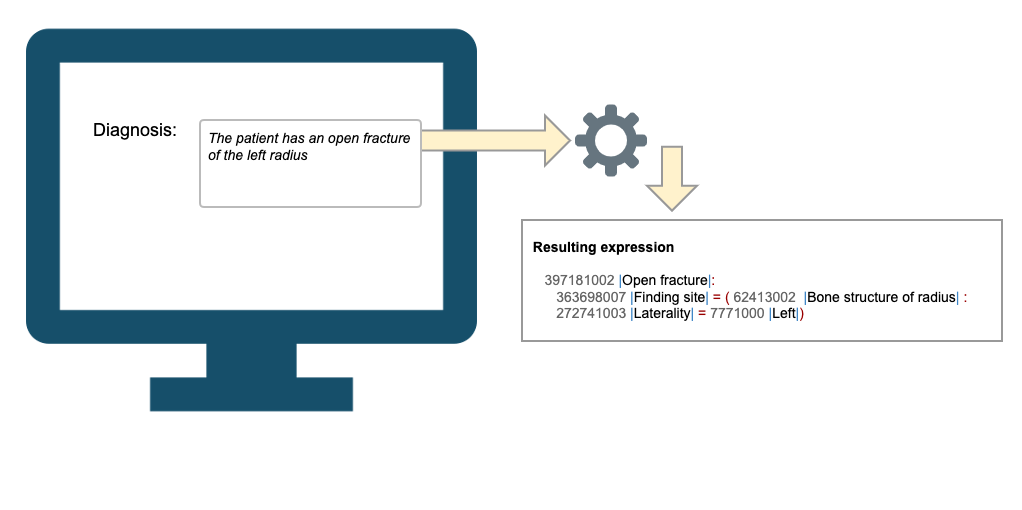
The image below illustrates how the phrase *"The patient has an open fracture of the left radius"* is processed by an NLP tool to form the expression:

```
42945005 |Open fracture of radius| : 272741003 |Laterality| = 7771000 |Left| . 
```

<figure><img src="/files/ro8ZNcU6f1QxVfzFiemc" alt=""><figcaption><p>Using free text to enter postcoordinated expressions involves the free text to be transformed into a SNOMED CT expression using a SNOMED CT-enabled Natural Language Processing tool.</p></figcaption></figure>

With this approach, the expressions are usually created at run-time, as the user types in the free text. This requires the system to incorporate a SNOMED CT- enabled NLP service that works in the local dialect.

Using the free-text approach with an NLP tool to generate the expressions, it is recommended, and often required for medicolegal reasons, to store both the free text as it was entered by the user, and also the coded expression that was generated by the NLP tool and confirmed by the user. You should also store the terms associated with the expression that was displayed to the user when they confirmed that it accurately reflects the meaning of the free text.

**Terminology services**

Enabling NLP with expressions in the EHR requires the EHR to add newly created expressions derived from the NLP algorithm.\
For this purpose, the following services may be required:

* **Lookup Expression**
* **Add Expression**
* **Get Display Term**. This may be required to display a human readable representation of the generated expression, to enable the end-user to confirm the result of the NLP analysis.

So, in this approach the expressions are usually created at run-time, as the user types in the free text. This requires the system to incorporate a SNOMED CT enabled NLP service that works in the local dialect. So, in this approach the expressions are usually created at run-time, as the user types in the free text. This requires the system to incorporate a SNOMED CT enabled NLP service that works in the local dialect.

<a href="https://docs.google.com/forms/d/e/1FAIpQLScTmbZIf0UEQwYDkY27EEWBkaiYkHSbR0_9DmFrMLXoQLyL7Q/viewform?usp=pp_url&#x26;entry.1767247133=Postcoordination+Guide&#x26;entry.670899847=Free-text%20with%20Natural%20Language%20Processing" class="button primary">Provide Feedback</a>


---

# Agent Instructions: Querying This Documentation

If you need additional information that is not directly available in this page, you can query the documentation dynamically by asking a question.

Perform an HTTP GET request on the current page URL with the `ask` query parameter:

```
GET https://docs.snomed.org/snomed-ct-practical-guides/snomed-ct-postcoordination-guide/expressions-in-the-ehr/entering-expressions-in-an-ehr/free-text-with-natural-language-processing.md?ask=<question>
```

The question should be specific, self-contained, and written in natural language.
The response will contain a direct answer to the question and relevant excerpts and sources from the documentation.

Use this mechanism when the answer is not explicitly present in the current page, you need clarification or additional context, or you want to retrieve related documentation sections.
