> For the complete documentation index, see [llms.txt](https://docs.snomed.org/llms.txt). Markdown versions of documentation pages are available by appending `.md` to page URLs; this page is available as [Markdown](https://docs.snomed.org/snomed-ct-practical-guides/snomed-ct-postcoordination-guide/expressions-in-the-ehr/entering-expressions-in-an-ehr/prepopulated-expressions.md).
# Prepopulated Expressions
When using pre-populated expressions, the user is presented with a list of clinical phrases (‘interface terms’), using a pick list, checkboxes, or another type of data entry control.
The essence of this approach is that the user is presented with a clinical phrase representing a specific clinical meaning, and in the backend of the system, this clinical phrase is associated with a postcoordinated expression (instead of a precoordinated concept).
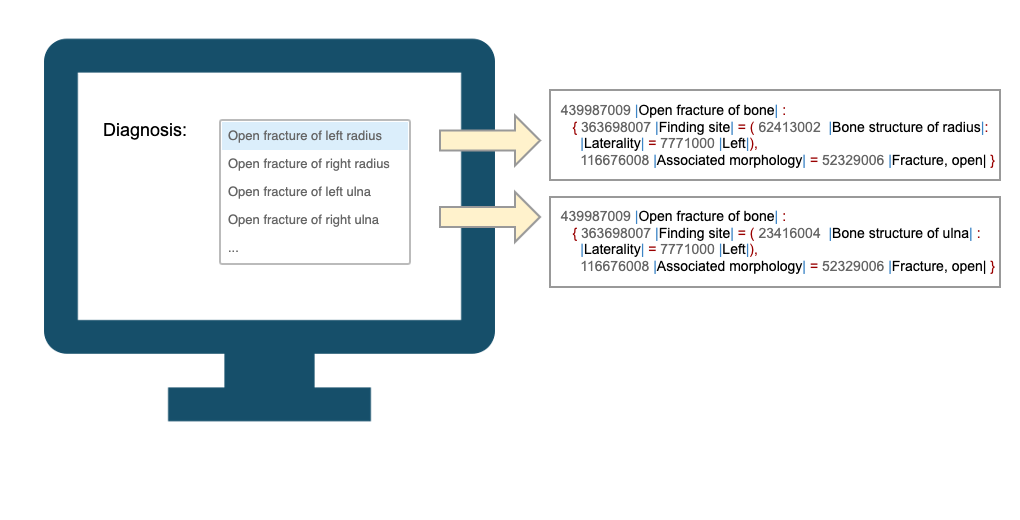
In the example shown in the image below, the user interface includes a list of phrases such as “Open fracture of left radius”, and “Open fracture of right radius”. Some of these phrases may be associated with precoordinated content (either via mapping or the released SNOMED CT descriptions), while other phrases may be associated with postcoordinated expressions. In this example, the phrase “Open fracture of left radius” and “Open fracture of left ulna” is associated with postcoordinated expressions.
Options displayed in a user interface may be associated with a postcoordinated expression
This approach requires the expressions to be created and mapped to an interface term by a SNOMED CT implementer. This occurs as part of the terminology binding process in the design stage of the implementation. Different approaches to the creation of the expressions exist and depend on the tools available. These approaches are described in the following pages.
Using postcoordinated expressions for items in a prepopulated list, or predefined values in a UI, each expression is associated with one field on the user interface. For precoordinated concepts, the best practice is to record the concept identifier as the code, and the term that was displayed or selected by the user as the original text.
The recommended approach to the storage of predefined postcoodinated expressions is similar to the storage of precoordinated concepts. This means that the display term used for the expression should be recorded in the health record, but the ‘code’ should either be the terse form of the full expression (i.e. the expression with the terms and spaces removed), or the unique identifier associated with the expression when this was added to the expression repository.
**Terminology services**
Enabling prepopulated expressions in the EHR requires the EHR to access expressions already created in the expression repository.\
For this purpose, the following services may be required:
* [Lookup Expression](https://github.com/SNOMED-Documents/snomed-postcoordination-guide/blob/main/expressions-in-the-ehr/entering-expressions-in-an-ehr/broken-reference/README.md)
* [Search Expression](https://github.com/SNOMED-Documents/snomed-postcoordination-guide/blob/main/expressions-in-the-ehr/entering-expressions-in-an-ehr/broken-reference/README.md)
* [Get Display Term](https://github.com/SNOMED-Documents/snomed-postcoordination-guide/blob/main/expressions-in-the-ehr/entering-expressions-in-an-ehr/broken-reference/README.md)
Provide Feedback
---
# Agent Instructions
This documentation is published with GitBook. GitBook is the documentation platform designed so that both humans and AI agents can read, navigate, and reason over technical content effectively. Learn more at gitbook.com.
## Querying This Documentation
If you need additional information that is not directly available in this page, you can query the documentation dynamically by asking a question.
Perform an HTTP GET request on the current page URL with the `ask` query parameter, and the optional `goal` query parameter:
```
GET https://docs.snomed.org/snomed-ct-practical-guides/snomed-ct-postcoordination-guide/expressions-in-the-ehr/entering-expressions-in-an-ehr/prepopulated-expressions.md?ask=&goal=
```
`ask` is the immediate question: it should be specific, self-contained, and written in natural language.
`goal` is optional and describes the broader end goal you are ultimately trying to accomplish on behalf of the user. GitBook uses it to tailor the answer towards what is most useful for that goal.
The response will contain a direct answer to the question and relevant excerpts and sources from the documentation.
Use this mechanism when the answer is not explicitly present in the current page, you need clarification or additional context, or you want to retrieve related documentation sections.