> For the complete documentation index, see [llms.txt](https://docs.snomed.org/llms.txt). Markdown versions of documentation pages are available by appending `.md` to page URLs; this page is available as [Markdown](https://docs.snomed.org/snomed-ct-specifications/snomed-ct-diagramming-specification/appendix/appendix-c-interactive-browsing-diagrams.md).

# Appendix C - Interactive Browsing Diagrams

[Diagram Types](/snomed-ct-specifications/snomed-ct-diagramming-specification/3-diagram-types.md) explores three different forms of diagram for expressing

* Expressions
* Concept definition
* Expression relation

This appendix explores a fourth type of diagram, essentially an extended use of the "Concept definition" diagram for use specifically in rendering interactive diagrams to navigate and explore SNOMED CT content.

This specific case is not included in the formal Diagramming Guideline at present, as it requires further exploration to be specified. However it may also be determined that there are multiple differing renderings that are useful in different browsing scenarios, and therefore one or a finite number of diagram styles may not be possible to define.

The following sections and examples are intended to demonstrate alternate layouts useful for browsing use cases, in an effort to elicit feedback and explore this scenario.

## Abbreviated concept definition

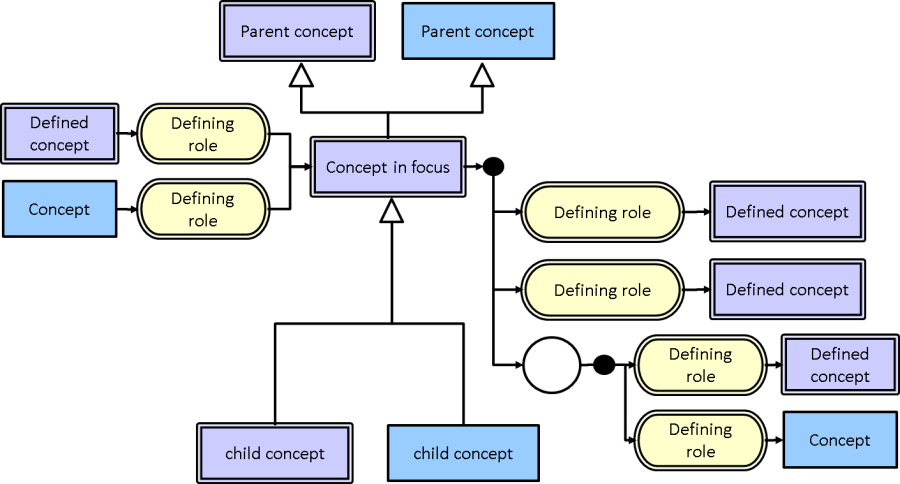
Figure Appendix C-1: depicts a concept definition diagram as used in the Workbench Utilities at the time of writing.

The most distinguishing feature of this approach is the removal of the "equivalence" symbol as an abbreviation. This enables the concept's parents to appear above the "concept in focus" while attributes appear on the right without excess clutter (as depicted in Figure 31).

Note that this diagram also includes child concepts of the "concept in focus" below, and attributes of which the "concept in focus" is a target on the left. This results in

* The arrows emanating from the "concept in focus" showing the definition of the "concept in focus"
* The arrows entering the "concept in focus" showing where the "concept in focus" is used in the definition of other concepts.

<figure><img src="/files/8pctFEghCKSSfrynDife" alt=""><figcaption><p>Figure Appendix C-2: abbreviated browsing concept definition diagram</p></figcaption></figure>

## Unabbreviated concept definition

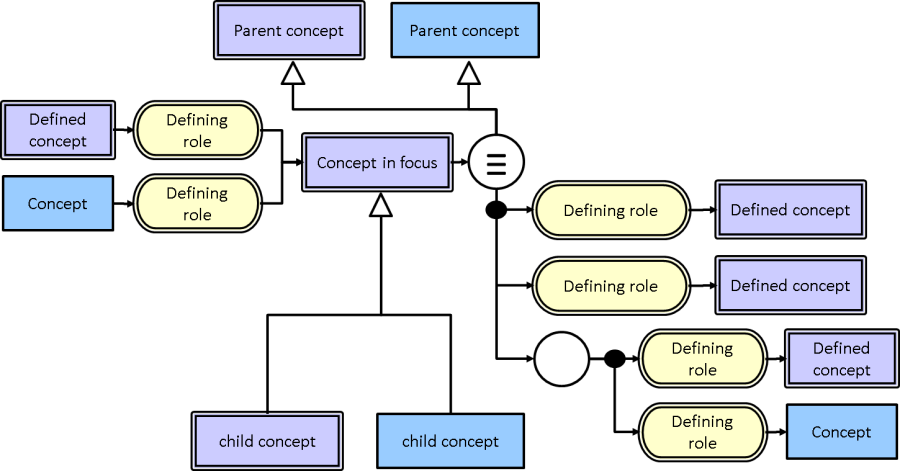
Figure Appendix C-3: depicts an alternate representation to that shown in Figure 30, where the "equivalence" symbol has not been abbreviated.

This approach is it conforms to the concept definition form in section 3.2; however it does present a more cluttered diagram than the abbreviated form in Figure 30.

<figure><img src="/files/T7V2rWqc6R1ndcEbgM38" alt=""><figcaption><p>Figure Appendix C-4: unabbreviated browsing concept definition diagram</p></figcaption></figure>

## Alternative Unabbreviated Concept Definition Layout

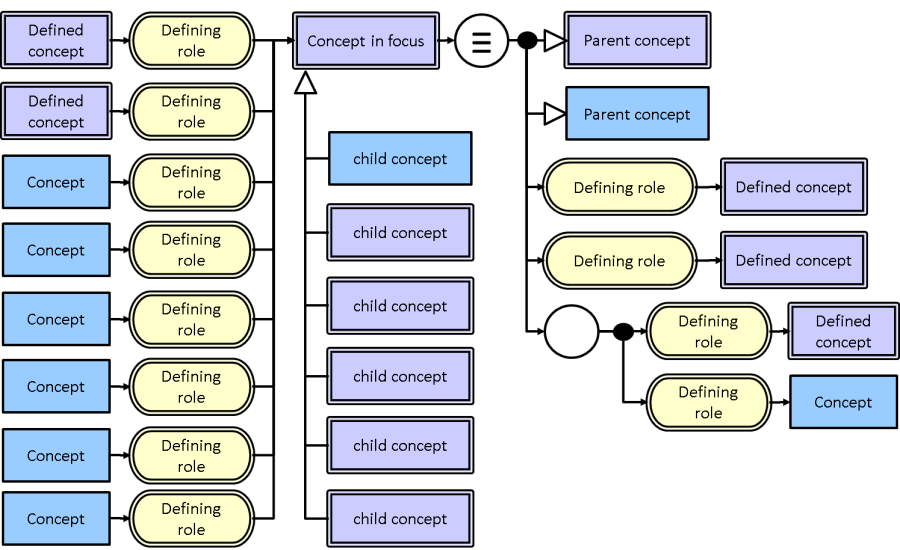
Figure Appendix C-5: shows an alternative layout of Figure 31. This layout uses the same layout used in 3.2 for the definition of the "concept in focus" - parent concepts shown on the right hand side.

This is matches the representation in 3.2, and achieves more space for rendering where the "concept in focus" is used in the definition of other concepts. However the resulting diagram is less intuitive than displaying the focus concept's parents above the focus concept.

<figure><img src="/files/PxnZtetTzIHCvkZYDdqk" alt=""><figcaption><p>Figure Appendix C-6: alternative unabbreviated browsing concept definition diagram</p></figcaption></figure>

## Alternative Views

The diagram options in this appendix have been largely focussed on a concept definition centric interaction/navigation; however there are other focuses that may also be useful.

For example it is common to consider browsing or navigating SNOMED CT purely from its sub/supertype relationships in a full hierarchical view back to the root node. While the examples in this section do provide immediate parents, sometimes hierarchical views showing full lineage are useful. However given the real-estate requirements of full lineage and full concept definition, it is unlikely that both renderings can coexist on the same diagram concurrently. Consequently an alternate style may be required for this view, of which there are many examples in SNOMED CT browsers at present.

Another example scenario is browsing a reference set/s or SNOMED CT content in context of a reference set/s. Again this use case is likely sufficiently at odds with the examples provided in this appendix that an alternate diagram style is required.

As this Diagramming Guideline is focussed on expressions and concept definitions, these and other potential views are out of scope and as yet unexplored formally by this document. Many examples of these renderings exist in the numerous SNOMED CT browsers, and may be left unspecified for the continued innovation of browser vendors, or explored in future versions of the Diagramming Guidelines if considered worthwhile.

<a href="https://docs.google.com/forms/d/e/1FAIpQLScTmbZIf0UEQwYDkY27EEWBkaiYkHSbR0_9DmFrMLXoQLyL7Q/viewform?usp=pp_url&#x26;entry.1767247133=SNOMED+Diagramming+Specification&#x26;entry.670899847=Appendix%20C%20-%20Interactive%20Browsing%20Diagrams" class="button primary">Provide Feedback</a>


---

# Agent Instructions
This documentation is published with GitBook. GitBook is the documentation platform designed so that both humans and AI agents can read, navigate, and reason over technical content effectively. Learn more at gitbook.com.

## Querying This Documentation
If you need additional information that is not directly available in this page, you can query the documentation dynamically by asking a question.

Perform an HTTP GET request on the current page URL with the `ask` query parameter, and the optional `goal` query parameter:

```
GET https://docs.snomed.org/snomed-ct-specifications/snomed-ct-diagramming-specification/appendix/appendix-c-interactive-browsing-diagrams.md?ask=<question>&goal=<endgoal>
```

`ask` is the immediate question: it should be specific, self-contained, and written in natural language.
`goal` is optional and describes the broader end goal you are ultimately trying to accomplish on behalf of the user. GitBook uses it to tailor the answer towards what is most useful for that goal.

The response will contain a direct answer to the question and relevant excerpts and sources from the documentation.

Use this mechanism when the answer is not explicitly present in the current page, you need clarification or additional context, or you want to retrieve related documentation sections.