> For the complete documentation index, see [llms.txt](https://docs.snomed.org/llms.txt). Markdown versions of documentation pages are available by appending `.md` to page URLs; this page is available as [Markdown](https://docs.snomed.org/snomed-ct-user-guides/authoring-user-guide/faqs/project-branches-task-branches-and-rebasing.md).
# Project Branches, Task Branches and Rebasing
## Content branching in the Terminology Server
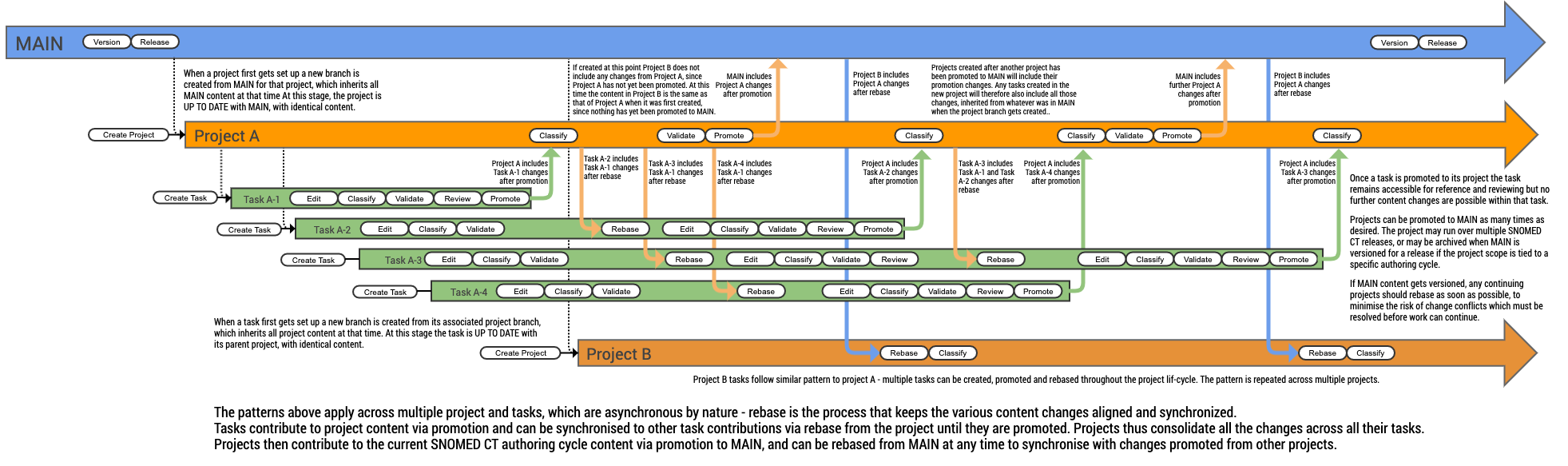
The Authoring Platform Terminology Server (Snowstorm) maintains SNOMED CT content in a controlled hierarchical structure of project and task branches originating from the mainline (or simply MAIN) branch.
MAIN carries controlled changes to SNOMED CT content in the current authoring cycle, which is periodically used to generate a new SNOMED CT International Release. It contains a set of project child branches, which can promote content for inclusion in the next SNOMED CT International release.
Each project branch contains any number of task child branches, which can promote content to the project level for sharing and synchronizing across the other tasks. Project branches can be synchronized (rebased from MAIN) with content updates from other projects which have promoted their changes to MAIN.
Task branches can be synchronized (rebased from project) with content updates from other tasks which have promoted their changes to the parent project.
Branch states
* `Up-to-date`\
Branch is synchronized with parent
* `Forward`\
Branch has at least one change whilst its parent branch is unchanged. This is the required state for merging a branch.
* `Behind`\
Parent branch has at least one change whilst the branch is unchanged. Branch can be safely rebased in this state, to bring in the parent changes.
* `Diverged`\
Both branch and its parent have at least one change since branch creation. Branch must be rebased before it can be safely promoted, to bring in the parent changes before promoting the branch.
* `Stale`\
Branch is no longer associated with its original parent (and should be deleted).
## Related How To... Guides
* [Rebase a project (synchronize content changes from other projects)](/snomed-ct-user-guides/authoring-user-guide/how-to/project-rebase-and-promotion/rebase-a-project-synchronize-content-changes-from-other-projects.md)
* [Create a new project](/snomed-ct-user-guides/authoring-user-guide/how-to/dashboard/create-a-new-project.md)
* [Create a new task](/snomed-ct-user-guides/authoring-user-guide/how-to/dashboard/create-a-new-task.md)
* [See all projects](/snomed-ct-user-guides/authoring-user-guide/how-to/dashboard/see-all-projects.md)
* [See my projects](/snomed-ct-user-guides/authoring-user-guide/how-to/dashboard/see-my-projects.md)
* [See my tasks](/snomed-ct-user-guides/authoring-user-guide/how-to/dashboard/see-my-tasks.md)
* [See tasks submitted for review (by other authors)](/snomed-ct-user-guides/authoring-user-guide/how-to/dashboard/see-tasks-submitted-for-review-by-other-authors.md)
* [Open one of my tasks (open task as an Author)](/snomed-ct-user-guides/authoring-user-guide/how-to/dashboard/open-one-of-my-tasks-open-task-as-an-author.md)
* [Rebase my task from the project (synchronize with changes made in its parent project since task creation)](/snomed-ct-user-guides/authoring-user-guide/how-to/task-rebase-and-promotion/rebase-my-task-from-the-project-synchronize-with-changes-made-in-its-parent-project-since-task-creat.md)
* [Search for tasks](/snomed-ct-user-guides/authoring-user-guide/how-to/dashboard/search-for-tasks.md)
Provide Feedback
---
# Agent Instructions
This documentation is published with GitBook. GitBook is the documentation platform designed so that both humans and AI agents can read, navigate, and reason over technical content effectively. Learn more at gitbook.com.
## Querying This Documentation
If you need additional information that is not directly available in this page, you can query the documentation dynamically by asking a question.
Perform an HTTP GET request on the current page URL with the `ask` query parameter, and the optional `goal` query parameter:
```
GET https://docs.snomed.org/snomed-ct-user-guides/authoring-user-guide/faqs/project-branches-task-branches-and-rebasing.md?ask=&goal=
```
`ask` is the immediate question: it should be specific, self-contained, and written in natural language.
`goal` is optional and describes the broader end goal you are ultimately trying to accomplish on behalf of the user. GitBook uses it to tailor the answer towards what is most useful for that goal.
The response will contain a direct answer to the question and relevant excerpts and sources from the documentation.
Use this mechanism when the answer is not explicitly present in the current page, you need clarification or additional context, or you want to retrieve related documentation sections.