> For the complete documentation index, see [llms.txt](https://docs.snomed.org/llms.txt). Markdown versions of documentation pages are available by appending `.md` to page URLs; this page is available as [Markdown](https://docs.snomed.org/snomed-ct-user-guides/authoring-user-guide/faqs/service-acceptance-criteria-sac-and-authoring-acceptance-gateway-aag-controls.md).
# Service Acceptance Criteria (SAC) and Authoring Acceptance Gateway (AAG) controls
## What are Service Acceptance Criteria (SAC)?
*Service Acceptance Criteria* (SAC) are used to assure that authored SNOMED CT content meets specific quality measures before the content can be promoted. The purpose of this is to ensure a specific level of quality is met at each promotion level. This in turn assures the quality of the content that is eventually promoted to the code system branch, with the benefit of minimising the quality checks required at that level (in general, the later the stage of the content release process, the greater the amount of work needed to correct any issues, so catching issues earlier in the process has many benefits).
SAC may be either automated or manual.
**Automated SAC** are checks which the system can sign off automatically without user intervention.
**Manual SAC** are checks that require sign-off via a particular user interaction, with that interaction governed by role-based access controls.
SAC may also be mandatory or optional.
**Mandatory SAC** block branch promotion until their required conditions are satisfied.
**Optional SAC** do not block promotion, but best practice would be to inform the Project Manager and/or Project Lead of reasons for promoting without the check being satisfied (an example may be a task-level spelling check, which might depend on the nature of the content being changed, and the availability of related spell-checking resources).
{% hint style="info" %}
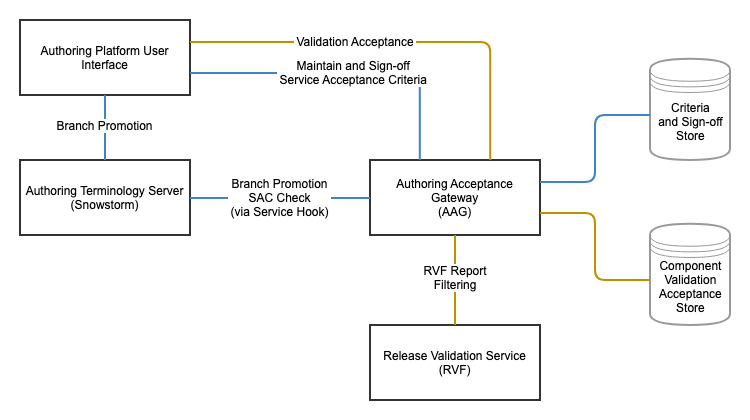
#### Service Acceptance Criteria and Authoring Acceptance Gateway Architecture (Authoring Platform)
Service Acceptance Criteria are components in a technical architecture solution which includes the Authoring Acceptance Gateway (AAG) and various data stores associated with acceptance and sign-off of content changes for promotion via AP tasks and projects, and also for the generation and packaging of SNOMED CT releases.
The following schematic illustrates the subset of this architecture directly related to AP features and their inter-relationships and dependencies (components relating to release preparation and packaging are omitted here for clarity, but are essential aspects of the overall technical architecture):
 {% endhint %}
SAC are defined at the global level by users with the ADMIN role, as are their mapping to required [RBAC roles](/snomed-ct-user-guides/authoring-user-guide/faqs/role-based-access-control-rbac.md). This is currently constrained as a technical support feature.
Globally defined SAC are then available as an options list to those with relevant permissions (set by RBAC role group definitions on the branch or its parents), to decide which to include in task-level or project-level gateway controls.
SAC are presented as checklist items in either the task details (for task level SAC) or project view (for project level SAC). The ability to modify the manual items to check them off via the AP user interface is a permission granted by the role assigned to each item in the SAC list. Task level manual SAC are usually available to all authors. Some project level manual SAC may also be available to all authors, but many will require additional permissions such as those for Project Managers or Project Leads to update (specific role mappings are set in the SAC global configuration definitions).
Some aspects of acceptance gateway controls are implicit in the [AP branch promotion process](/snomed-ct-user-guides/authoring-user-guide/faqs/project-branches-task-branches-and-rebasing.md) - for instance, diverged content branches cannot be promoted: each branch must be rebased from its immediate parent branch with all merge conflicts resolved before the branch can be promoted.
{% hint style="info" %}
#### Authoring Acceptance Gateway 1: Task Level SAC examples
Early Visibility Notice if Required\
Manual spell check\
Review complete\
RVF Report Clean
{% endhint %}
{% hint style="info" %}
#### Authoring Acceptance Gateway 2: Project Level SAC examples
Project Documentation (TIG Editorial Guide) Complete\
Project Lead (Peer reviewer): All Release Validation Reports Checked\
Project Lead (Peer reviewer): Exceptions Checked and Signed off\
Project Lead (Peer reviewer): Final Sign-Off\
Project Manager: Signed Off Project as Ready to Promote\
Relevant MRCM Changes Implemented\
Report: Case Significance Clean\
Report: Duplicate Terms Clean\
Report: KPI Patterns Clean\
Report: New Descriptions Clean\
Report: Release Issues Clean\
Report: Template Compliance Clean\
Report: Validate Inactivations with Associations Clean\
Validation Report Clean
{% endhint %}
## Related How To... Guides
* [Promote my (non-complex) task changes to their parent project (share with other authors)](/snomed-ct-user-guides/authoring-user-guide/how-to/task-rebase-and-promotion/promote-my-non-complex-task-changes-to-their-parent-project-share-with-other-authors.md)
* [Promote my (complex) task changes to their parent project (share with other authors)](/snomed-ct-user-guides/authoring-user-guide/how-to/task-rebase-and-promotion/promote-my-batch-task-changes-to-their-parent-project-share-with-other-authors.md)
* [Promote my (batch) task changes to their parent project (share with other authors)](/snomed-ct-user-guides/authoring-user-guide/how-to/task-rebase-and-promotion/promote-my-batch-task-changes-to-their-parent-project-share-with-other-authors.md)
* [Automatically Promote my task changes to their parent project (share with other authors)](/snomed-ct-user-guides/authoring-user-guide/how-to/task-rebase-and-promotion/automatically-promote-my-task-changes-to-their-parent-project-share-with-other-authors.md)
* [Promote a project (promote to MAIN)](/snomed-ct-user-guides/authoring-user-guide/how-to/project-rebase-and-promotion/promote-a-project-promote-to-main.md)
Provide Feedback
---
# Agent Instructions
This documentation is published with GitBook. GitBook is the documentation platform designed so that both humans and AI agents can read, navigate, and reason over technical content effectively. Learn more at gitbook.com.
## Querying This Documentation
If you need additional information that is not directly available in this page, you can query the documentation by asking a question.
Perform an HTTP GET request on the following URL with the `ask` and `goal` query parameters:
```
GET https://docs.snomed.org/snomed-ct-user-guides/authoring-user-guide/faqs/service-acceptance-criteria-sac-and-authoring-acceptance-gateway-aag-controls.md?ask=&goal=
```
`ask` is the immediate question: it should be specific, self-contained, and written in natural language.
`goal` is what the user is ultimately trying to achieve, the reason they need the answer. Sharing it helps GitBook give you a better, more relevant answer. A goal is most helpful when it describes the outcome the user wants rather than restating the question. For example, with `ask=how do I create an API token`, a goal like `automate deployments from our CI pipeline` lets GitBook tailor the answer to that use case.
The response will contain a direct answer to the question and relevant excerpts and sources from the documentation.
Use this mechanism when the answer is not explicitly present in the current page, you need clarification or additional context, or you want to retrieve related documentation sections.
{% endhint %}
SAC are defined at the global level by users with the ADMIN role, as are their mapping to required [RBAC roles](/snomed-ct-user-guides/authoring-user-guide/faqs/role-based-access-control-rbac.md). This is currently constrained as a technical support feature.
Globally defined SAC are then available as an options list to those with relevant permissions (set by RBAC role group definitions on the branch or its parents), to decide which to include in task-level or project-level gateway controls.
SAC are presented as checklist items in either the task details (for task level SAC) or project view (for project level SAC). The ability to modify the manual items to check them off via the AP user interface is a permission granted by the role assigned to each item in the SAC list. Task level manual SAC are usually available to all authors. Some project level manual SAC may also be available to all authors, but many will require additional permissions such as those for Project Managers or Project Leads to update (specific role mappings are set in the SAC global configuration definitions).
Some aspects of acceptance gateway controls are implicit in the [AP branch promotion process](/snomed-ct-user-guides/authoring-user-guide/faqs/project-branches-task-branches-and-rebasing.md) - for instance, diverged content branches cannot be promoted: each branch must be rebased from its immediate parent branch with all merge conflicts resolved before the branch can be promoted.
{% hint style="info" %}
#### Authoring Acceptance Gateway 1: Task Level SAC examples
Early Visibility Notice if Required\
Manual spell check\
Review complete\
RVF Report Clean
{% endhint %}
{% hint style="info" %}
#### Authoring Acceptance Gateway 2: Project Level SAC examples
Project Documentation (TIG Editorial Guide) Complete\
Project Lead (Peer reviewer): All Release Validation Reports Checked\
Project Lead (Peer reviewer): Exceptions Checked and Signed off\
Project Lead (Peer reviewer): Final Sign-Off\
Project Manager: Signed Off Project as Ready to Promote\
Relevant MRCM Changes Implemented\
Report: Case Significance Clean\
Report: Duplicate Terms Clean\
Report: KPI Patterns Clean\
Report: New Descriptions Clean\
Report: Release Issues Clean\
Report: Template Compliance Clean\
Report: Validate Inactivations with Associations Clean\
Validation Report Clean
{% endhint %}
## Related How To... Guides
* [Promote my (non-complex) task changes to their parent project (share with other authors)](/snomed-ct-user-guides/authoring-user-guide/how-to/task-rebase-and-promotion/promote-my-non-complex-task-changes-to-their-parent-project-share-with-other-authors.md)
* [Promote my (complex) task changes to their parent project (share with other authors)](/snomed-ct-user-guides/authoring-user-guide/how-to/task-rebase-and-promotion/promote-my-batch-task-changes-to-their-parent-project-share-with-other-authors.md)
* [Promote my (batch) task changes to their parent project (share with other authors)](/snomed-ct-user-guides/authoring-user-guide/how-to/task-rebase-and-promotion/promote-my-batch-task-changes-to-their-parent-project-share-with-other-authors.md)
* [Automatically Promote my task changes to their parent project (share with other authors)](/snomed-ct-user-guides/authoring-user-guide/how-to/task-rebase-and-promotion/automatically-promote-my-task-changes-to-their-parent-project-share-with-other-authors.md)
* [Promote a project (promote to MAIN)](/snomed-ct-user-guides/authoring-user-guide/how-to/project-rebase-and-promotion/promote-a-project-promote-to-main.md)
Provide Feedback
---
# Agent Instructions
This documentation is published with GitBook. GitBook is the documentation platform designed so that both humans and AI agents can read, navigate, and reason over technical content effectively. Learn more at gitbook.com.
## Querying This Documentation
If you need additional information that is not directly available in this page, you can query the documentation by asking a question.
Perform an HTTP GET request on the following URL with the `ask` and `goal` query parameters:
```
GET https://docs.snomed.org/snomed-ct-user-guides/authoring-user-guide/faqs/service-acceptance-criteria-sac-and-authoring-acceptance-gateway-aag-controls.md?ask=&goal=
```
`ask` is the immediate question: it should be specific, self-contained, and written in natural language.
`goal` is what the user is ultimately trying to achieve, the reason they need the answer. Sharing it helps GitBook give you a better, more relevant answer. A goal is most helpful when it describes the outcome the user wants rather than restating the question. For example, with `ask=how do I create an API token`, a goal like `automate deployments from our CI pipeline` lets GitBook tailor the answer to that use case.
The response will contain a direct answer to the question and relevant excerpts and sources from the documentation.
Use this mechanism when the answer is not explicitly present in the current page, you need clarification or additional context, or you want to retrieve related documentation sections.