# Log in to the International Authoring Platform

| Steps                                                                                                                                                                                                                                                                                                                                                                                                                                                                                                                                                                                                                                                                                                                                                                                                                                                                                                                                                                                                                                                                                                                                                                                                                                                                                                                                                                                                                                                                                                                                                                                                                                                                                                                                                                                                                                                                                                                                                                                 | References                                                                                                                                                                                                                                                                             |
| ------------------------------------------------------------------------------------------------------------------------------------------------------------------------------------------------------------------------------------------------------------------------------------------------------------------------------------------------------------------------------------------------------------------------------------------------------------------------------------------------------------------------------------------------------------------------------------------------------------------------------------------------------------------------------------------------------------------------------------------------------------------------------------------------------------------------------------------------------------------------------------------------------------------------------------------------------------------------------------------------------------------------------------------------------------------------------------------------------------------------------------------------------------------------------------------------------------------------------------------------------------------------------------------------------------------------------------------------------------------------------------------------------------------------------------------------------------------------------------------------------------------------------------------------------------------------------------------------------------------------------------------------------------------------------------------------------------------------------------------------------------------------------------------------------------------------------------------------------------------------------------------------------------------------------------------------------------------------------------- | -------------------------------------------------------------------------------------------------------------------------------------------------------------------------------------------------------------------------------------------------------------------------------------- |
| <p>Go to the International AP in your web browser.<br></p><p>The International AP uses the SNOMED International IMS to authenticate and authorise access via a registered account.<br></p><p>If you're already registered with an existing SNOMED International Jira/Confluence account which has been granted AP access then you can use those credentials.</p>                                                                                                                                                                                                                                                                                                                                                                                                                                                                                                                                                                                                                                                                                                                                                                                                                                                                                                                                                                                                                                                                                                                                                                                                                                                                                                                                                                                                                                                                                                                                                                                                                      | <https://authoring.ihtsdotools.org/>                                                                                                                                                                                                                                                   |
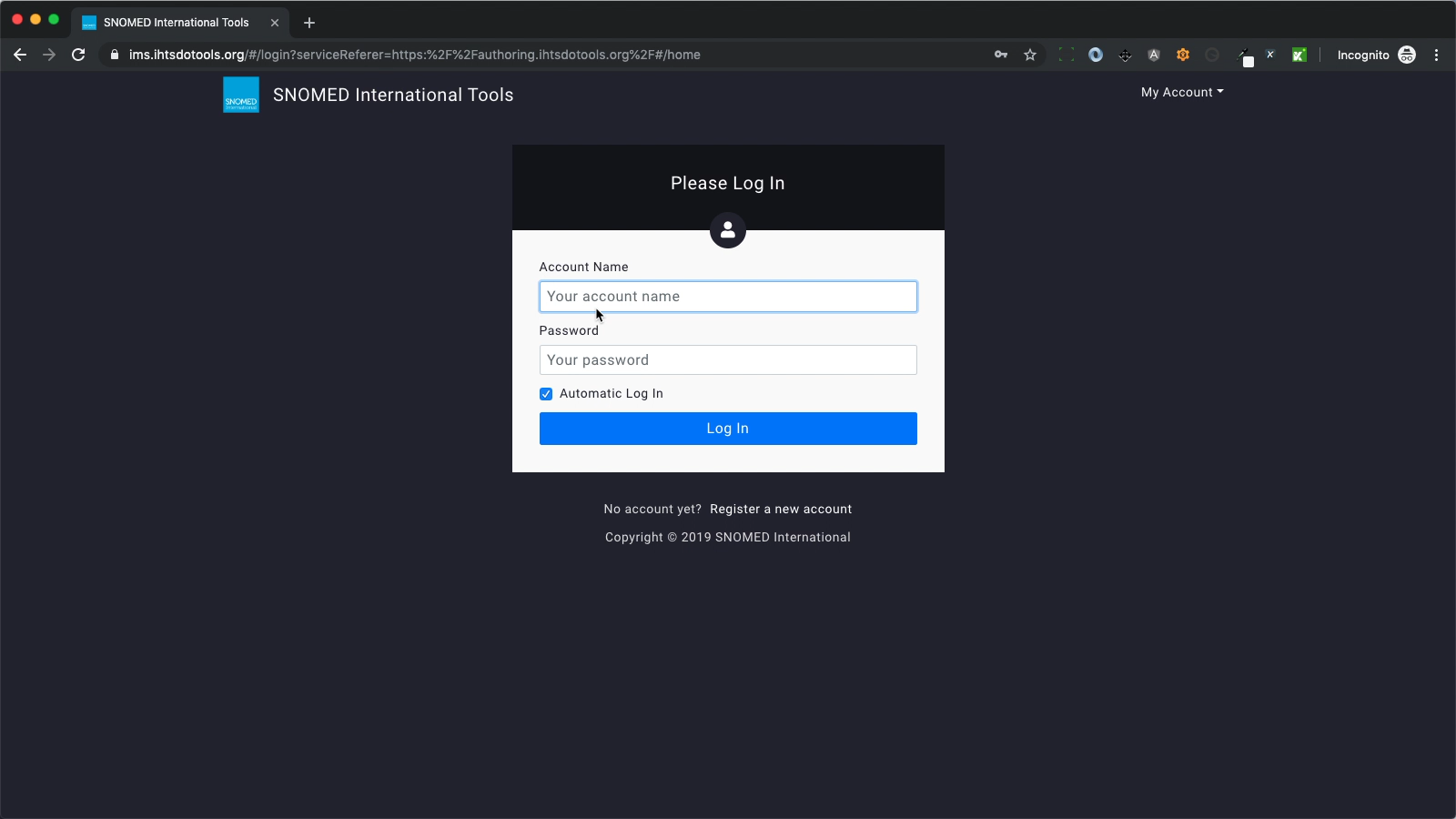
| <p>If you are not logged in to the AP, your web browser will be redirected to IMS for account authentication and access authorisation. You will see the IMS login screen in your web browser.<br></p><p>Enter your account name and password.<br></p><p>If you check the <code>Automatic log in</code> box before pressing <code>Log In,</code> your credentials will be cached, so that your account name and password are automatically entered in the form when you next need to log in.<br></p><p>With your credentials entered, press <code>Log In</code>.<br></p><p>If your credentials cannot be authenticated or your account is not authorised for access to the AP, then IMS will reload the login screen so you can try again with updated credentials.<br></p>                                                                                                                                                                                                                                                                                                                                                                                                                                                                                                                                                                                                                                                                                                                                                                                                                                                                                                                                                                                                                                                                                                                                                                                                            | <div><figure><img src="https://956592758-files.gitbook.io/~/files/v0/b/gitbook-x-prod.appspot.com/o/spaces%2FO8kNzHFIgz2UFgwrcB08%2Fuploads%2Fgit-blob-8e512fdca5ea48c7d395618ac1026732f4b77a7b%2F96807809.png?alt=media" alt="" height="480"><figcaption></figcaption></figure></div> |
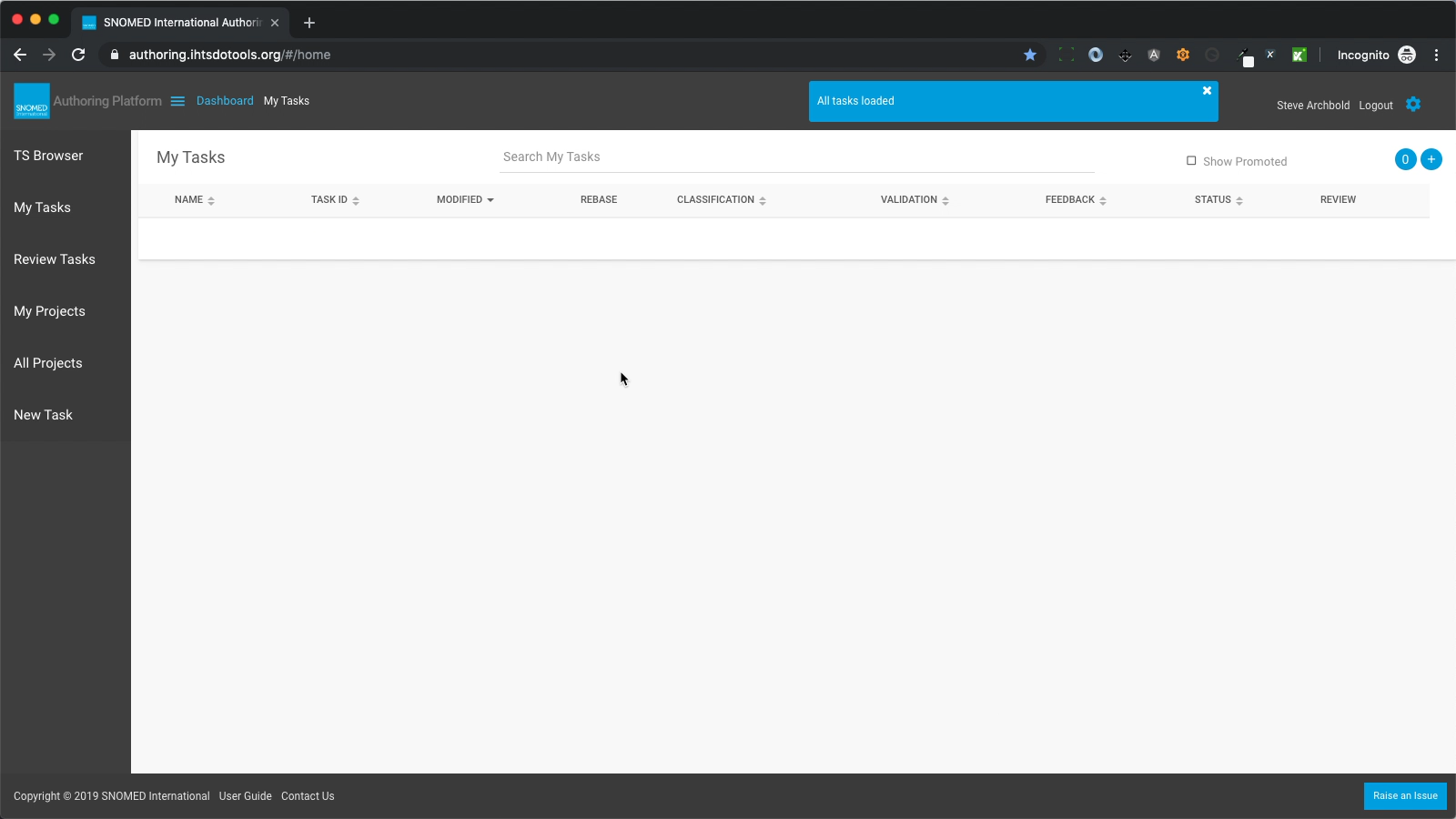
| <p>Once authenticated and authorised, your web browser will then be redirected back to the AP URL which triggered the authorisation and authentication process.<br></p><p>At this point you will have an authorised account session cookie in your web browser which means you will no longer be prompted for account credentials until either you have explicitly logged off or closed your web browser.<br></p><p>If the main URL above was used to open the International AP, you will then see the <em>Dashboard - My Tasks</em> view, and a blue notification box will show in the page header stating "All tasks loaded" (the header notification will automatically close after a brief interval, or you can press the <code>X</code> button in its upper right corner to close it manually).<br></p><p>If this is the first time you have used the AP (or all your existing tasks have been either promoted or deleted) then you will see an empty Dashboard listing view. This is where your tasks will be listed once created.<br></p><p>At this point you're in the International AP and ready to author content in your own tasks or review content created in other tasks by other authors.</p><div data-gb-custom-block data-tag="hint" data-style="warning" class="hint hint-warning"><p><strong>Not the International AP?</strong><br>If you have access permissions to more than one Authoring Platform, it's possible to inadvertently log into one of the others (perhaps via a bookmarked address) when the International AP was your intention, and they can appear almost identical in style and layout apart from the task names of any previously created tasks.<br></p><p>Please verify the domain name in your browser's address bar if you're not sure, and if it's not what you intended, simply logout and start over with the International AP URL ( <a href="https://authoring.ihtsdotools.org/"><https://authoring.ihtsdotools.org/></a> ).</p></div> | <div><figure><img src="https://956592758-files.gitbook.io/~/files/v0/b/gitbook-x-prod.appspot.com/o/spaces%2FO8kNzHFIgz2UFgwrcB08%2Fuploads%2Fgit-blob-0326bf6f62256f111080b41dcfd41d0171a77549%2F96807810.png?alt=media" alt="" height="480"><figcaption></figcaption></figure></div> |

<a href="https://docs.google.com/forms/d/e/1FAIpQLScTmbZIf0UEQwYDkY27EEWBkaiYkHSbR0_9DmFrMLXoQLyL7Q/viewform?usp=pp_url&#x26;entry.1767247133=AP+UG&#x26;entry.670899847=Log%20in%20to%20the%20International%20Authoring%20Platform" class="button primary">Provide Feedback</a>


---

# Agent Instructions: Querying This Documentation

If you need additional information that is not directly available in this page, you can query the documentation dynamically by asking a question.

Perform an HTTP GET request on the current page URL with the `ask` query parameter:

```
GET https://docs.snomed.org/snomed-ct-user-guides/authoring-user-guide/how-to/log-in/log-in-to-the-international-authoring-platform.md?ask=<question>
```

The question should be specific, self-contained, and written in natural language.
The response will contain a direct answer to the question and relevant excerpts and sources from the documentation.

Use this mechanism when the answer is not explicitly present in the current page, you need clarification or additional context, or you want to retrieve related documentation sections.