> For the complete documentation index, see [llms.txt](https://docs.snomed.org/llms.txt). Markdown versions of documentation pages are available by appending `.md` to page URLs; this page is available as [Markdown](https://docs.snomed.org/snomed-ct-user-guides/authoring-user-guide/how-to/log-in/log-in-to-the-managed-service-authoring-platform.md).

# Log in to the Managed Service Authoring Platform

| Steps                                                                                                                                                                                                                                                                                                                                                                                                                                                                                                                                                                                                                                                                                                                                                                                                                                                                                                                                                                                                                                                                                                                                                                                                                                                                                                                                                                                                                                                                                                                                                                                                                                                                                                                                                                                                                                                                                                                                                                                                                                                                                                              | References                                                                                                                                                                                                                                                                                                                                                                                                                                                                                                                                                                                                                                                                                                                                                                                                                                                                                                                                                                                                                                                                                                                                                                                                                                                                                                                                                                                                                                                                                                                                                                                                                                                               |
| ------------------------------------------------------------------------------------------------------------------------------------------------------------------------------------------------------------------------------------------------------------------------------------------------------------------------------------------------------------------------------------------------------------------------------------------------------------------------------------------------------------------------------------------------------------------------------------------------------------------------------------------------------------------------------------------------------------------------------------------------------------------------------------------------------------------------------------------------------------------------------------------------------------------------------------------------------------------------------------------------------------------------------------------------------------------------------------------------------------------------------------------------------------------------------------------------------------------------------------------------------------------------------------------------------------------------------------------------------------------------------------------------------------------------------------------------------------------------------------------------------------------------------------------------------------------------------------------------------------------------------------------------------------------------------------------------------------------------------------------------------------------------------------------------------------------------------------------------------------------------------------------------------------------------------------------------------------------------------------------------------------------------------------------------------------------------------------------------------------------ | ------------------------------------------------------------------------------------------------------------------------------------------------------------------------------------------------------------------------------------------------------------------------------------------------------------------------------------------------------------------------------------------------------------------------------------------------------------------------------------------------------------------------------------------------------------------------------------------------------------------------------------------------------------------------------------------------------------------------------------------------------------------------------------------------------------------------------------------------------------------------------------------------------------------------------------------------------------------------------------------------------------------------------------------------------------------------------------------------------------------------------------------------------------------------------------------------------------------------------------------------------------------------------------------------------------------------------------------------------------------------------------------------------------------------------------------------------------------------------------------------------------------------------------------------------------------------------------------------------------------------------------------------------------------------ |
| <p>Each Managed Service has its own <code>??-authoring</code> sub-domain within the <code>ihtsdotools.org</code> domain.<br></p><p>Go to the Managed Service AP in your web browser using the appropriate URL from the References list (sorted by country code in the sub-domain prefix).<br></p><p>The Managed Service AP uses the SNOMED International Identity Management Service (IMS) to authenticate and authorise registered account access.<br></p><p>If you're already registered with an existing SNOMED International Jira/Confluence account which has been granted AP access then you can use those credentials.</p>                                                                                                                                                                                                                                                                                                                                                                                                                                                                                                                                                                                                                                                                                                                                                                                                                                                                                                                                                                                                                                                                                                                                                                                                                                                                                                                                                                                                                                                                                  | <p><a href="https://au-authoring.ihtsdotools.org/"><https://au-authoring.ihtsdotools.org/></a> MS Australia<br><a href="https://at-authoring.ihtsdotools.org/"><https://at-authoring.ihtsdotools.org/></a> MS Austria<br><a href="https://be-authoring.ihtsdotools.org/"><https://be-authoring.ihtsdotools.org/></a> MS Belgium<br><a href="https://ch-authoring.ihtsdotools.org/"><https://ch-authoring.ihtsdotools.org/></a> MS Switzerland<br><a href="https://de-authoring.ihtsdotools.org/"><https://de-authoring.ihtsdotools.org/></a> MS Germany<br><a href="https://dk-authoring.ihtsdotools.org/"><https://dk-authoring.ihtsdotools.org/></a> MS Denmark<br><a href="https://ee-authoring.ihtsdotools.org/"><https://ee-authoring.ihtsdotools.org/></a> MS Estonia<br><a href="https://fr-authoring.ihtsdotools.org/"><https://fr-authoring.ihtsdotools.org/></a> MS France<br><a href="https://ie-authoring.ihtsdotools.org/"><https://ie-authoring.ihtsdotools.org/></a> MS Ireland<br><a href="https://kr-authoring.ihtsdotools.org/"><https://kr-authoring.ihtsdotools.org/></a> MS Korea<br><a href="https://nl-authoring.ihtsdotools.org/"><https://nl-authoring.ihtsdotools.org/></a> MS Netherlands<br><a href="https://no-authoring.ihtsdotools.org/"><https://no-authoring.ihtsdotools.org/></a> MS Norway<br><a href="https://nz-authoring.ihtsdotools.org/"><https://nz-authoring.ihtsdotools.org/></a> MS New Zealand<br><a href="https://se-authoring.ihtsdotools.org/"><https://se-authoring.ihtsdotools.org/></a> MS Sweden<br><a href="https://us-authoring.ihtsdotools.org/"><https://us-authoring.ihtsdotools.org/></a> MS United States</p> |
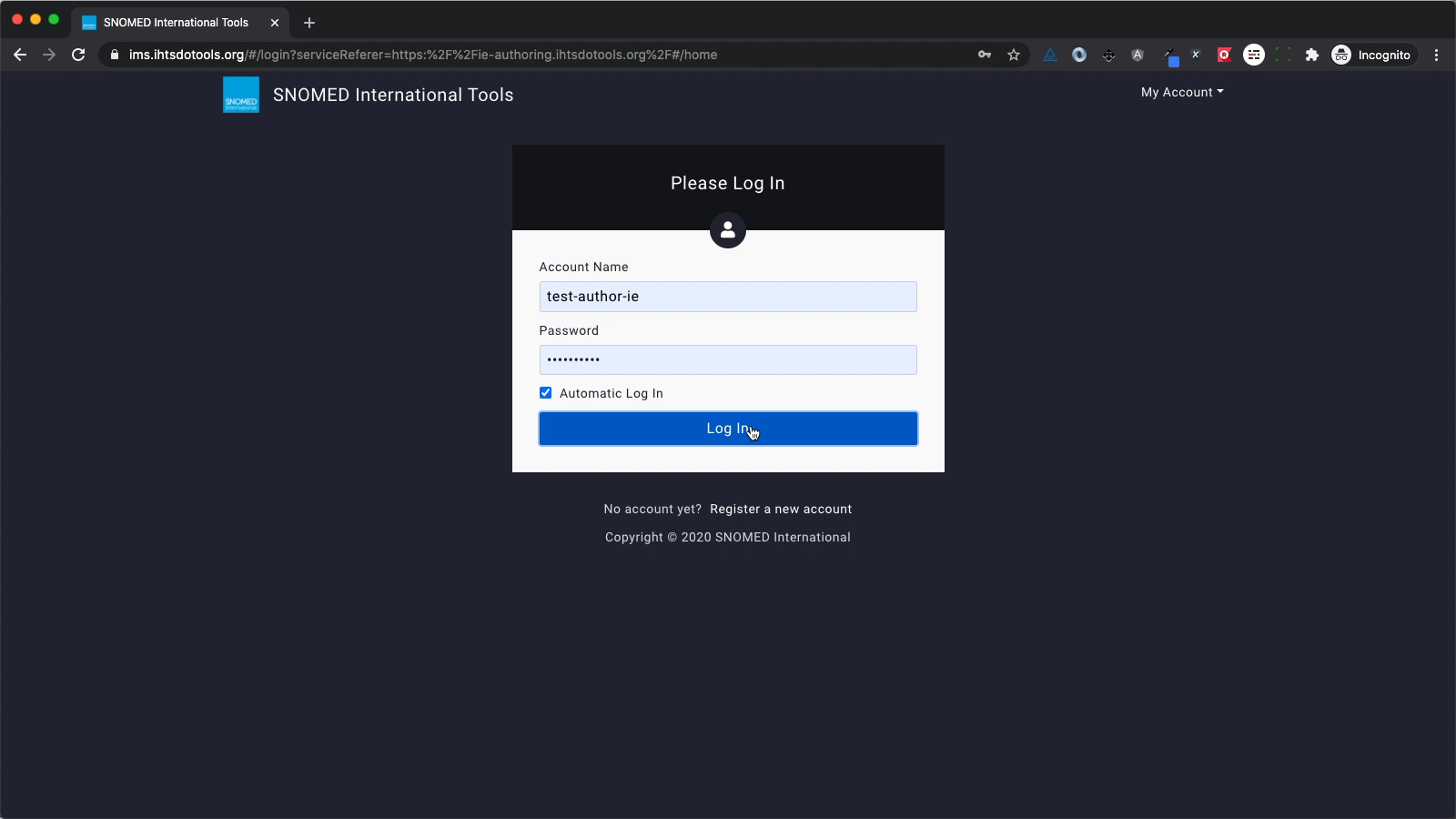
| <p>If you are not logged in to the AP, your web browser will be redirected to IMS for account authentication and access authorisation. You will see the IMS login screen in your web browser. Enter your account name and password.<br></p><p>If you check the <code>Automatic log in</code> box before pressing <code>Log In,</code> your credentials will be cached, so that your account name and password are automatically entered in the form when you next need to log in.<br></p><p>With your credentials entered, press <code>Log In</code>.<br></p><p>If your credentials cannot be authenticated or your account is not authorised for access to the AP, then IMS will reload the login screen so you can try again with updated credentials.</p>                                                                                                                                                                                                                                                                                                                                                                                                                                                                                                                                                                                                                                                                                                                                                                                                                                                                                                                                                                                                                                                                                                                                                                                                                                                                                                                                                       | <div><figure><img src="/files/5pB3fM15wlL1ix2FyCOL" alt="" height="480"><figcaption></figcaption></figure></div>                                                                                                                                                                                                                                                                                                                                                                                                                                                                                                                                                                                                                                                                                                                                                                                                                                                                                                                                                                                                                                                                                                                                                                                                                                                                                                                                                                                                                                                                                                                                                         |
| <p>Once authenticated and authorised, your web browser will then be redirected back to the Authoring Platform URL which triggered the authorisation and authentication process.<br></p><p>At this point you will have an authorised account session cookie in your web browser which means you will no longer be prompted for account credentials until either you have explicitly logged off or closed your web browser.<br></p><p>If one of the main URLs above was used to open the Authoring Platform, you will then see the appropriate <em>Dashboard - My Tasks</em> view, and a blue notification box will show in the page header stating "All tasks loaded" (the header notification will automatically close after a brief interval, or you can press the <code>X</code> button in its upper right corner to close it manually).<br></p><p>The example screens in this page are for a Managed Service Ireland test account login, but others follow an identical pattern.<br></p><p>If this is the first time you have used the AP (or all your existing tasks have been either promoted or deleted) then you will see an empty Dashboard listing view. This is where your tasks will be listed once created.<br></p><p>At this point you're in the AP and ready to author content in your own tasks or review content created in other tasks by other authors.<br></p><div data-gb-custom-block data-tag="hint" data-style="warning" class="hint hint-warning"><p><strong>Not your Managed Service AP?</strong><br>If you have access permissions to more than one Authoring Platform, it's possible to inadvertently log into one of the others (perhaps via a bookmarked address) when a Managed Service AP was your intention, and they can appear almost identical in style and layout apart from the task names of any previously created tasks.<br></p><p>Please verify the domain name in your browser's address bar if you're not sure, and if it's not what you intended, simply logout and start over with the appropriate AP URL from the References list in the first step above.</p></div> | <div><figure><img src="/files/yQDGqc1R489Mely1Pq37" alt="" height="480"><figcaption></figcaption></figure></div>                                                                                                                                                                                                                                                                                                                                                                                                                                                                                                                                                                                                                                                                                                                                                                                                                                                                                                                                                                                                                                                                                                                                                                                                                                                                                                                                                                                                                                                                                                                                                         |

<a href="https://docs.google.com/forms/d/e/1FAIpQLScTmbZIf0UEQwYDkY27EEWBkaiYkHSbR0_9DmFrMLXoQLyL7Q/viewform?usp=pp_url&#x26;entry.1767247133=AP+UG&#x26;entry.670899847=log-in-to-the-managed-service-authoring-platform" class="button primary">Provide Feedback</a>


---

# Agent Instructions
This documentation is published with GitBook. GitBook is the documentation platform designed so that both humans and AI agents can read, navigate, and reason over technical content effectively. Learn more at gitbook.com.

## Querying This Documentation
If you need additional information that is not directly available in this page, you can query the documentation dynamically by asking a question.

Perform an HTTP GET request on the current page URL with the `ask` query parameter, and the optional `goal` query parameter:

```
GET https://docs.snomed.org/snomed-ct-user-guides/authoring-user-guide/how-to/log-in/log-in-to-the-managed-service-authoring-platform.md?ask=<question>&goal=<endgoal>
```

`ask` is the immediate question: it should be specific, self-contained, and written in natural language.
`goal` is optional and describes the broader end goal you are ultimately trying to accomplish on behalf of the user. GitBook uses it to tailor the answer towards what is most useful for that goal.

The response will contain a direct answer to the question and relevant excerpts and sources from the documentation.

Use this mechanism when the answer is not explicitly present in the current page, you need clarification or additional context, or you want to retrieve related documentation sections.