# Raise an Issue

| Steps                                                                                                                                                                                                                                                                                                                                                                                                                                                                                                                                                                                                                                                                                                                                                                                                                                                                                                                                                                                                                                                                                                                                                                                                                                                                                                                                                                                                                                    | References                                                                                                                                                                                             |
| ---------------------------------------------------------------------------------------------------------------------------------------------------------------------------------------------------------------------------------------------------------------------------------------------------------------------------------------------------------------------------------------------------------------------------------------------------------------------------------------------------------------------------------------------------------------------------------------------------------------------------------------------------------------------------------------------------------------------------------------------------------------------------------------------------------------------------------------------------------------------------------------------------------------------------------------------------------------------------------------------------------------------------------------------------------------------------------------------------------------------------------------------------------------------------------------------------------------------------------------------------------------------------------------------------------------------------------------------------------------------------------------------------------------------------------------- | ------------------------------------------------------------------------------------------------------------------------------------------------------------------------------------------------------ |
| Press `Raise an Issue` to report issues or submit change requests related to AP usability and features.                                                                                                                                                                                                                                                                                                                                                                                                                                                                                                                                                                                                                                                                                                                                                                                                                                                                                                                                                                                                                                                                                                                                                                                                                                                                                                                                  | <div><figure><img src="/files/OSWZc1OqzihjKC69uTlG" alt=""><figcaption></figcaption></figure></div>                                                                                                    |
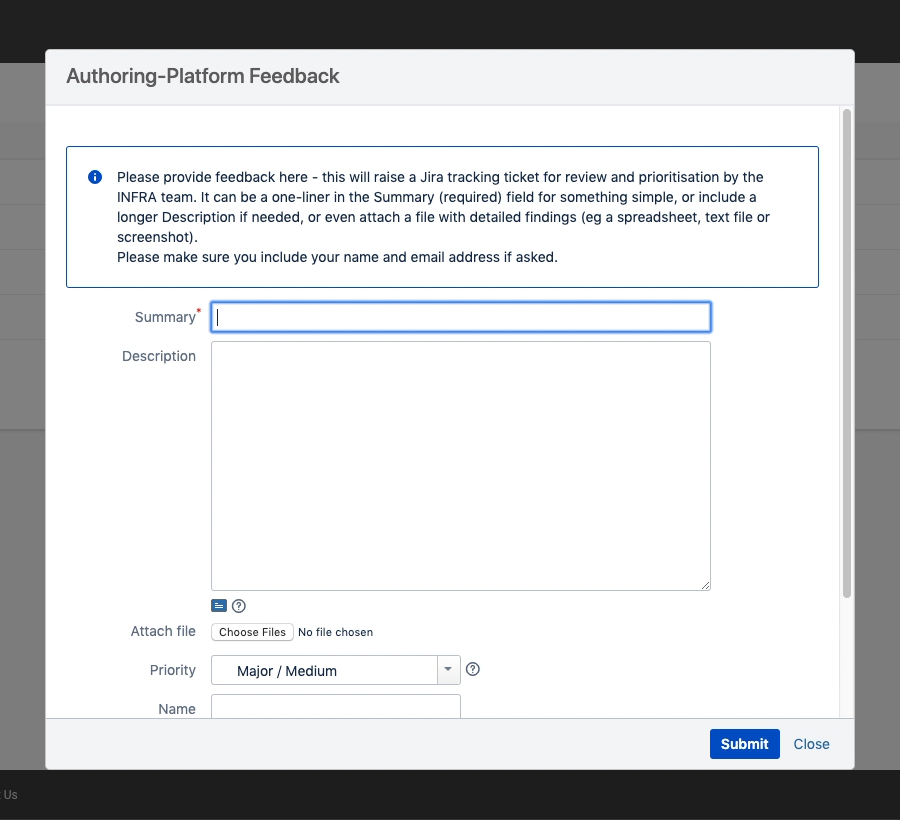
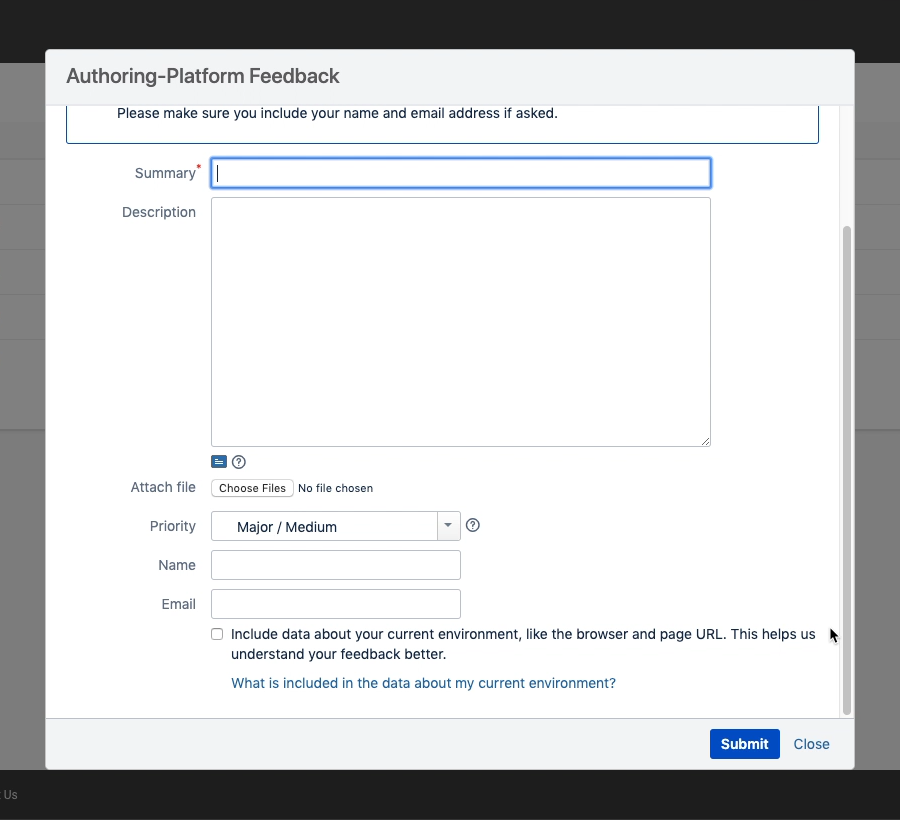
| <p>The <em>Raise an Issue</em> pop-up form is presented. If the form height is larger than your available web browser display height, a vertical scroll bar will appear to allow you to scroll down and see all the form content (the form header title and footer actions remain visible whilst scrolling). The following fields are available:</p><ul><li><code>Summary</code> (required, single line text, maximum of 255 characters)</li><li><code>Description</code> (multi-line text with markup formatting support for structured text)</li><li>Attach file (browser's local file selector)</li><li><code>Priority</code> (single choice option list selector)</li><li><code>Name</code> (single line text, maximum of 255 characters)</li><li><code>Email</code> (single line text, maximum of 255 characters)</li><li><code>Include data about your current environment, like the browser and page URL</code> (opt-in checkbox)</li></ul><p>The form footer has a <code>Submit</code> action button and a <code>Close</code> link.</p>                                                                                                                                                                                                                                                                                                                                                                                          | <div><figure><img src="/files/oPDdIv9BT4CBN1eMQ2Y5" alt=""><figcaption></figcaption></figure></div><div><figure><img src="/files/SqTPje1WcXpgwRX3FYMd" alt=""><figcaption></figcaption></figure></div> |
| <p>Enter the desired details. The more information included the better, but also try to be as concise as possible and ideally keep to one identifiable issue per submission - this will simplify subsequent processing and hence make it quicker to assess, prioritise and investigate further if needed.<br></p><p>The minimum needed is a brief one-line <code>Summary</code> of the issue. Everything below that on the form is optional.<br></p><p>The <code>Description</code> field supports formatting options for structured text. Press the small question mark icon to open a <em>Text Formatting Notation Help</em> pop-up window with guidelines on including advanced formatting (wiki) markup.<br></p><p>You can use the <code>Attach file (Choose Files)</code> field to include a file attachment such as a screenshot.<br></p><p>An indication of the issue impact or urgency can be included using the <code>Priority</code> drop-down selector options. This will be taken into account when assessing the submitted issue but it will be treated as advisory and considered with additional contexts, including capacity and release scheduling.<br></p><p>Please elaborate any critical dependencies in the Description to help with follow-up prioritisation.<br></p><p>Including your <code>Name</code> and <code>Email</code> will help in identification, tracking and follow-up notifications/discussions.</p> | <div><figure><img src="/files/RNfYz2WoLAIx5U9hsoYB" alt=""><figcaption></figcaption></figure></div>                                                                                                    |
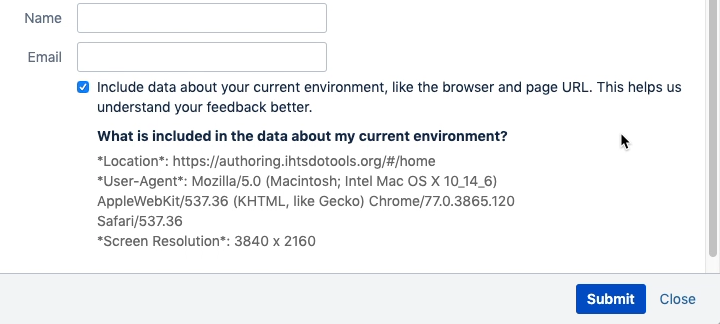
| The opt-in checkbox enables the form to capture details about your current web browser environment. You can press the `What is included in the data about my current environment?` link to preview those details and help decide whether or not to include them if unsure. Including them can help the technical support teams when troubleshooting defect reports, particularly anything related to screen presentation/layout, but of course it's entirely optional.                                                                                                                                                                                                                                                                                                                                                                                                                                                                                                                                                                                                                                                                                                                                                                                                                                                                                                                                                                   | <div><figure><img src="/files/nJU0vsfmCwLRIp3mpTyB" alt=""><figcaption></figcaption></figure></div>                                                                                                    |
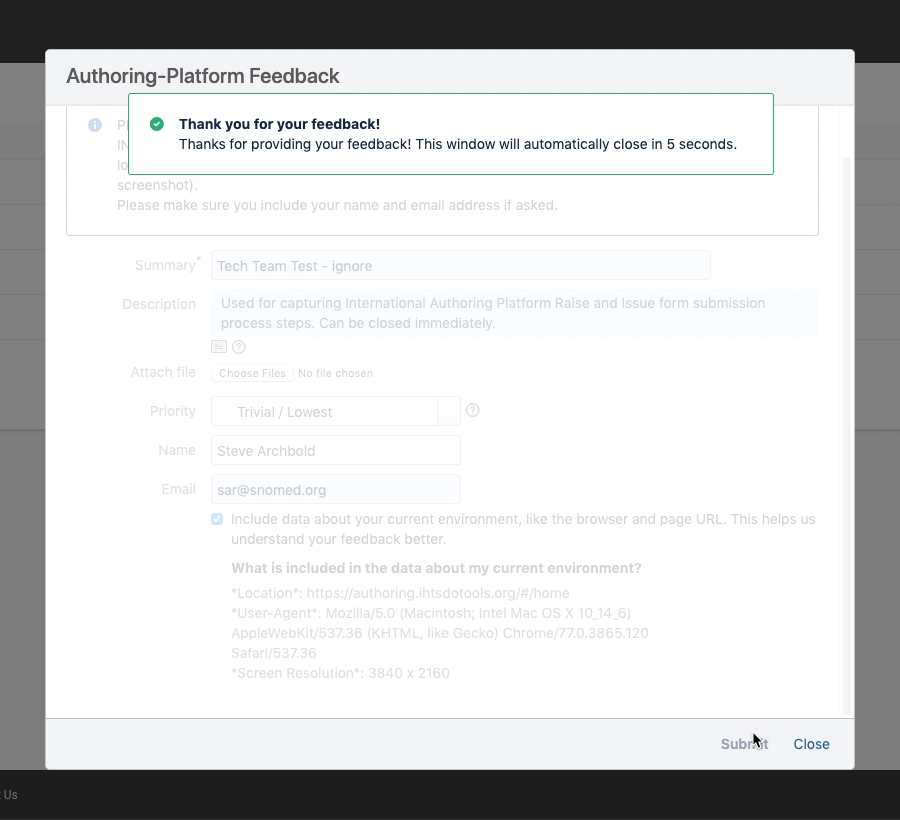
| <p>Press <code>Submit</code> in the form footer to submit your entered feedback details. A <em>Thank you for your feedback!</em> message will appear for 5 seconds and then the pop-up form will automatically close, returning you to whatever AP context you were in when the <code>Raise an Issue</code> button was pressed.<br></p><p>For the International Authoring Platform this creates a Devops Support (INFRA) ticket, which the Technical Team will assess, prioritise and respond to with appropriate notifications and follow-up actions (your patience is appreciated!).<br></p><p>Alternatively, if you have decided not to raise an issue since opening the form, simply press <code>Close</code> in the form footer to <strong>immediately</strong> close the pop-up dialogue and return to your AP context.</p><div data-gb-custom-block data-tag="hint" data-style="warning" class="hint hint-warning"><p><strong>Close has no second chance!</strong><br></p><p>Be wary there is no guard on the <code>Close</code> action - as soon at it is pressed, any entered information is lost. If you want to preserve anything for a later submission please use your local environment cut/paste tools to capture anything essential first!</p></div>                                                                                                                                                                     | <div><figure><img src="/files/pESEIL4bhHR1cJmNiceI" alt=""><figcaption></figcaption></figure></div>                                                                                                    |

<a href="https://docs.google.com/forms/d/e/1FAIpQLScTmbZIf0UEQwYDkY27EEWBkaiYkHSbR0_9DmFrMLXoQLyL7Q/viewform?usp=pp_url&#x26;entry.1767247133=AP+UG&#x26;entry.670899847=Raise%20an%20Issue" class="button primary">Provide Feedback</a>


---

# Agent Instructions: Querying This Documentation

If you need additional information that is not directly available in this page, you can query the documentation dynamically by asking a question.

Perform an HTTP GET request on the current page URL with the `ask` query parameter:

```
GET https://docs.snomed.org/snomed-ct-user-guides/authoring-user-guide/how-to/raise-an-issue.md?ask=<question>
```

The question should be specific, self-contained, and written in natural language.
The response will contain a direct answer to the question and relevant excerpts and sources from the documentation.

Use this mechanism when the answer is not explicitly present in the current page, you need clarification or additional context, or you want to retrieve related documentation sections.