# Run an existing report

| Steps                                                                                                                                                                                                                                                                                                                                                                                                                                                                                                                                                                                                                                                                                                                                                                                                                                                                                                                                                                                                                                                                                                                                                                                                                                | References                                                                                                                                                                                                                                                                                                                                                                                                                                                                                                                                         |
| ------------------------------------------------------------------------------------------------------------------------------------------------------------------------------------------------------------------------------------------------------------------------------------------------------------------------------------------------------------------------------------------------------------------------------------------------------------------------------------------------------------------------------------------------------------------------------------------------------------------------------------------------------------------------------------------------------------------------------------------------------------------------------------------------------------------------------------------------------------------------------------------------------------------------------------------------------------------------------------------------------------------------------------------------------------------------------------------------------------------------------------------------------------------------------------------------------------------------------------ | -------------------------------------------------------------------------------------------------------------------------------------------------------------------------------------------------------------------------------------------------------------------------------------------------------------------------------------------------------------------------------------------------------------------------------------------------------------------------------------------------------------------------------------------------- |
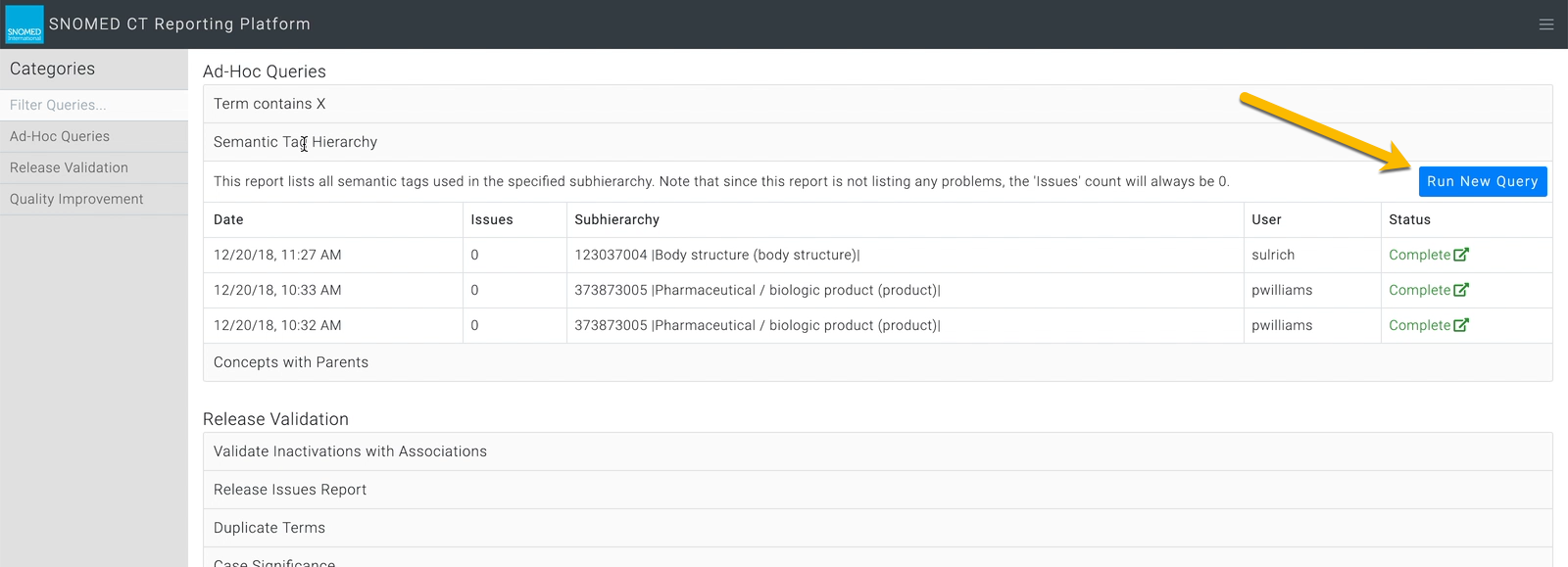
| Press `Run New Query` in the right-hand top corner of the report description panel. This opens the *Report Details* form in a pop-up dialogue box.                                                                                                                                                                                                                                                                                                                                                                                                                                                                                                                                                                                                                                                                                                                                                                                                                                                                                                                                                                                                                                                                                   | <div><figure><img src="https://956592758-files.gitbook.io/~/files/v0/b/gitbook-x-prod.appspot.com/o/spaces%2FO8kNzHFIgz2UFgwrcB08%2Fuploads%2Fgit-blob-33aeb3bf6a7137783c63e9d0450713f3617ccfe3%2F96811429.png?alt=media" alt=""><figcaption></figcaption></figure></div>                                                                                                                                                                                                                                                                          |
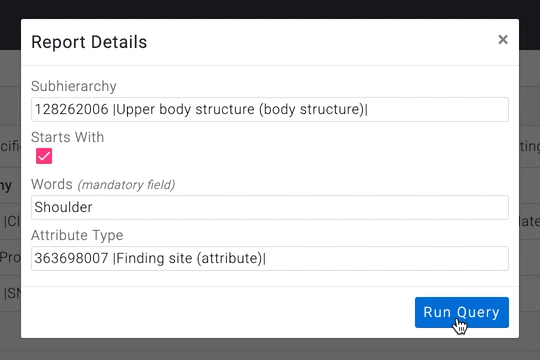
| <p>Each report type has a relevant set of query parameters which may be specified.<br></p><p>Example Report Details form: <code>Term Contains X</code><br></p><p>This query takes the following values:<br></p><ul><li><strong>Subhierarchy</strong> - a constraining sub-hierarchy of SNOMED CT to limit the query scope.</li><li><strong>Starts With</strong> - if this is checked the Words value must occur at the start of a term.</li><li><strong>Words</strong> <em>(mandatory field)</em> - words to find within concept terms</li><li><strong>Attribute Type</strong> - a constraining attribute type to limit the query scope.</li></ul><p>Note the <strong>Words</strong> field which is labelled as a mandatory field. If this is not populated, the report run will fail when the details are submitted, with <em>Failed</em> showing in the <code>Status</code> column of the reports list entry.<br></p><p>Later versions of the Reporting Platform will introduce deeper form validation to prevent submission with invalid report details (form validation varies according to the complexity and dependencies of the different report details).</p>                                                                | <div><figure><img src="https://lh6.googleusercontent.com/fNO3mjEI5YFTEN6aX1Dod2QhZ0jpz5YPCNemek_NMj516jWZXvIP-A3KFPEb9DQ_uAJuuvClVEsEo0QiNvAo5egQ3SW53_Qi6vNhbEpZQwjyul-_Fdtsa9I-G1SW6JjAHbGNgnMS" alt=""><figcaption></figcaption></figure></div>                                                                                                                                                                                                                                                                                                 |
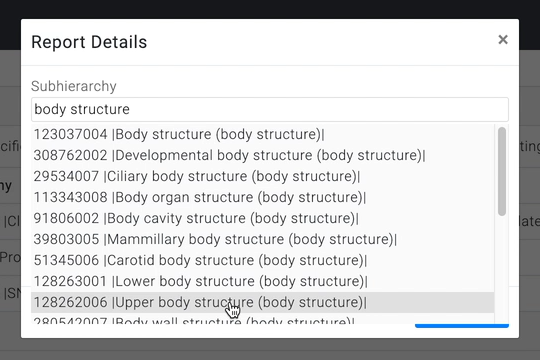
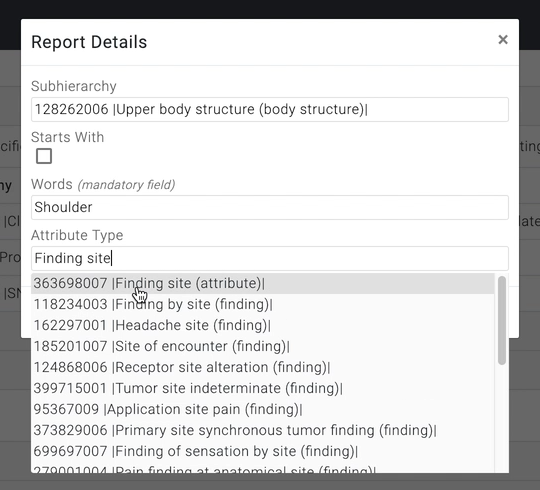
| <p>Enter your desired query details.<br></p><p><strong>Subhierarchy</strong> and <strong>Attribute Type</strong> are examples of type-ahead select fields - start typing a word in the field box and the form will present a drop-down list of matching options (it may take a few seconds to query the server and present the selection list).<br></p><p>Press a list option to set the field value.</p>                                                                                                                                                                                                                                                                                                                                                                                                                                                                                                                                                                                                                                                                                                                                                                                                                            | <div><figure><img src="https://956592758-files.gitbook.io/~/files/v0/b/gitbook-x-prod.appspot.com/o/spaces%2FO8kNzHFIgz2UFgwrcB08%2Fuploads%2Fgit-blob-016f3760bbb8a0f79b559dbd39801a892244dbb7%2F96811430.png?alt=media" alt=""><figcaption></figcaption></figure></div><div><figure><img src="https://956592758-files.gitbook.io/~/files/v0/b/gitbook-x-prod.appspot.com/o/spaces%2FO8kNzHFIgz2UFgwrcB08%2Fuploads%2Fgit-blob-4d92141ac0349651bb3f6a17ed01e9d7169013eb%2F96811419.png?alt=media" alt=""><figcaption></figcaption></figure></div> |
| <p>Complete your desired query details and then press the Run Query button in the lower right-corner of the Report Details dialogue box. This will submit the report for running on the server.<br></p><p>If you wish to cancel, press the <code>x</code> in the upper right corner of the dialogue box to close it without running the query.</p>                                                                                                                                                                                                                                                                                                                                                                                                                                                                                                                                                                                                                                                                                                                                                                                                                                                                                   | <div><figure><img src="https://956592758-files.gitbook.io/~/files/v0/b/gitbook-x-prod.appspot.com/o/spaces%2FO8kNzHFIgz2UFgwrcB08%2Fuploads%2Fgit-blob-b7f4f47dc202542ac6508c0aeea9c772f7c0f91c%2F96811420.png?alt=media" alt=""><figcaption></figcaption></figure></div>                                                                                                                                                                                                                                                                          |
| On submitting the Report Details, the report `Status` changes to Scheduled. At this point the report request is queued on the server.                                                                                                                                                                                                                                                                                                                                                                                                                                                                                                                                                                                                                                                                                                                                                                                                                                                                                                                                                                                                                                                                                                | <div><figure><img src="https://956592758-files.gitbook.io/~/files/v0/b/gitbook-x-prod.appspot.com/o/spaces%2FO8kNzHFIgz2UFgwrcB08%2Fuploads%2Fgit-blob-dedc1fc5ed609c833c2063f438085ed4fb97a1b2%2F96811421.png?alt=media" alt=""><figcaption></figcaption></figure></div>                                                                                                                                                                                                                                                                          |
| <p>When the queue processing reaches your scheduled report, the report <code>Status</code> changes to Running. At this point the report query is run against the mainline content on the Authoring Platform. The report run time depends on the complexity of the query and its related hierarchy size, available server resources and queue length.<br></p><div data-gb-custom-block data-tag="hint" data-style="warning" class="hint hint-warning"><p><strong>report running time</strong><br></p><p>The current query run time limit is 2 minutes on the server - sufficient for most reporting needs whilst preventing performance issues associated with "runaway" queries. Time to update the report list <code>Status</code> may be longer if there is significant concurrent server processing, and is also be influenced by network communications latency between the server and the requestor's web browser.<br></p><p>If the run time limit is exceeded, the report run will stop and be marked as Failed in the report list. This may happen with queries that would return excessively large result sets , for instance a query with unconstrained scope that returns everything below a high-level concept.</p></div> | <div><figure><img src="https://956592758-files.gitbook.io/~/files/v0/b/gitbook-x-prod.appspot.com/o/spaces%2FO8kNzHFIgz2UFgwrcB08%2Fuploads%2Fgit-blob-1613007212a98ec15415cf2c61ddd3f45a7746d3%2F96811422.png?alt=media" alt=""><figcaption></figcaption></figure></div>                                                                                                                                                                                                                                                                          |
| After successful completion of the report, its `Status` is updated to Complete, and the Google Sheet report is then available in Google Drive, linked from the report entry `Status` label/icon.                                                                                                                                                                                                                                                                                                                                                                                                                                                                                                                                                                                                                                                                                                                                                                                                                                                                                                                                                                                                                                     | <div><figure><img src="https://956592758-files.gitbook.io/~/files/v0/b/gitbook-x-prod.appspot.com/o/spaces%2FO8kNzHFIgz2UFgwrcB08%2Fuploads%2Fgit-blob-211f42c637b99218cc48eee441f4d6f19d582854%2F96811423.png?alt=media" alt=""><figcaption></figcaption></figure></div>                                                                                                                                                                                                                                                                          |

<a href="https://docs.google.com/forms/d/e/1FAIpQLScTmbZIf0UEQwYDkY27EEWBkaiYkHSbR0_9DmFrMLXoQLyL7Q/viewform?usp=pp_url&#x26;entry.1767247133=AP+UG&#x26;entry.670899847=Run%20an%20existing%20report" class="button primary">Provide Feedback</a>


---

# Agent Instructions: Querying This Documentation

If you need additional information that is not directly available in this page, you can query the documentation dynamically by asking a question.

Perform an HTTP GET request on the current page URL with the `ask` query parameter:

```
GET https://docs.snomed.org/snomed-ct-user-guides/authoring-user-guide/how-to/reporting-platform/run-an-existing-report.md?ask=<question>
```

The question should be specific, self-contained, and written in natural language.
The response will contain a direct answer to the question and relevant excerpts and sources from the documentation.

Use this mechanism when the answer is not explicitly present in the current page, you need clarification or additional context, or you want to retrieve related documentation sections.