# Classify my task changes (to generate inferred relationships)

| Steps                                                                                                                                                                                                                                                                                                                                                                                                                                                                                                                                                                                                                                                                                                                                                                                                                                        | References                                                                                                                                                                                                                             |
| -------------------------------------------------------------------------------------------------------------------------------------------------------------------------------------------------------------------------------------------------------------------------------------------------------------------------------------------------------------------------------------------------------------------------------------------------------------------------------------------------------------------------------------------------------------------------------------------------------------------------------------------------------------------------------------------------------------------------------------------------------------------------------------------------------------------------------------------- | -------------------------------------------------------------------------------------------------------------------------------------------------------------------------------------------------------------------------------------- |
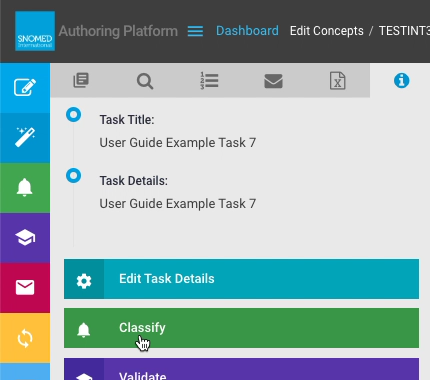
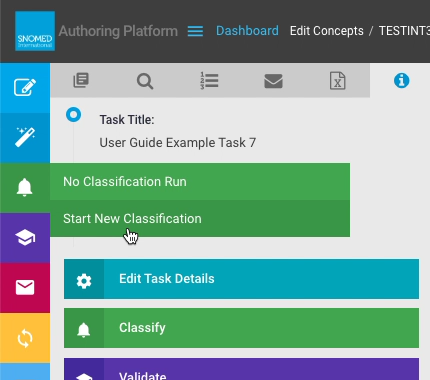
| <p><strong>Either</strong><br></p><p>Press <code>Classify</code> in the <em>Task View - Task Details</em> panel actions button list.<br></p><p><strong>Or</strong><br></p><p>Press <code>Run New Classification</code> from the left-hand button bar <em>Classification</em> sub-menu.</p>                                                                                                                                                                                                                                                                                                                                                                                                                                                                                                                                                   | <div><figure><img src="/files/tRuHg3uwJiID5oyiuqpD" alt=""><figcaption></figcaption></figure></div><div><figure><img src="/files/K8TaxvnCzBzZTQBUP5M8" alt=""><figcaption></figcaption></figure></div>                                 |
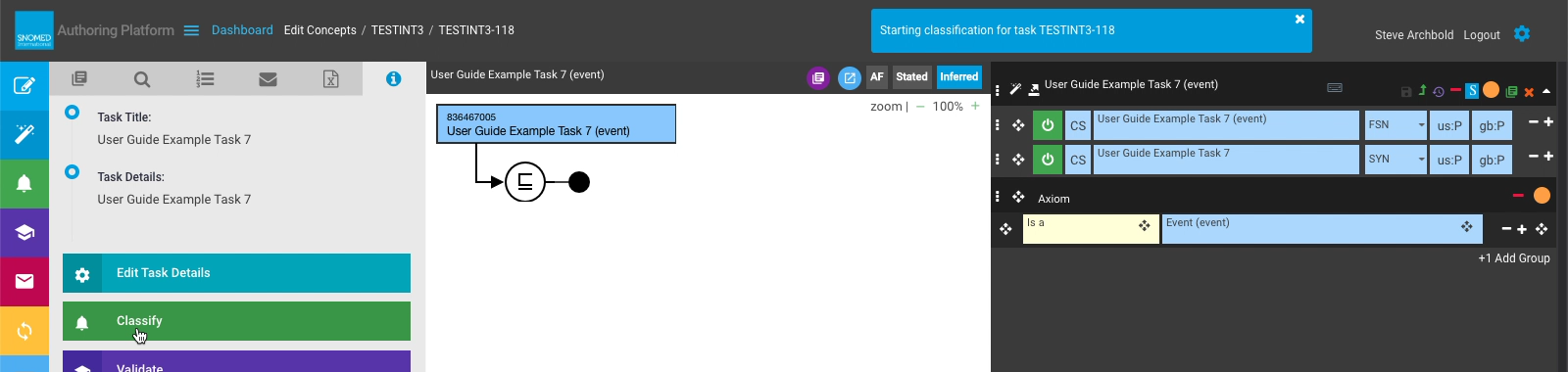
| A "Starting classification for task *\<task-id>*" notification is presented in the page header.                                                                                                                                                                                                                                                                                                                                                                                                                                                                                                                                                                                                                                                                                                                                              | <div><figure><img src="/files/IaekC8ICFKkYkncrRoKi" alt=""><figcaption></figcaption></figure></div>                                                                                                                                    |
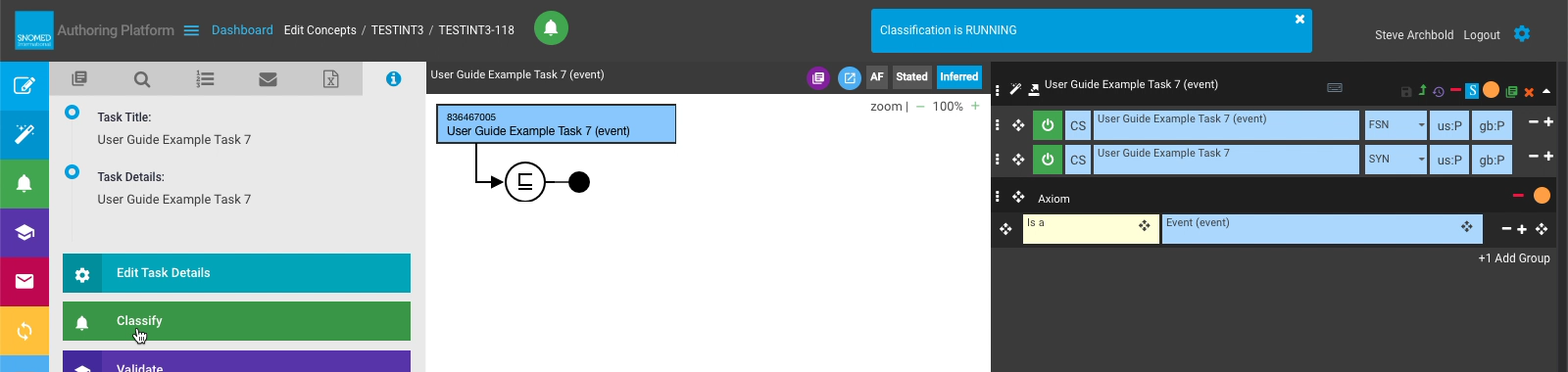
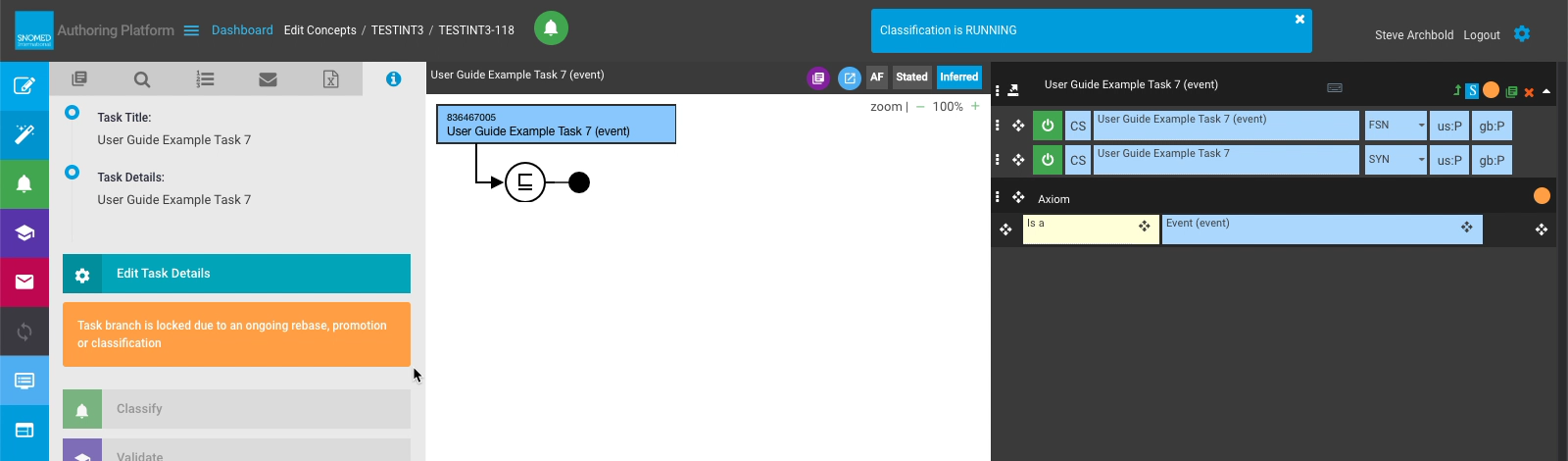
| A "Classification is RUNNING" notification follows once the *Classification Service* has received the task details.                                                                                                                                                                                                                                                                                                                                                                                                                                                                                                                                                                                                                                                                                                                          | <div><figure><img src="/files/TduN6Os7iqxSPv8ytZyf" alt=""><figcaption></figcaption></figure></div>                                                                                                                                    |
| <p>In the initial stage of classification, the task content branch is locked to prevent any further changes, and a warning notification is presented above the <code>Classify</code> action button in the <em>Task Details</em> panel.<br></p><p>Whilst this warning is present, changes cannot be made to the content saved in the task branch, and action buttons other than <code>Edit Task Details</code> become inactive.</p>                                                                                                                                                                                                                                                                                                                                                                                                           | <div><figure><img src="/files/hdHSJsv41yWanfgsnBd4" alt=""><figcaption></figcaption></figure></div>                                                                                                                                    |
| Whilst classification is running, a status icon is presented in the page header, to the right of the task identifier.                                                                                                                                                                                                                                                                                                                                                                                                                                                                                                                                                                                                                                                                                                                        | <div><figure><img src="/files/xlzm5Xc2waCyFzlNEQPQ" alt=""><figcaption></figcaption></figure></div>                                                                                                                                    |
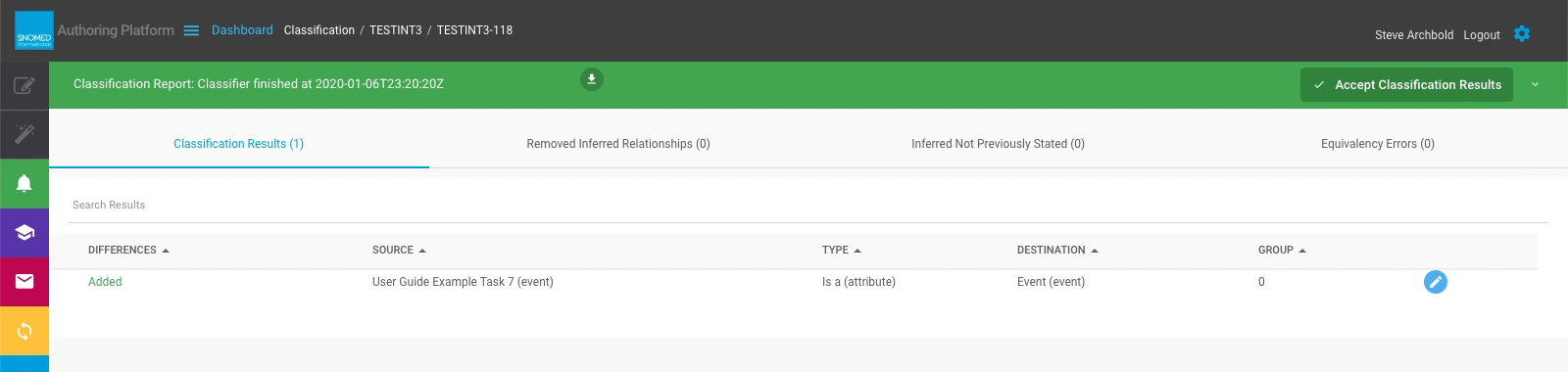
| <p>When the task classification is completed, a header notification is presented which includes a link to the <em>Classification Report</em> containing the classification results.<br></p><p><strong>EITHER</strong><br></p><p>Follow the link in the header notification to open the <em>Classification Report</em>.<br></p><p><strong>OR</strong><br></p><p>Press <code>View Classification (completed \<em>< date-time-stamp>\</em>)</code> in the left-hand button bar <em>Classification</em> sub-menu.</p>                                                                                                                                                                                                                                                                                                                            | <div><figure><img src="/files/YggD6kOPOpkxW9zMUby1" alt=""><figcaption></figcaption></figure></div>                                                                                                                                    |
| <p>The <em>Classification Report</em> is presented in place of the <em>Edit Panel</em>, <em>Concept Diagram</em>, and left-hand context panels.<br></p><p>This contains the following:<br></p><ul><li><p>Header bar with</p><ul><li>Report label showing "Classification finished at <em>< date-time-stamp></em>".</li><li><code>Download Classification Results</code> icon action button</li><li><code>Accept Classification Results</code> icon/text action button.</li></ul></li><li>Report change listing, with tabs for <em>Classification Results</em>, <em>Removed Inferred Relationships</em>, <em>Inferred Not Previously Stated</em>, and <em>Equivalency Errors</em>.</li></ul><p>Each report tab shows Differences, Source, Type, Destination and Group information, and also a Preview Results button for each result row.</p> | <div><figure><img src="/files/udWLHnrnXaNmO0N4dIhb" alt=""><figcaption></figcaption></figure></div>                                                                                                                                    |
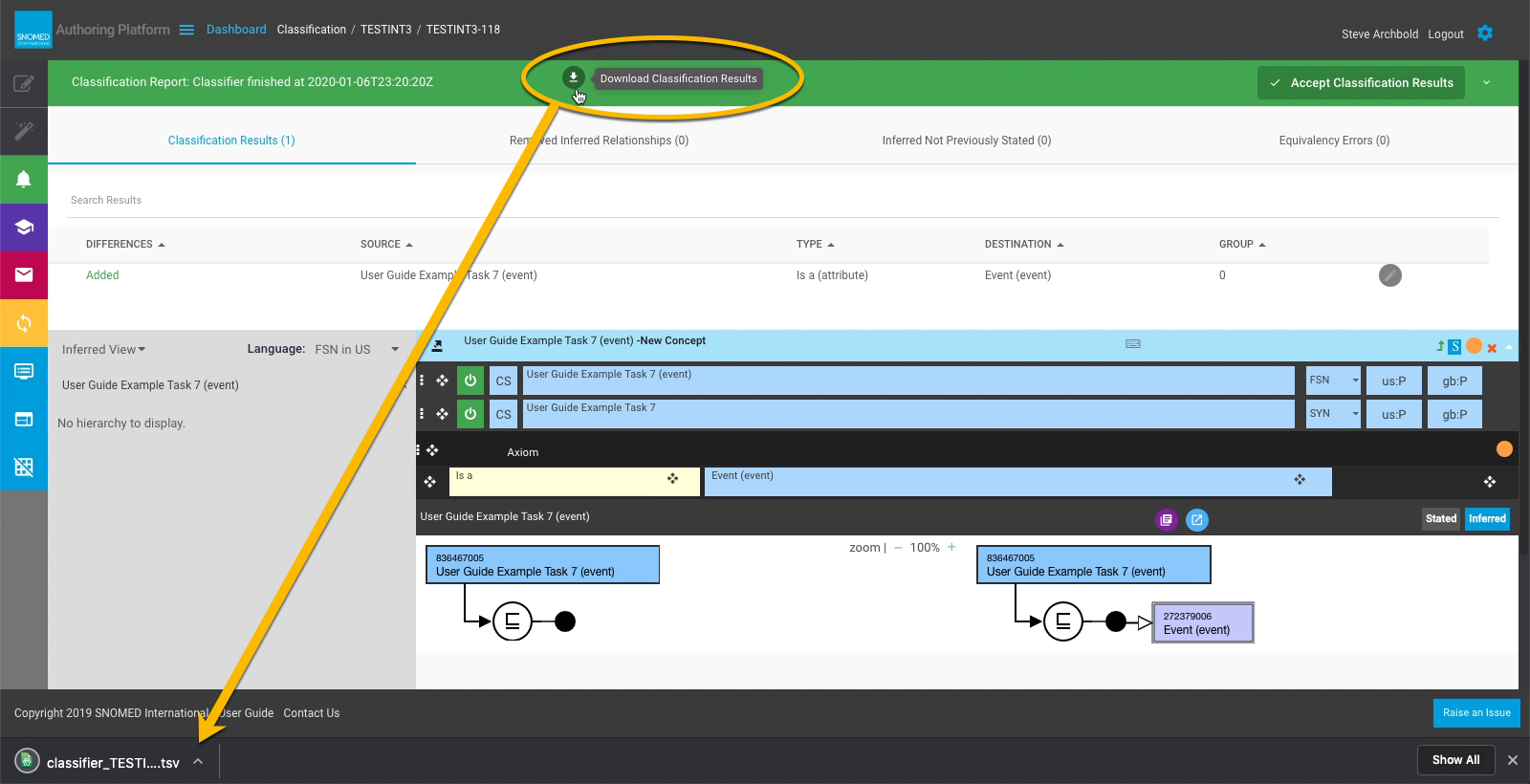
| Each result can be previewed to confirm/review the changes prior to saving the classification results.                                                                                                                                                                                                                                                                                                                                                                                                                                                                                                                                                                                                                                                                                                                                       | See [Preview concept changes before saving classification results](/snomed-ct-user-guides/authoring-user-guide/how-to/task-classification-and-validation/preview-concept-changes-before-saving-classification-results.md) for details. |
| <p>Classification results can be downloaded to your local machine in <code>.tsv</code> format.<br></p><p>The download file contains each classification result on a new line (line 1 is a header line with field labels) with tab-delimited field values for <em>changeNature</em>, <em>sourceId</em>, <em>sourceFsn</em>, <em>typeId</em>, <em>typeFsn</em>, <em>destinationId</em>, <em>destinationNegated</em>, <em>characteristicTypeId</em>, <em>group</em>, <em>id</em>, <em>unionGroup</em> and <em>modifier</em>.<br></p><div data-gb-custom-block data-tag="hint" data-style="info" class="hint hint-info"><p><strong>Classification results download file (.tsv format)</strong><br></p><p><img src="/files/CBj9I5euiay9SFn4BXbn" alt="" data-size="original"></p></div>                                                           | <div><figure><img src="/files/vIJl5sYwYdcZAXJH3xG1" alt=""><figcaption></figcaption></figure></div>                                                                                                                                    |
| Press `Accept Classification Results` to save the classification changes to the task.                                                                                                                                                                                                                                                                                                                                                                                                                                                                                                                                                                                                                                                                                                                                                        | <div><figure><img src="/files/z2OL7KrQ7WZ4vg6gBIL3" alt=""><figcaption></figcaption></figure></div>                                                                                                                                    |
| A "Saving classification" header notification is presented whilst the results are saved to the task branch on the Terminology Server.                                                                                                                                                                                                                                                                                                                                                                                                                                                                                                                                                                                                                                                                                                        | <div><figure><img src="/files/khBBXVrcAqhpltae02zW" alt=""><figcaption></figcaption></figure></div>                                                                                                                                    |
| <p>A "Classification saved" header notification indicates changes are now in the task branch contents, and the <code>Accept Classification Results</code> button becomes deactivated with the label changed to <code>Classification saved</code>.<br></p><p>From this point the report can still be retrieved (via the left-hand button bar <em>Classification</em> sub-menu) for viewing and downloading of results, but no further changes are possible with this set of results.<br></p><p>If further changes are made in the editor, another classification must be run to pick up those changes.</p>                                                                                                                                                                                                                                    | <div><figure><img src="/files/vC6vMahN48I65qfoCgEP" alt=""><figcaption></figcaption></figure></div>                                                                                                                                    |

<a href="https://docs.google.com/forms/d/e/1FAIpQLScTmbZIf0UEQwYDkY27EEWBkaiYkHSbR0_9DmFrMLXoQLyL7Q/viewform?usp=pp_url&#x26;entry.1767247133=AP+UG&#x26;entry.670899847=Classify%20my%20task%20changes%20%28to%20generate%20inferred%20relationships%29" class="button primary">Provide Feedback</a>


---

# Agent Instructions: Querying This Documentation

If you need additional information that is not directly available in this page, you can query the documentation dynamically by asking a question.

Perform an HTTP GET request on the current page URL with the `ask` query parameter:

```
GET https://docs.snomed.org/snomed-ct-user-guides/authoring-user-guide/how-to/task-classification-and-validation/classify-my-task-changes-to-generate-inferred-relationships.md?ask=<question>
```

The question should be specific, self-contained, and written in natural language.
The response will contain a direct answer to the question and relevant excerpts and sources from the documentation.

Use this mechanism when the answer is not explicitly present in the current page, you need clarification or additional context, or you want to retrieve related documentation sections.