# Automatically Promote my task changes to their parent project (share with other authors)

| Steps                                                                                                                                                                                                                                                                                                                                                                                                                                                                                                                                                                                                                                                                                                                                                                                                                                                                                                                                                                                                                                                                                                                                        | References                                                                                                                                                                                                                                                                 |
| -------------------------------------------------------------------------------------------------------------------------------------------------------------------------------------------------------------------------------------------------------------------------------------------------------------------------------------------------------------------------------------------------------------------------------------------------------------------------------------------------------------------------------------------------------------------------------------------------------------------------------------------------------------------------------------------------------------------------------------------------------------------------------------------------------------------------------------------------------------------------------------------------------------------------------------------------------------------------------------------------------------------------------------------------------------------------------------------------------------------------------------------- | -------------------------------------------------------------------------------------------------------------------------------------------------------------------------------------------------------------------------------------------------------------------------- |
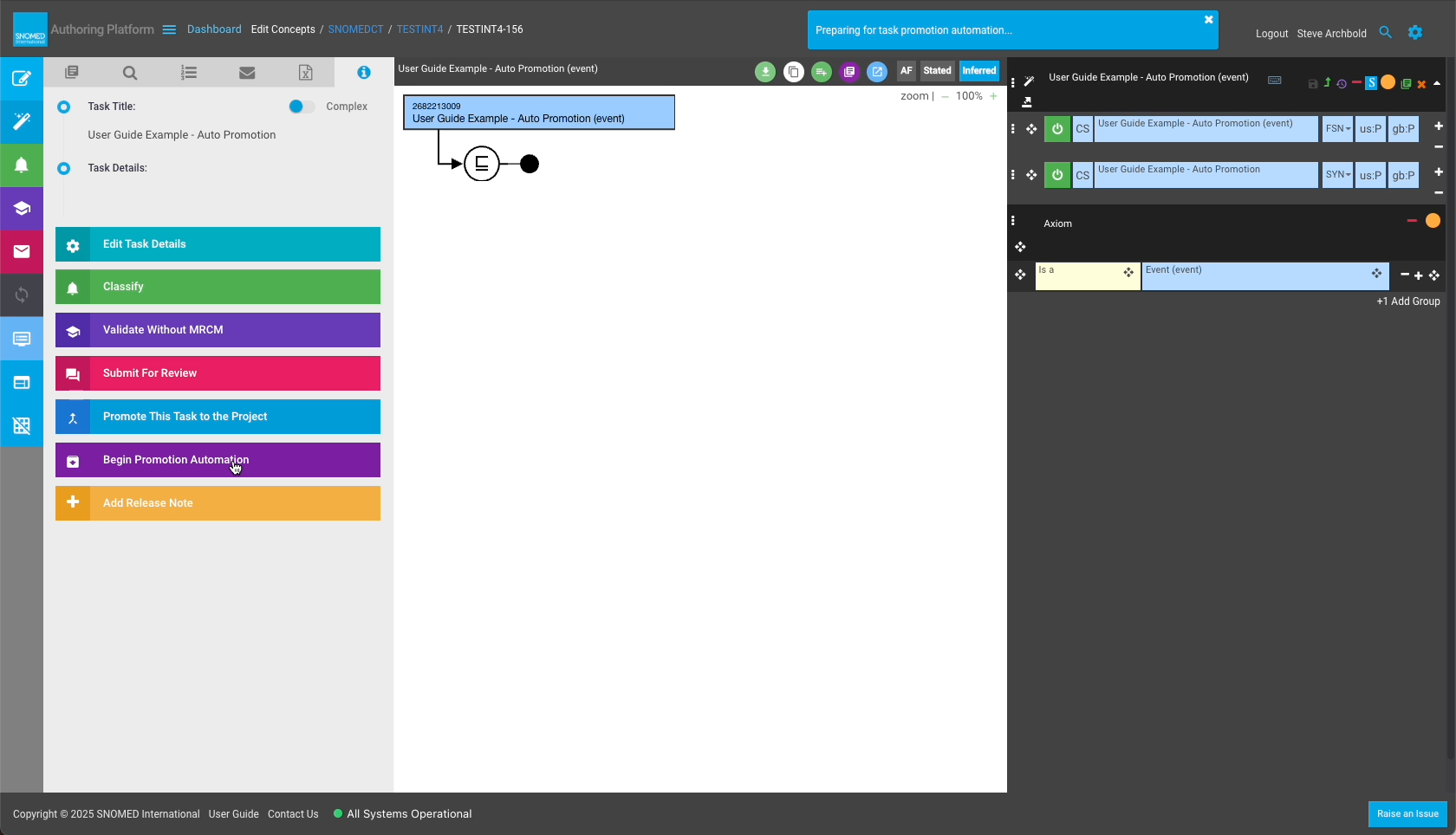
| <p>After making the desired content changes, press <code>Begin Promotion Automation</code> in the <em>Task View - Task Details</em> panel actions button list.<br></p><p>A "Preparing for task promotion automation..." notification is presented in the page header bar.<br></p><div data-gb-custom-block data-tag="hint" data-style="warning" class="hint hint-warning"><p><strong>Unmet SAC items block automatic promotion</strong><br></p><p>If the task has any <strong>Service Acceptance Criteria (SAC)</strong> items, task promotion will be blocked and the <code>Begin Promotion Automation</code> action button will not be enabled until <strong>all mandatory task-level SAC</strong> are met.</p></div><div data-gb-custom-block data-tag="hint" data-style="warning" class="hint hint-warning"><p><strong>Role-based access controls apply to automatic promotion</strong><br></p><p>If the user's authenticated account session roles do not include permissions for task promotion (such as when viewing another author's task), the <code>Begin Promotion Automation</code> action button will not be enabled.</p></div> | <div><figure><img src="https://956592758-files.gitbook.io/~/files/v0/b/gitbook-x-prod.appspot.com/o/spaces%2FO8kNzHFIgz2UFgwrcB08%2Fuploads%2Fgit-blob-2af2b474d56887c70499406d2c59a987da51fc61%2F273516384.png?alt=media" alt=""><figcaption></figcaption></figure></div> |
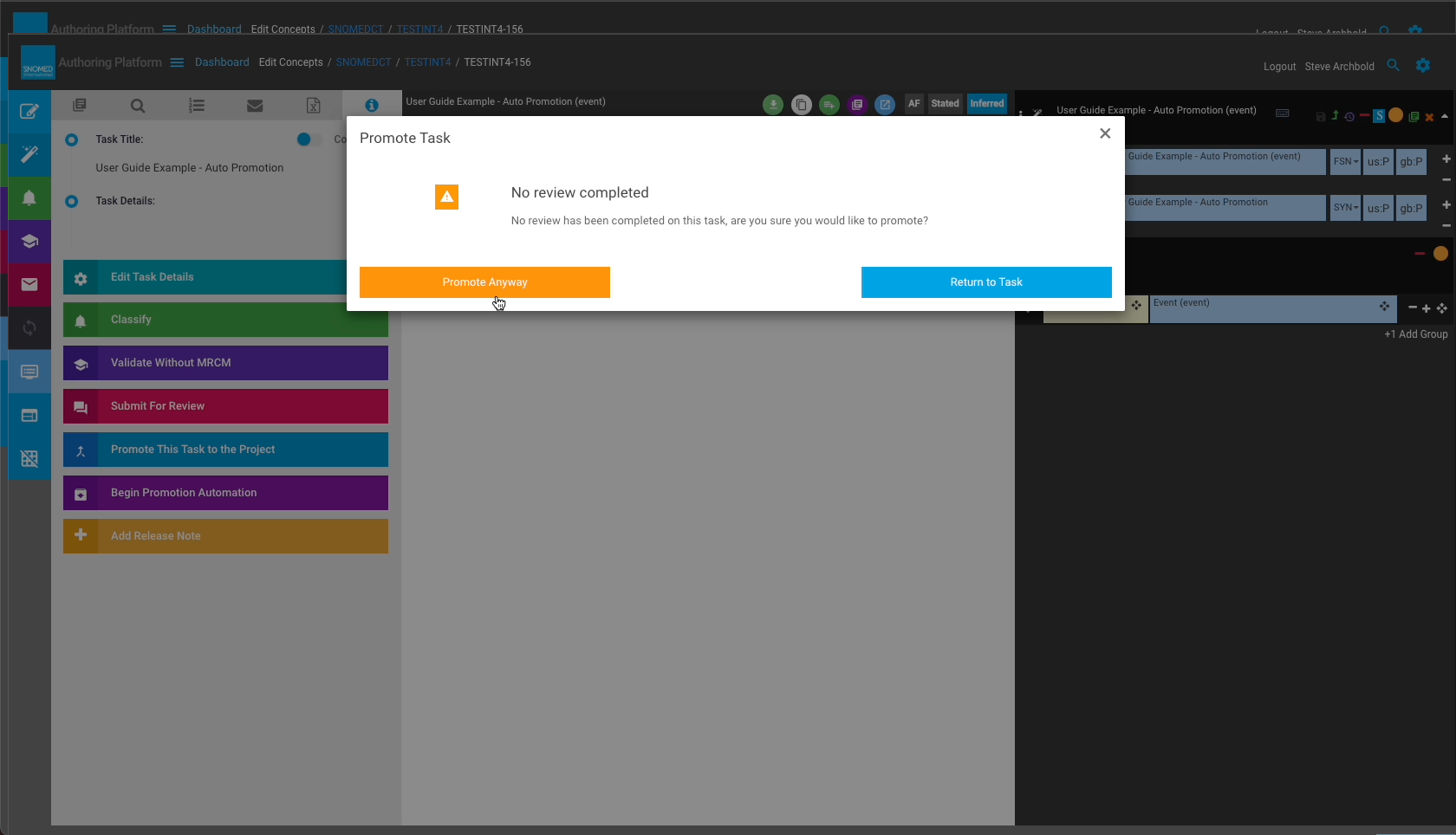
| <p>The automated promotion process first checks to see if the task has been reviewed.<br></p><p>If a review has not yet been completed the <em>Promote Task</em> dialogue presents a warning message with calls to action to either continue or return to task editing and cancel the promotion.<br></p><p>Press <code>Promote Anyway</code> to continue the promotion process.<br></p><p>Press <code>Return To Task</code> to close the dialogue and stop the promotion process.<br></p><div data-gb-custom-block data-tag="hint" data-style="info" class="hint hint-info"><p><strong>Task review check</strong><br></p><p>The warning is only presented if a review has not been completed.<br></p></div><div data-gb-custom-block data-tag="hint" data-style="info" class="hint hint-info"><p><strong>Task status</strong><br></p><p>After pressing <code>Begin Promotion Automation</code>, the <em>My Tasks</em> view task <code>Status</code> column remains <em>In Progress</em> until the review check is completed.</p></div>                                                                                                       | <div><figure><img src="https://956592758-files.gitbook.io/~/files/v0/b/gitbook-x-prod.appspot.com/o/spaces%2FO8kNzHFIgz2UFgwrcB08%2Fuploads%2Fgit-blob-75097bda34909fe5a52bdf21016513bab7713182%2F273516390.png?alt=media" alt=""><figcaption></figcaption></figure></div> |
| <p>Following the review check, the task is then placed in a promotion automation queue.<br></p><p>A notification panel showing "Automated promotion in progress: Status Queued" is presented between <code>Edit Task Details</code> and <code>Classify</code> in the <em>Task View - Task Details</em> panel actions button list.<br></p><p>An "Automated promotion: Queued" status icon is also presented in the page header bar.</p>                                                                                                                                                                                                                                                                                                                                                                                                                                                                                                                                                                                                                                                                                                       | <div><figure><img src="https://956592758-files.gitbook.io/~/files/v0/b/gitbook-x-prod.appspot.com/o/spaces%2FO8kNzHFIgz2UFgwrcB08%2Fuploads%2Fgit-blob-d2da5029ba5451caa9b2c6f0e94f4356526e67b4%2F273516422.png?alt=media" alt=""><figcaption></figcaption></figure></div> |
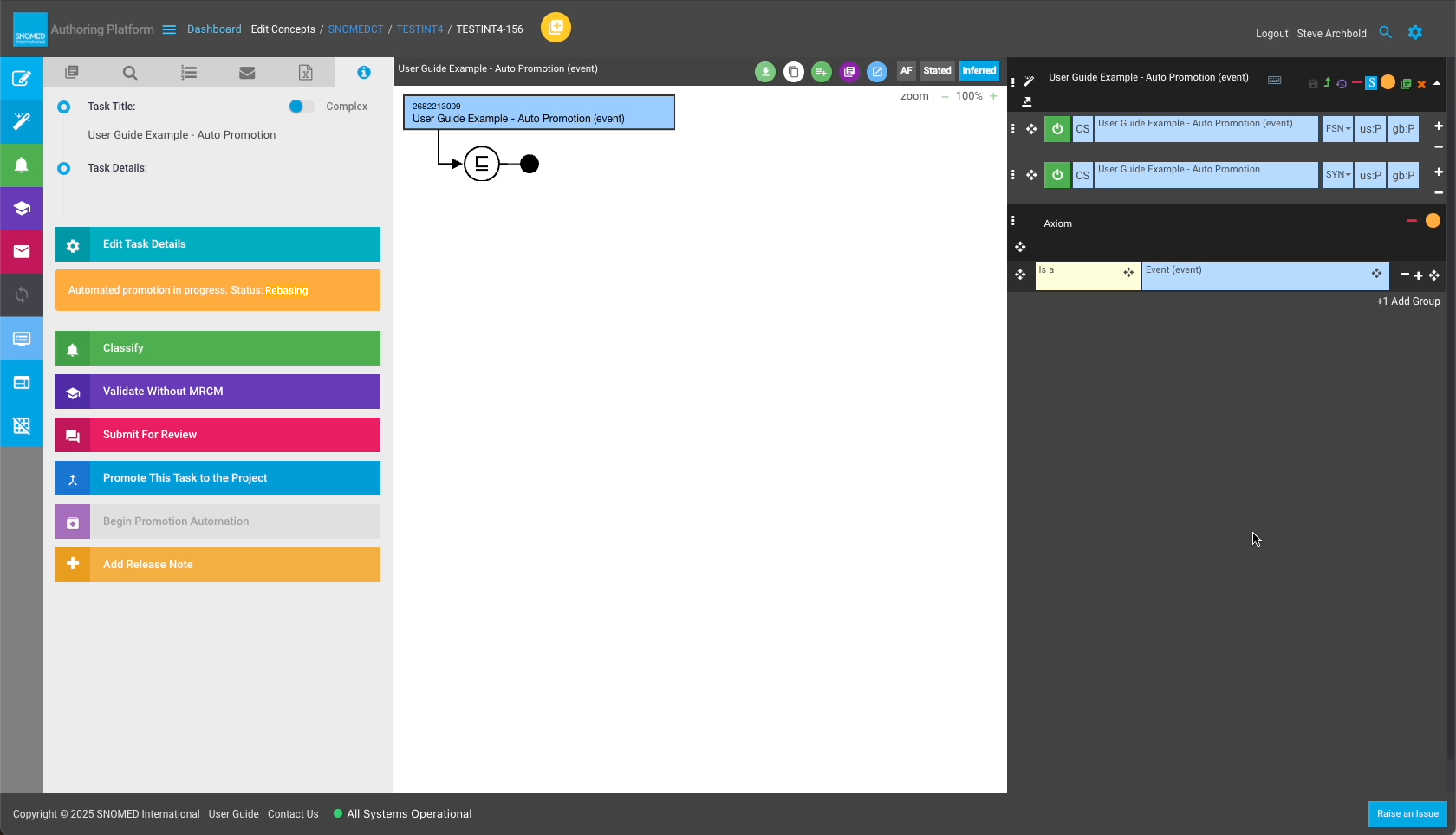
| <p>When picked up from the queue, the task is checked to see if needs to be rebased.<br></p><p>If the task content is diverged from its parent project content, the process initiates a task rebase, and the notification panel changes to "Automated promotion in progress: Status: Rebasing".<br></p><p>If rebase completes with no conflicts, the auto-promotion process continues.</p>                                                                                                                                                                                                                                                                                                                                                                                                                                                                                                                                                                                                                                                                                                                                                   | <div><figure><img src="https://956592758-files.gitbook.io/~/files/v0/b/gitbook-x-prod.appspot.com/o/spaces%2FO8kNzHFIgz2UFgwrcB08%2Fuploads%2Fgit-blob-04b10f3beb800cf0c1510d46ec37d7baa7bfae51%2F273517079.png?alt=media" alt=""><figcaption></figcaption></figure></div> |
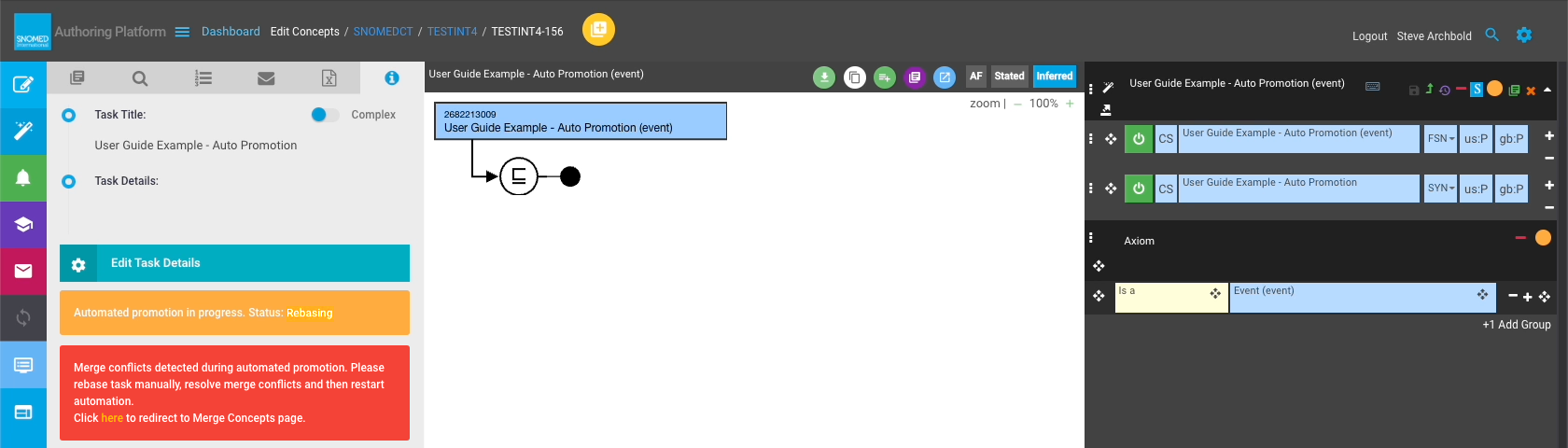
| <div data-gb-custom-block data-tag="hint" data-style="info" class="hint hint-info"><p><strong>Task review check</strong><br></p><p>If merge conflicts are found during rebase, the automatic promotion process is stopped, and the process notification changes to state that rebase conflicts must be resolved before restarting automatic promotion.</p></div>                                                                                                                                                                                                                                                                                                                                                                                                                                                                                                                                                                                                                                                                                                                                                                             | <div><figure><img src="https://956592758-files.gitbook.io/~/files/v0/b/gitbook-x-prod.appspot.com/o/spaces%2FO8kNzHFIgz2UFgwrcB08%2Fuploads%2Fgit-blob-beefd1c222ce37079bb05d7f31337fc3dadea044%2F273517080.png?alt=media" alt=""><figcaption></figcaption></figure></div> |
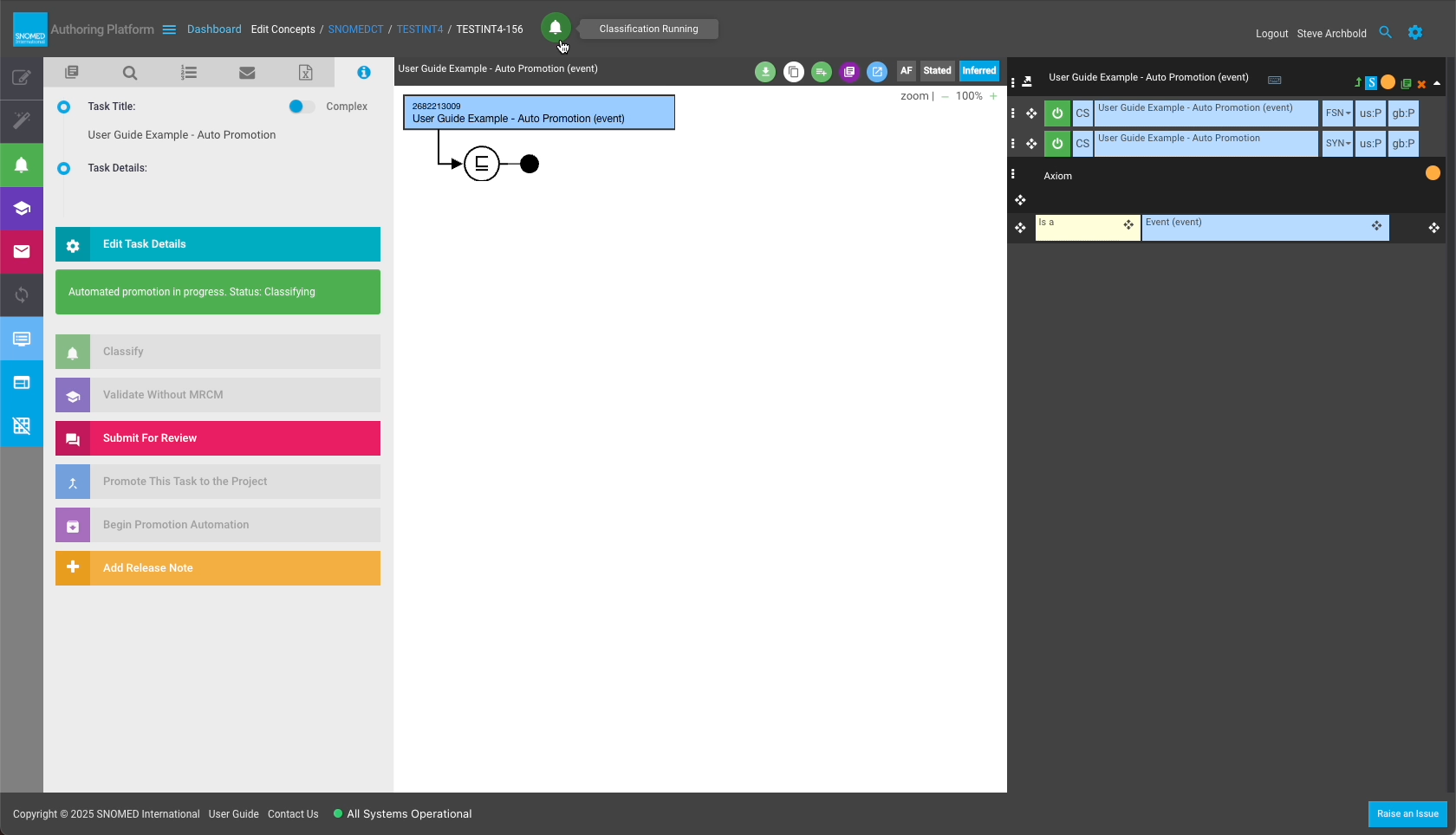
| <p>After confirming that the task does not have any rebase conflicts, classification is invoked to ensure all content changes are classified prior to promotion.<br></p><p>The process notification panel changes to "Automated promotion in progress: Status Classifying"<br></p><p>The page header bar icon changes to "Classification Running".</p>                                                                                                                                                                                                                                                                                                                                                                                                                                                                                                                                                                                                                                                                                                                                                                                       | <div><figure><img src="https://956592758-files.gitbook.io/~/files/v0/b/gitbook-x-prod.appspot.com/o/spaces%2FO8kNzHFIgz2UFgwrcB08%2Fuploads%2Fgit-blob-070cad08c41342d132bfdf351c39f9f20c314ce7%2F273517064.png?alt=media" alt=""><figcaption></figcaption></figure></div> |
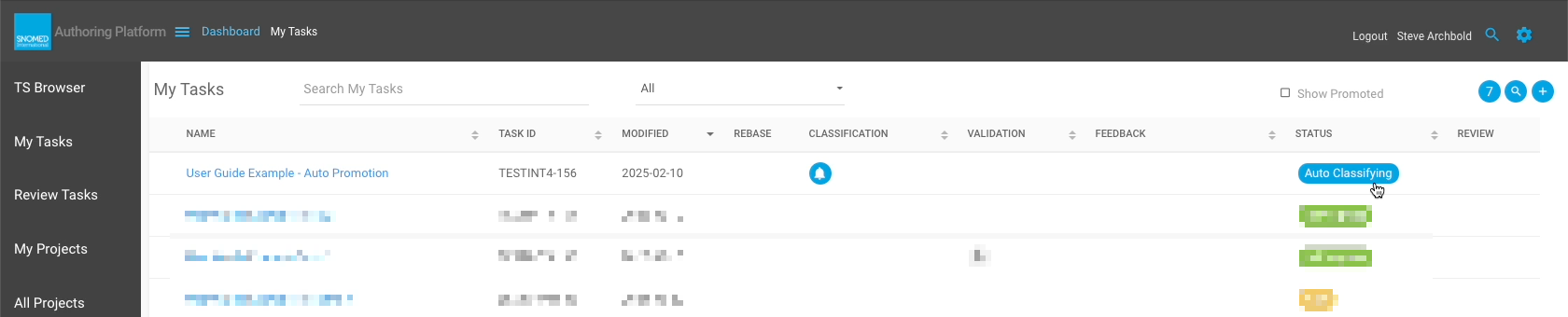
| Once the promotion automation invokes the classification process, the *My Tasks* view task `Status` column entry changes to *Auto Classifying*.                                                                                                                                                                                                                                                                                                                                                                                                                                                                                                                                                                                                                                                                                                                                                                                                                                                                                                                                                                                              | <div><figure><img src="https://956592758-files.gitbook.io/~/files/v0/b/gitbook-x-prod.appspot.com/o/spaces%2FO8kNzHFIgz2UFgwrcB08%2Fuploads%2Fgit-blob-b88a1b9aca925ce6c9dbe6829fcbfc0cccc1a2e9%2F273516421.png?alt=media" alt=""><figcaption></figcaption></figure></div> |
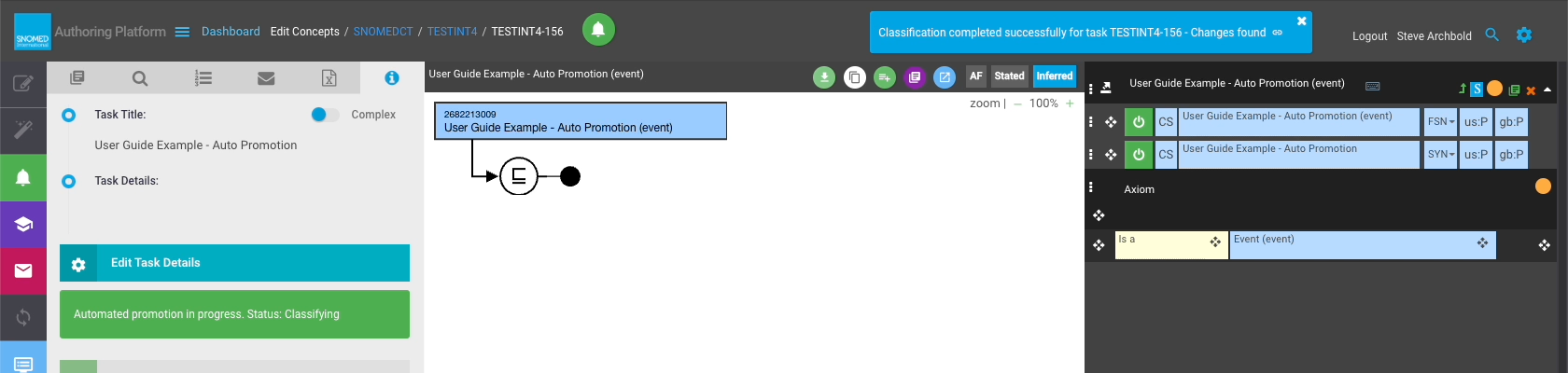
| If classification detects results (unclassified task content), a header notification states that classification completed successfully with changes found.                                                                                                                                                                                                                                                                                                                                                                                                                                                                                                                                                                                                                                                                                                                                                                                                                                                                                                                                                                                   | <div><figure><img src="https://956592758-files.gitbook.io/~/files/v0/b/gitbook-x-prod.appspot.com/o/spaces%2FO8kNzHFIgz2UFgwrcB08%2Fuploads%2Fgit-blob-fa46f38e74ded3de6237ef54ea175981a70e1862%2F273517065.png?alt=media" alt=""><figcaption></figcaption></figure></div> |
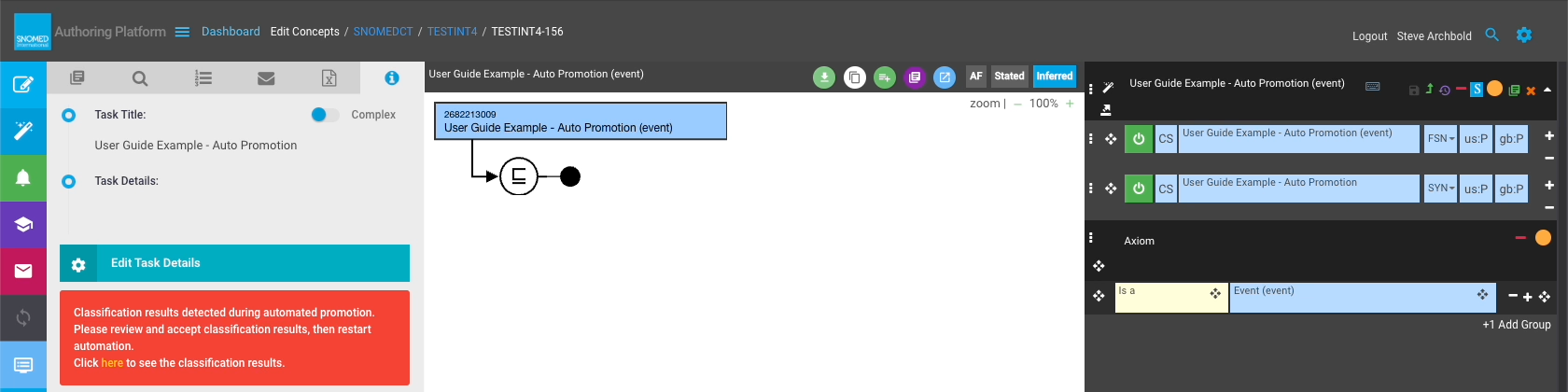
| <div data-gb-custom-block data-tag="hint" data-style="info" class="hint hint-info"><p><strong>Unclassified content blocks auto-promotion</strong><br></p><p>If classification results are found, the auto-promotion process is stopped, and the process notification panel changes to inform that classification results were detected, with an instruction to review and accept classification results before restarting the auto-promotion process.</p></div>                                                                                                                                                                                                                                                                                                                                                                                                                                                                                                                                                                                                                                                                              | <div><figure><img src="https://956592758-files.gitbook.io/~/files/v0/b/gitbook-x-prod.appspot.com/o/spaces%2FO8kNzHFIgz2UFgwrcB08%2Fuploads%2Fgit-blob-036126cf5ff51e2d0f58b0f8d5db8ab69c72fb45%2F273517066.png?alt=media" alt=""><figcaption></figcaption></figure></div> |
| If classification does not detect any changes, a header notification states that classification completed successfully with no changes found.                                                                                                                                                                                                                                                                                                                                                                                                                                                                                                                                                                                                                                                                                                                                                                                                                                                                                                                                                                                                | <div><figure><img src="https://956592758-files.gitbook.io/~/files/v0/b/gitbook-x-prod.appspot.com/o/spaces%2FO8kNzHFIgz2UFgwrcB08%2Fuploads%2Fgit-blob-8f194b556820f90cefffd07ff9f220643ec7d82c%2F273517067.png?alt=media" alt=""><figcaption></figcaption></figure></div> |
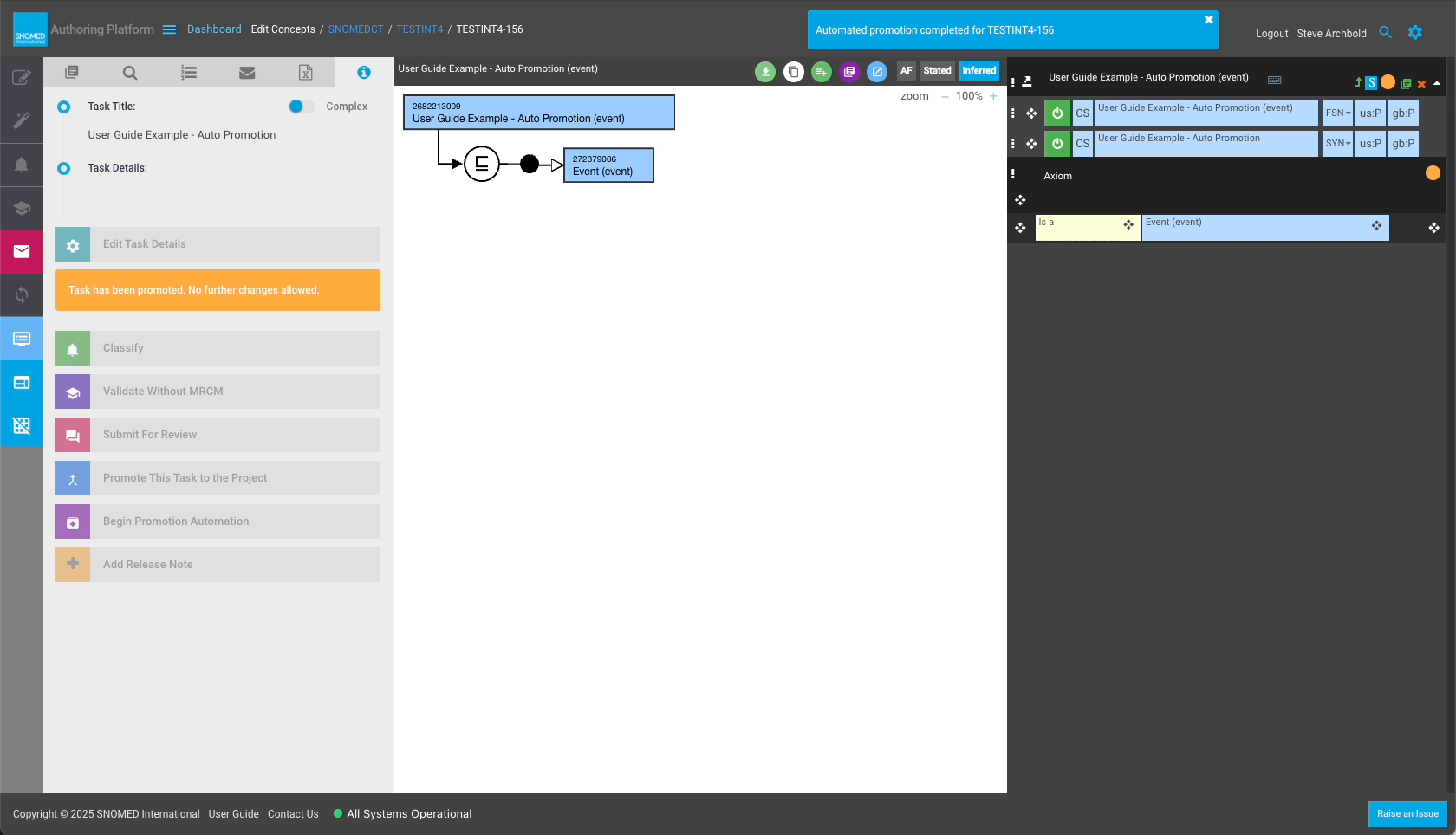
| <p>The automation process proceeds with task promotion, following which a header notification states that automated promotion completed for the task.<br></p><p>At this point task actions become inactive, and the process notification panel changes to inform that the task has been promoted and no further changes are allowed.</p>                                                                                                                                                                                                                                                                                                                                                                                                                                                                                                                                                                                                                                                                                                                                                                                                     | <div><figure><img src="https://956592758-files.gitbook.io/~/files/v0/b/gitbook-x-prod.appspot.com/o/spaces%2FO8kNzHFIgz2UFgwrcB08%2Fuploads%2Fgit-blob-ee0199276fdf90a1dab9880b791853dfb8a3e6ae%2F273517068.png?alt=media" alt=""><figcaption></figcaption></figure></div> |
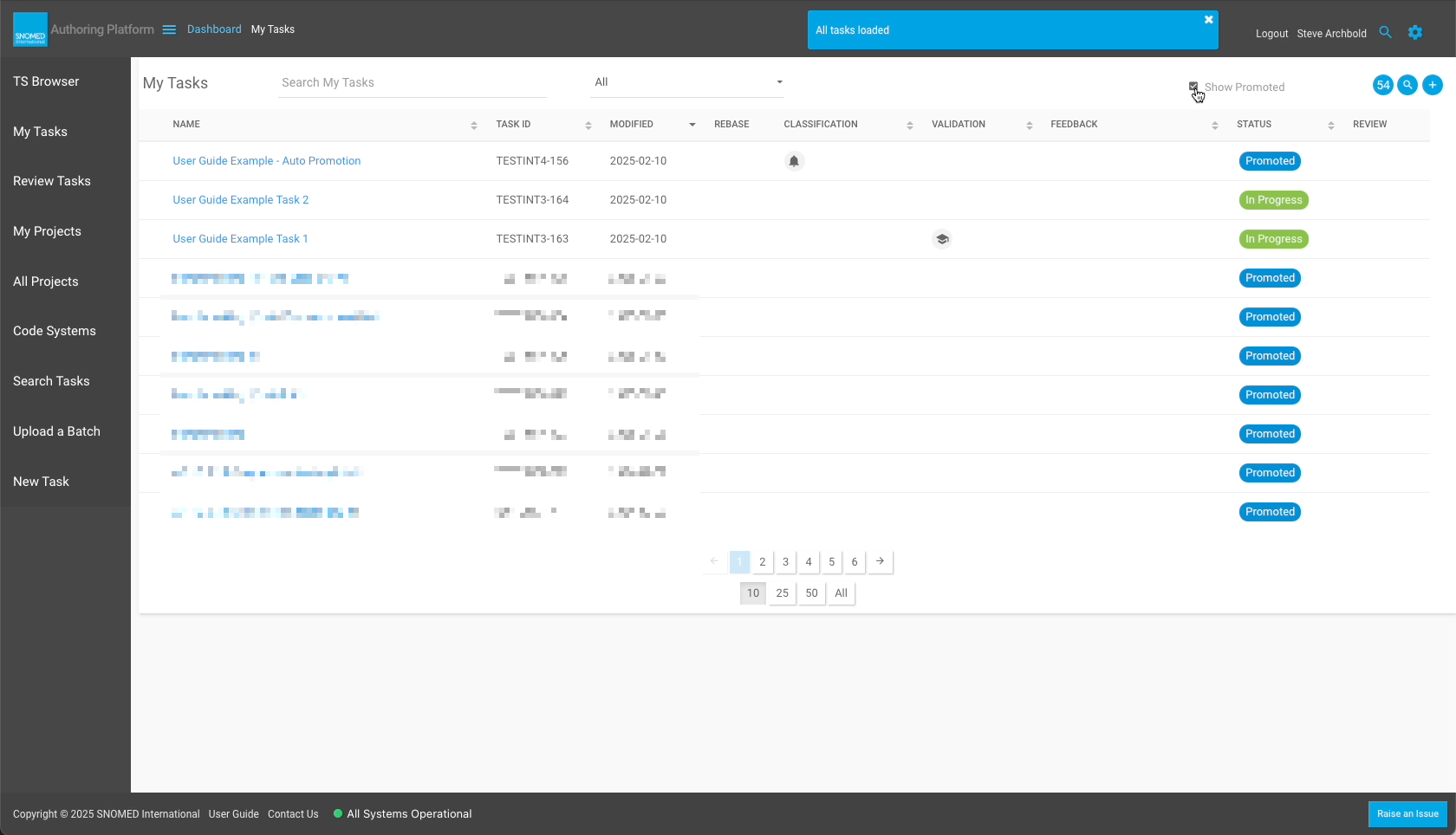
| <p>Promoted tasks are hidden by default in the <em>My Tasks</em> view, however they can be brought into the view listing by checking the <code>Show Promoted</code> checkbox.<br></p><p>Their task status shows <em>Promoted</em>, with a blue background.<br></p><p><strong>All</strong> historical promoted tasks are shown when the box is checked, not just the most recently promoted.</p>                                                                                                                                                                                                                                                                                                                                                                                                                                                                                                                                                                                                                                                                                                                                              | <div><figure><img src="https://956592758-files.gitbook.io/~/files/v0/b/gitbook-x-prod.appspot.com/o/spaces%2FO8kNzHFIgz2UFgwrcB08%2Fuploads%2Fgit-blob-4d276d538221a567eec26313bb30d9262cb41461%2F273517069.png?alt=media" alt=""><figcaption></figcaption></figure></div> |

<a href="https://docs.google.com/forms/d/e/1FAIpQLScTmbZIf0UEQwYDkY27EEWBkaiYkHSbR0_9DmFrMLXoQLyL7Q/viewform?usp=pp_url&#x26;entry.1767247133=AP+UG&#x26;entry.670899847=Automatically%20Promote%20my%20task%20changes%20to%20their%20parent%20project%20%28share%20with%20other%20authors%29" class="button primary">Provide Feedback</a>


---

# Agent Instructions: Querying This Documentation

If you need additional information that is not directly available in this page, you can query the documentation dynamically by asking a question.

Perform an HTTP GET request on the current page URL with the `ask` query parameter:

```
GET https://docs.snomed.org/snomed-ct-user-guides/authoring-user-guide/how-to/task-rebase-and-promotion/automatically-promote-my-task-changes-to-their-parent-project-share-with-other-authors.md?ask=<question>
```

The question should be specific, self-contained, and written in natural language.
The response will contain a direct answer to the question and relevant excerpts and sources from the documentation.

Use this mechanism when the answer is not explicitly present in the current page, you need clarification or additional context, or you want to retrieve related documentation sections.