> For the complete documentation index, see [llms.txt](https://docs.snomed.org/llms.txt). Markdown versions of documentation pages are available by appending `.md` to page URLs; this page is available as [Markdown](https://docs.snomed.org/snomed-ct-user-guides/authoring-user-guide/how-to/task-saved-list/add-a-saved-concept-to-the-project-favorites-list-and-act-on-the-listed-concepts.md).

# Add a saved concept to the Project Favorites list and act on the listed concepts

{% hint style="info" %}
**US spelling**<br>

The international Authoring Platform user interface uses en-US spelling for its labels, hence the spelling of words such as "favorite" in this guide.
{% endhint %}

| Steps                                                                                                                                                                                                                                                                                                                                                                                                                                                                                                                                                                                                                                                                                                                                                                                                                                                                                                                                                                                          | References                                                                                                                                                                                                                                                                 |
| ---------------------------------------------------------------------------------------------------------------------------------------------------------------------------------------------------------------------------------------------------------------------------------------------------------------------------------------------------------------------------------------------------------------------------------------------------------------------------------------------------------------------------------------------------------------------------------------------------------------------------------------------------------------------------------------------------------------------------------------------------------------------------------------------------------------------------------------------------------------------------------------------------------------------------------------------------------------------------------------------- | -------------------------------------------------------------------------------------------------------------------------------------------------------------------------------------------------------------------------------------------------------------------------- |
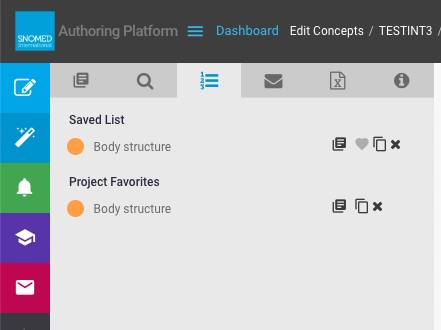
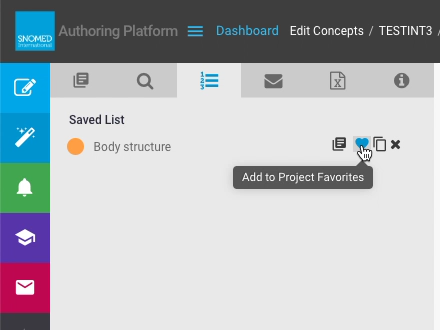
| <p>In a <em>Task View - Saved List</em> entry, press <code>Add to Project Favorites</code> to extend the <em>Project Favorites</em> list with that concept.<br></p><p>If no project favorites have yet been added then the <em>Task View - Saved List</em> content panel only shows the task saved concepts.<br></p><p>After adding at least one saved list item to the <em>Project Favorites</em>, the content panel updates to show the <em>Project Favorites</em> list below the task <em>Saved List</em>.<br></p><p>If any concepts have been saved as a project favorite in any task within the project, then all tasks in that project will show the <em>Project Favorites</em> list in their <em>Task View - Saved List</em>.<br></p><p>The <em>Task View</em> web page automatically picks up changes when first loaded, but it may need to be refreshed to pick up any changes made by others whilst it remains open in the web browser.</p>                                          | <div><figure><img src="https://956592758-files.gitbook.io/~/files/v0/b/gitbook-x-prod.appspot.com/o/spaces%2FO8kNzHFIgz2UFgwrcB08%2Fuploads%2Fgit-blob-fe54d34e187b964f321bac3ce03ebea0564454c8%2F100893281.png?alt=media" alt=""><figcaption></figcaption></figure></div> |
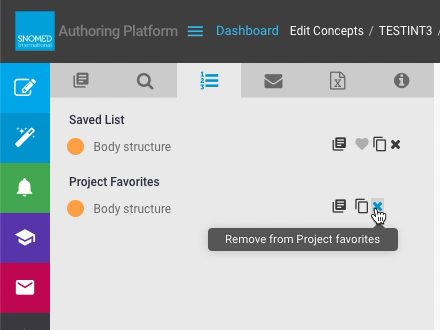
| <p>Each item in the <em>Project Favorites</em> list has the following:<br></p><ul><li><code>Primitive</code> or <code>Fully Defined</code> button (status definition icon)</li><li><code>Preferred Term</code></li><li><code>View in Taxonomy</code> button</li><li><code>Clone this concept</code> button</li><li><code>Remove from Project Favourites</code> button</li></ul>                                                                                                                                                                                                                                                                                                                                                                                                                                                                                                                                                                                                                | <div><figure><img src="https://956592758-files.gitbook.io/~/files/v0/b/gitbook-x-prod.appspot.com/o/spaces%2FO8kNzHFIgz2UFgwrcB08%2Fuploads%2Fgit-blob-85337e5b07491837a8718ef0f074aad50457bb6c%2F100893282.png?alt=media" alt=""><figcaption></figcaption></figure></div> |
| <p>Project Favorites actions function in exactly the same way as their <em>Saved List</em> counterparts described in <a href="/snomed-ct-user-guides/authoring-user-guide/how-to/task-saved-list/add-a-concept-to-my-task-saved-list-and-act-on-saved-concepts.md">Add a concept to my task Saved List and act on saved concepts</a>, with the notable exception of <code>Remove from Project Favorites</code> which does exactly as it says, as soon as it is pressed.<br></p><div data-gb-custom-block data-tag="hint" data-style="info" class="hint hint-info"><p><strong>Removing a concept from the Project Favorites list by mistake</strong><br></p><p>If a concept is removed by mistake and it is not in the <em>Task View - Saved List</em> then it is probably wise to go back to <em>Search</em>, add it into the <em>Task View - Saved List</em>, and then add it back into <em>Project Favorites</em> (in case another task within the project still needs to use it).</p></div> | <div><figure><img src="https://956592758-files.gitbook.io/~/files/v0/b/gitbook-x-prod.appspot.com/o/spaces%2FO8kNzHFIgz2UFgwrcB08%2Fuploads%2Fgit-blob-d4c6450caffb8e9c1c10ee649436f564f16336c9%2F100893278.png?alt=media" alt=""><figcaption></figcaption></figure></div> |

<a href="https://docs.google.com/forms/d/e/1FAIpQLScTmbZIf0UEQwYDkY27EEWBkaiYkHSbR0_9DmFrMLXoQLyL7Q/viewform?usp=pp_url&#x26;entry.1767247133=AP+UG&#x26;entry.670899847=Add%20a%20saved%20concept%20to%20the%20Project%20Favorites%20list%20and%20act%20on%20the%20listed%20concepts" class="button primary">Provide Feedback</a>


---

# Agent Instructions
This documentation is published with GitBook. GitBook is the documentation platform designed so that both humans and AI agents can read, navigate, and reason over technical content effectively. Learn more at gitbook.com.

## Querying This Documentation
If you need additional information that is not directly available in this page, you can query the documentation dynamically by asking a question.

Perform an HTTP GET request on the current page URL with the `ask` query parameter, and the optional `goal` query parameter:

```
GET https://docs.snomed.org/snomed-ct-user-guides/authoring-user-guide/how-to/task-saved-list/add-a-saved-concept-to-the-project-favorites-list-and-act-on-the-listed-concepts.md?ask=<question>&goal=<endgoal>
```

`ask` is the immediate question: it should be specific, self-contained, and written in natural language.
`goal` is optional and describes the broader end goal you are ultimately trying to accomplish on behalf of the user. GitBook uses it to tailor the answer towards what is most useful for that goal.

The response will contain a direct answer to the question and relevant excerpts and sources from the documentation.

Use this mechanism when the answer is not explicitly present in the current page, you need clarification or additional context, or you want to retrieve related documentation sections.