# View extension concept module details

| Steps                                                                                                                                                                                                                                                                                                                                                                                                                                                                                                                                                                                                                                                                                                                                                                                                                                                                                                                                                                                                                                               | References                                                                                                                                                                                                                                                                                                                                                                                                                                                                                                      |
| --------------------------------------------------------------------------------------------------------------------------------------------------------------------------------------------------------------------------------------------------------------------------------------------------------------------------------------------------------------------------------------------------------------------------------------------------------------------------------------------------------------------------------------------------------------------------------------------------------------------------------------------------------------------------------------------------------------------------------------------------------------------------------------------------------------------------------------------------------------------------------------------------------------------------------------------------------------------------------------------------------------------------------------------------- | --------------------------------------------------------------------------------------------------------------------------------------------------------------------------------------------------------------------------------------------------------------------------------------------------------------------------------------------------------------------------------------------------------------------------------------------------------------------------------------------------------------- |
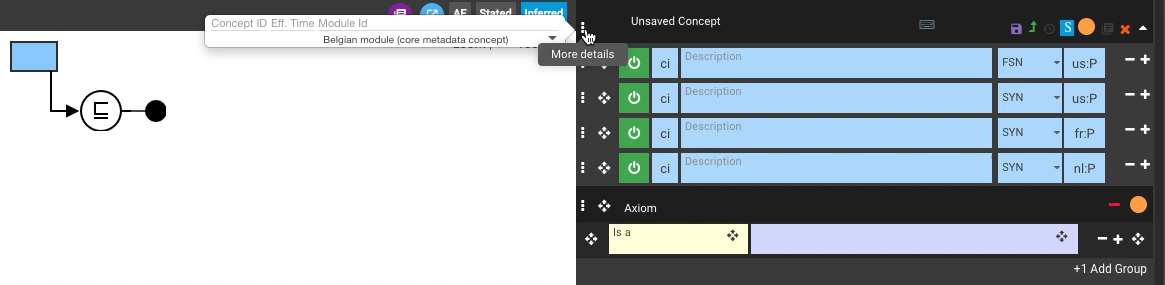
| <p>With the new concept loaded in the Edit Panel, press the <code>More details</code> <i class="fa-ellipsis-vertical">:ellipsis-vertical:</i> icon button to the left of the concept header.<br></p><p>The <em>More Details</em> pop-over dialogue shows the extension <code>Module Id</code> for the new concept.<br></p><p>The example shows a Belgian module concept.</p>                                                                                                                                                                                                                                                                                                                                                                                                                                                                                                                                                                                                                                                                        | <div><figure><img src="/files/caztHcs8Yk4JDJULlhI2" alt=""><figcaption></figcaption></figure></div>                                                                                                                                                                                                                                                                                                                                                                                                             |
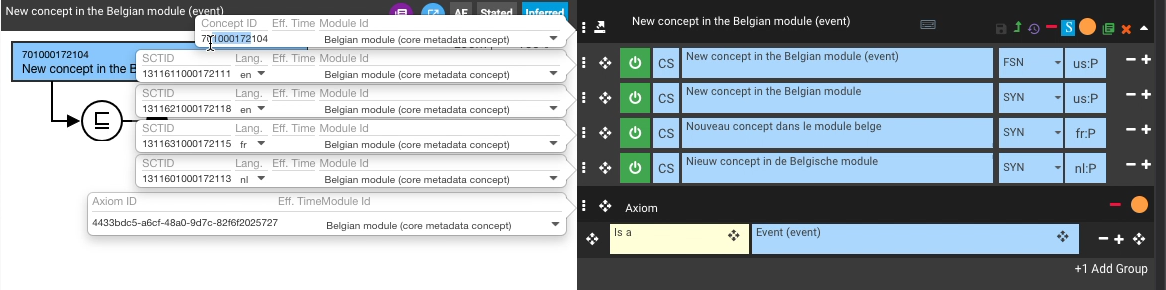
| <p>Press any description row <code>More details</code> <i class="fa-ellipsis-vertical">:ellipsis-vertical:</i> icon button (to the left of the description row) to see a similar pop-over for each description.<br></p><p>The example shows a Belgian module concept, in which the <strong>fr</strong> and <strong>nl</strong> languages can also be seen in the <code>Lang.</code> (language reference set) setting for each translated description, as well as its extension <code>Module Id</code>.<br></p><p>Note that <em>en:US</em> is the language reference set for the FSN and first PT.</p>                                                                                                                                                                                                                                                                                                                                                                                                                                               | <div><figure><img src="/files/jJrp37WZjODMQ9nM0crS" alt=""><figcaption></figcaption></figure></div><div><figure><img src="/files/ewnE99ApwC3SvXlOOQFU" alt=""><figcaption></figcaption></figure></div><div><figure><img src="/files/jahXQiYyrBynlGmL4ODg" alt=""><figcaption></figcaption></figure></div><div><figure><img src="/files/nlvGd4eVa5Wjb3X73ESb" alt=""><figcaption></figcaption></figure></div>                                                                                                    |
| <div data-gb-custom-block data-tag="hint" data-style="info" class="hint hint-info"><p><strong>No SCTID information until new concept is saved</strong><br></p><p>The examples above show a new extension module concept that has not yet been saved, so their SCTID values are empty in the <em>More Details</em> pop-over dialogues.<br></p><p>Once a new concept has been saved, the appropriate SCIDs will be shown for the concept and its descriptions, which can also be seen to contain the namespace identifier for the extension module (<strong>1000172</strong> for the Belgian extension namespace).<br></p></div><div data-gb-custom-block data-tag="hint" data-style="success" class="hint hint-success"><p><strong>Closing information pop-overs</strong><br></p><p>Press the <code>More details</code> <i class="fa-ellipsis-vertical">:ellipsis-vertical:</i> icon button to toggle its related pop-over open/closed.<br></p><p>Press anywhere in the Edit Panel outside a pop-over box to close all open pop-overs.<br></p></div> | <div><figure><img src="/files/92tPop8i01VC7UKsrHby" alt=""><figcaption></figcaption></figure></div><div><figure><img src="/files/uNpapHWWd2WRx5iVMvkg" alt=""><figcaption></figcaption></figure></div><div><figure><img src="/files/SfObjL5d7VHgtEXV0myL" alt=""><figcaption></figcaption></figure></div><div><figure><img src="/files/ulqkYpCilGCa0MNSFRzL" alt=""><figcaption></figcaption></figure></div><div><figure><img src="/files/dQe5OTiKxpA1lC9DMtls" alt=""><figcaption></figcaption></figure></div> |

<a href="https://docs.google.com/forms/d/e/1FAIpQLScTmbZIf0UEQwYDkY27EEWBkaiYkHSbR0_9DmFrMLXoQLyL7Q/viewform?usp=pp_url&#x26;entry.1767247133=AP+UG&#x26;entry.670899847=View%20extension%20concept%20module%20details" class="button primary">Provide Feedback</a>


---

# Agent Instructions: Querying This Documentation

If you need additional information that is not directly available in this page, you can query the documentation dynamically by asking a question.

Perform an HTTP GET request on the current page URL with the `ask` query parameter:

```
GET https://docs.snomed.org/snomed-ct-user-guides/authoring-user-guide/how-to/work-in-an-extension/view-extension-concept-module-details.md?ask=<question>
```

The question should be specific, self-contained, and written in natural language.
The response will contain a direct answer to the question and relevant excerpts and sources from the documentation.

Use this mechanism when the answer is not explicitly present in the current page, you need clarification or additional context, or you want to retrieve related documentation sections.