# Release Management

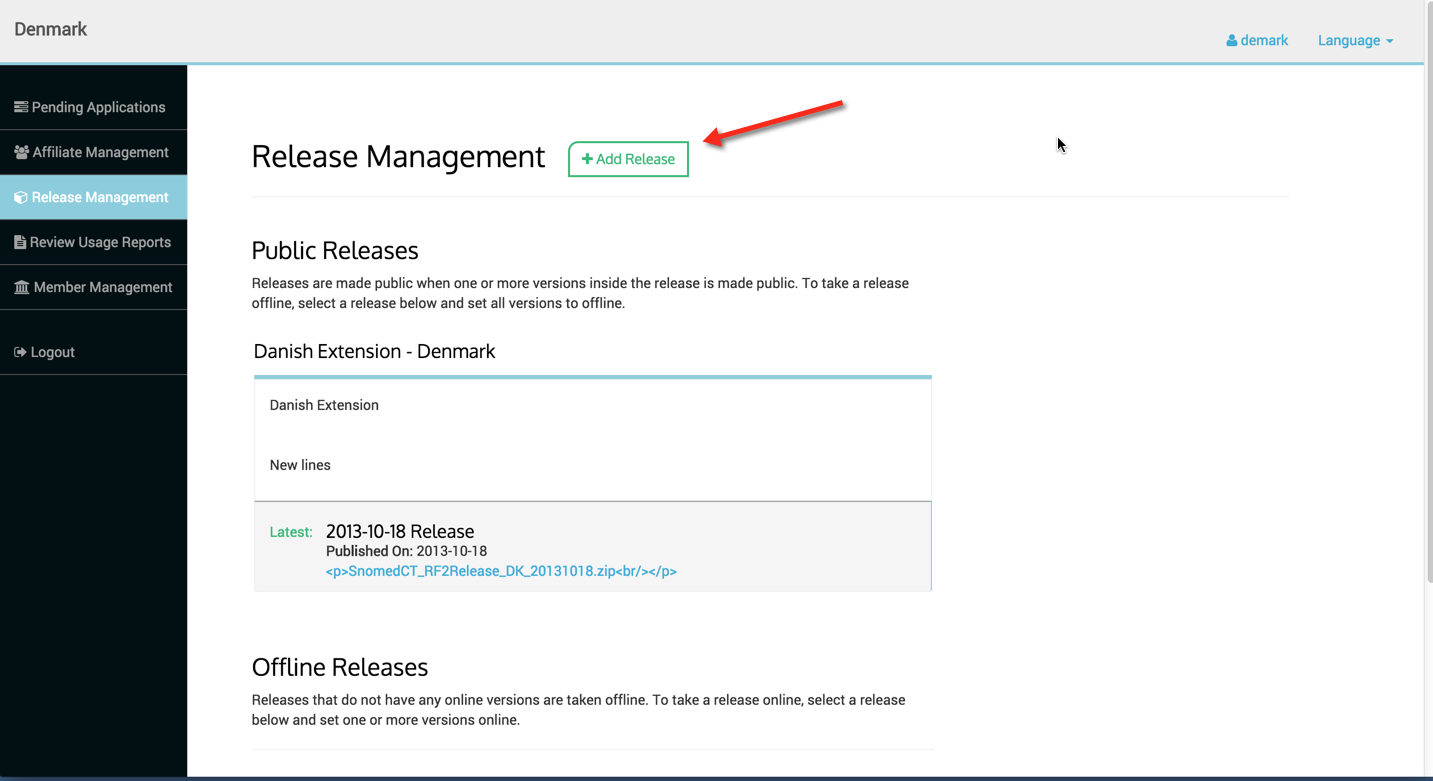
### Step 1 - To add a Release Package, go to the Release Management menu and Click on Add Release button as shown below.

<figure><img src="https://969927579-files.gitbook.io/~/files/v0/b/gitbook-x-prod.appspot.com/o/spaces%2FLYgfgtQAEX6IwigniPM1%2Fuploads%2Fgit-blob-812f9a73343ece9873dd5a102e78d85a0eebe5d2%2F6849100.png?alt=media" alt=""><figcaption></figcaption></figure>

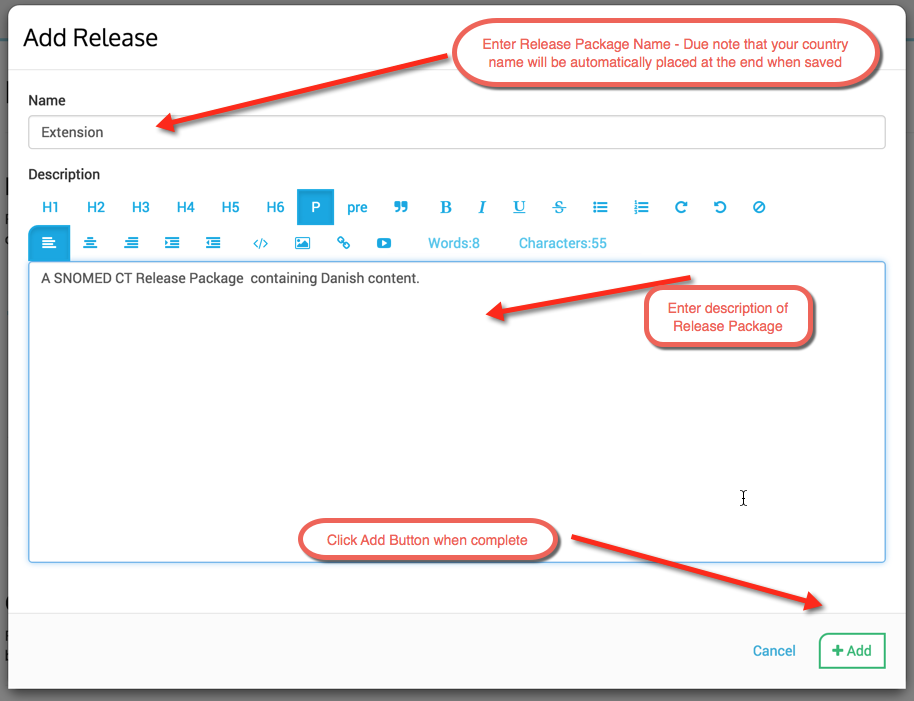
### Step 2 - Enter Release Package name and description.

<figure><img src="https://969927579-files.gitbook.io/~/files/v0/b/gitbook-x-prod.appspot.com/o/spaces%2FLYgfgtQAEX6IwigniPM1%2Fuploads%2Fgit-blob-b46bfbe940494a8320705600532d69ad6b7ffc24%2F6849139.png?alt=media" alt=""><figcaption></figcaption></figure>

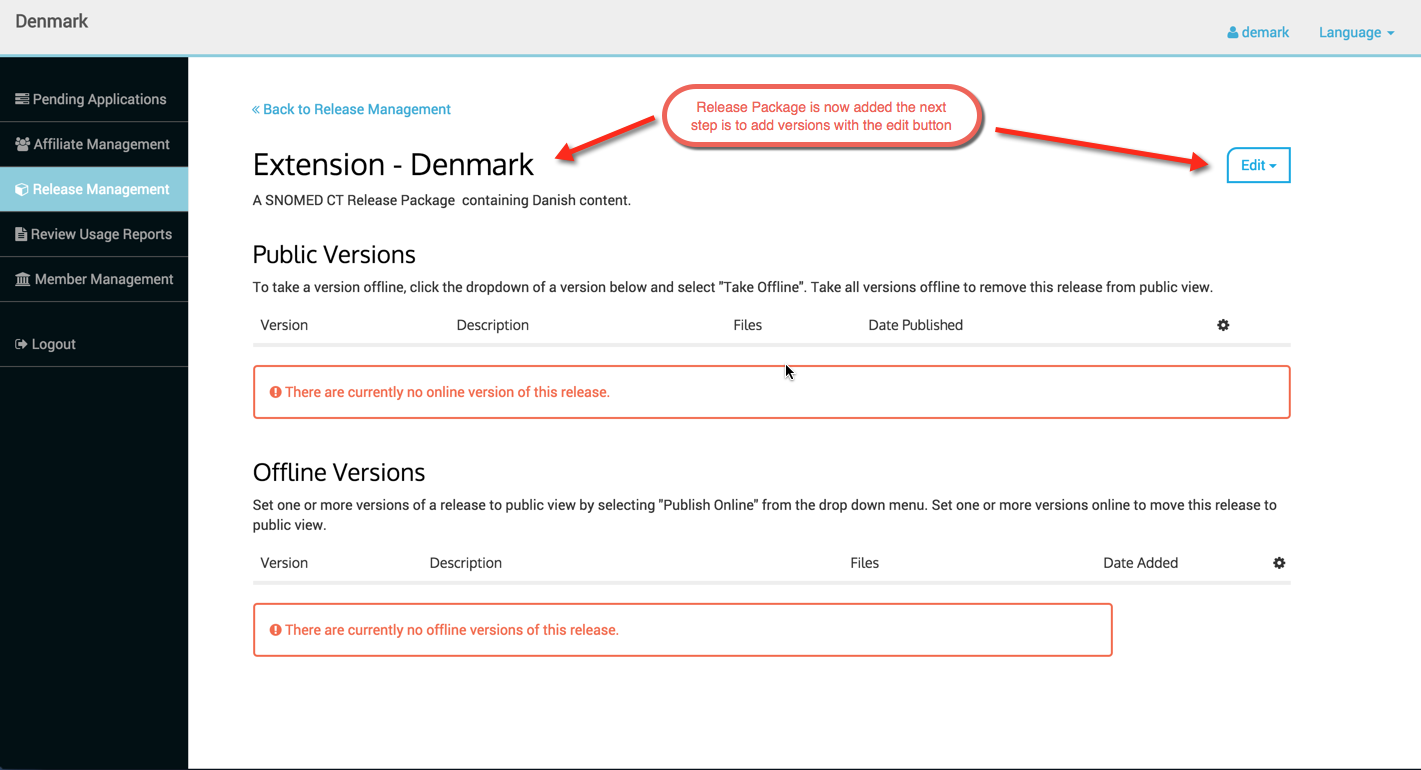
### Step 3 - Adding Versions to the Release Package

<figure><img src="https://969927579-files.gitbook.io/~/files/v0/b/gitbook-x-prod.appspot.com/o/spaces%2FLYgfgtQAEX6IwigniPM1%2Fuploads%2Fgit-blob-694e362efc64387fcec3eb6311ef2f5cb4cc21cb%2F6849140.png?alt=media" alt=""><figcaption></figcaption></figure>

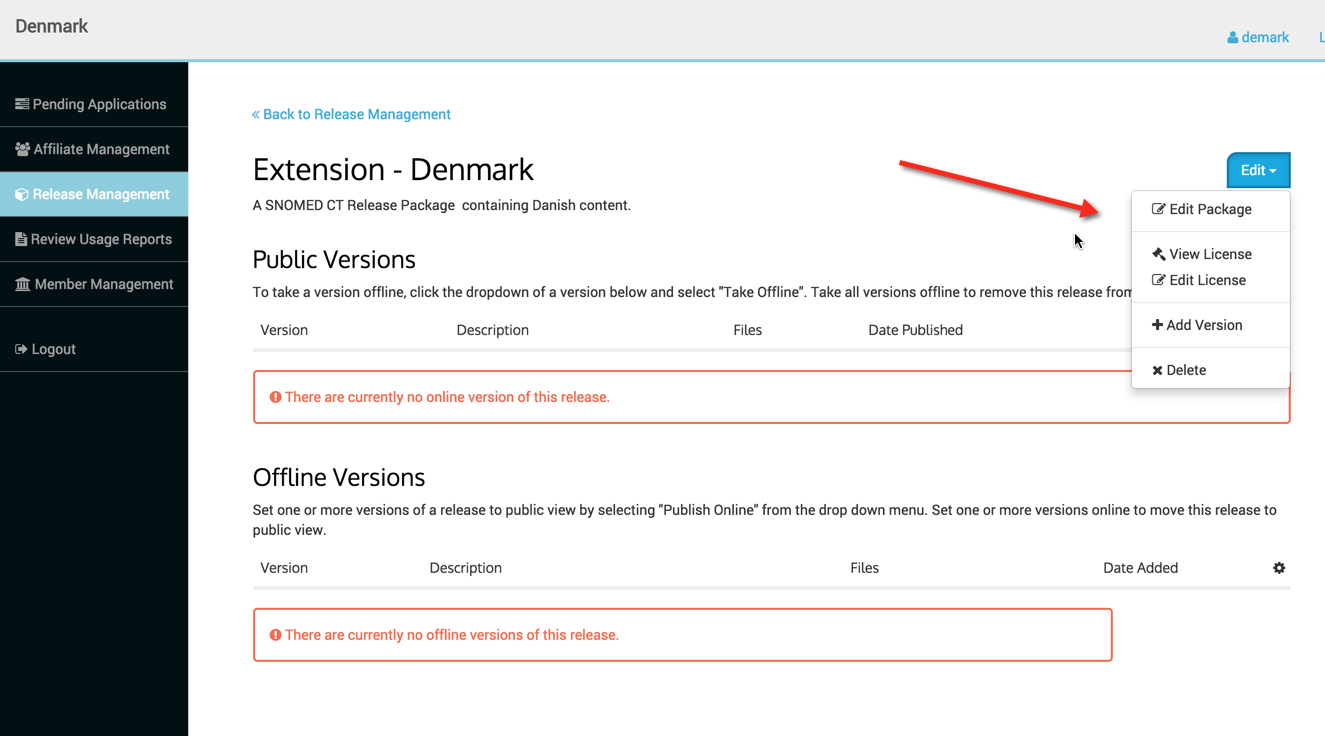
### Edit Menu - The edit menu has several options

* **Edit Package** - enables editing of Release Package name and description
* **View License** - enables viewing of the license for the Release Package selected, *note license must be uploaded via the Edit License option firs* t
* **Edit License** - enables end user to upload a license for the Release Package selected
* **Add Version** - enables end user to add a version to the Release Package
* **Delete** - enables end user to delete the Release Package selected

<figure><img src="https://969927579-files.gitbook.io/~/files/v0/b/gitbook-x-prod.appspot.com/o/spaces%2FLYgfgtQAEX6IwigniPM1%2Fuploads%2Fgit-blob-9b290b5e46b8fa44896b0f716d85902ade7f078b%2F6849141.png?alt=media" alt=""><figcaption></figcaption></figure>

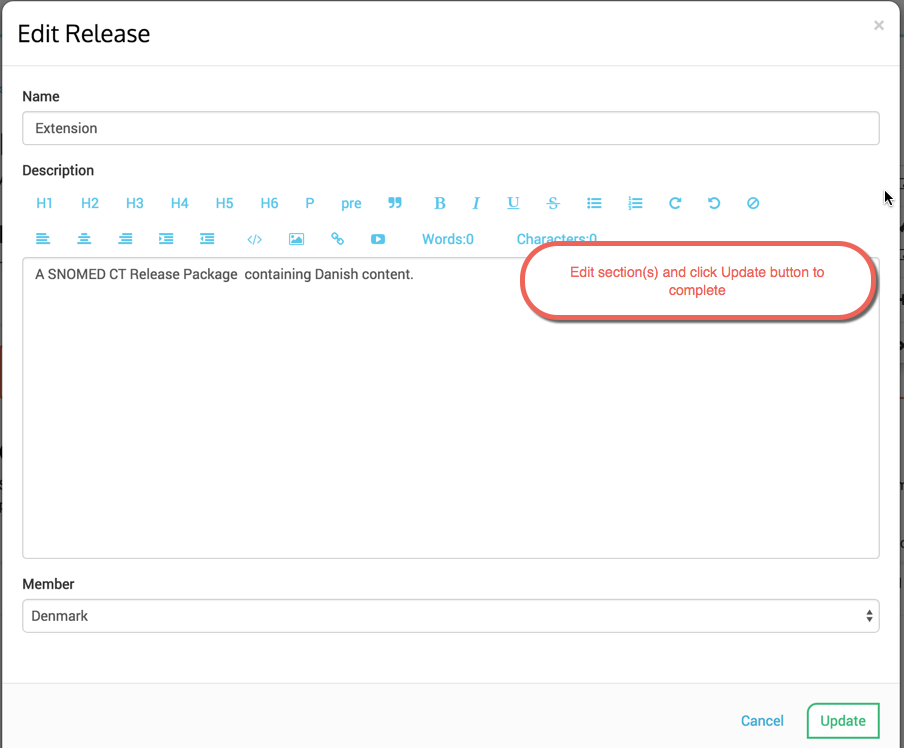
### Edit Package Option

Click Edit Package menu option, edit as desired and click update to complete.

<figure><img src="https://969927579-files.gitbook.io/~/files/v0/b/gitbook-x-prod.appspot.com/o/spaces%2FLYgfgtQAEX6IwigniPM1%2Fuploads%2Fgit-blob-5407cddaae84b425be373daeee1ff34327e3fae9%2F6849149.png?alt=media" alt=""><figcaption></figcaption></figure>

### View License Option

To view a license for the selected Release Package, click on View License and the license file will be downloaded to the end users local drive for viewing. The end user must use the Edit License option to add the license first.

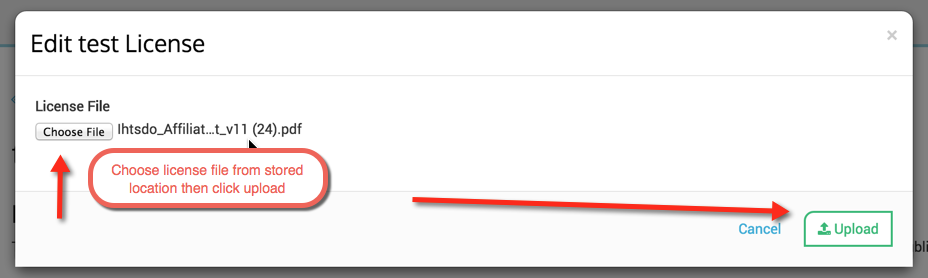
### Edit License Option

### Step 1 - Add information as directed below and press save.

<figure><img src="https://969927579-files.gitbook.io/~/files/v0/b/gitbook-x-prod.appspot.com/o/spaces%2FLYgfgtQAEX6IwigniPM1%2Fuploads%2Fgit-blob-f4e3c0a9286a996c9f09ae5c080045edf88deb77%2F6849145.png?alt=media" alt=""><figcaption></figcaption></figure>

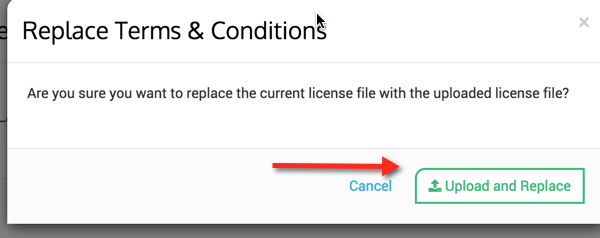
### Step 2 - Confirm Upload and Replace by clicking green button.

<figure><img src="https://969927579-files.gitbook.io/~/files/v0/b/gitbook-x-prod.appspot.com/o/spaces%2FLYgfgtQAEX6IwigniPM1%2Fuploads%2Fgit-blob-e2275230643c3b3dd8f9aaaf924abb963f31b155%2F6849146.png?alt=media" alt=""><figcaption></figcaption></figure>

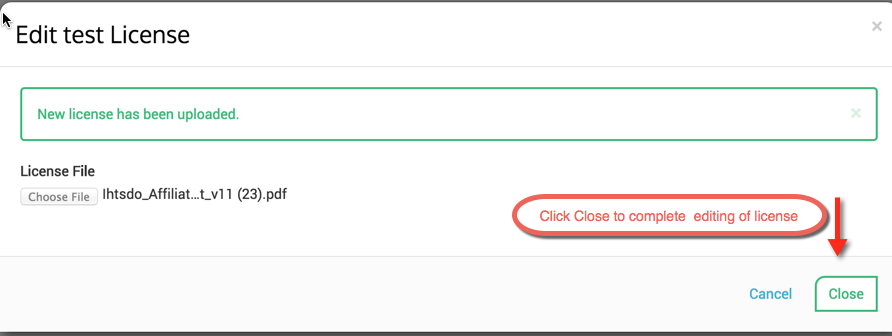
### Step 3 - New license file is confirmed and the end user will receive the below message

<figure><img src="https://969927579-files.gitbook.io/~/files/v0/b/gitbook-x-prod.appspot.com/o/spaces%2FLYgfgtQAEX6IwigniPM1%2Fuploads%2Fgit-blob-dea4d7979810d5b1c93515161484081902b8d5d9%2F6849148.png?alt=media" alt=""><figcaption></figcaption></figure>

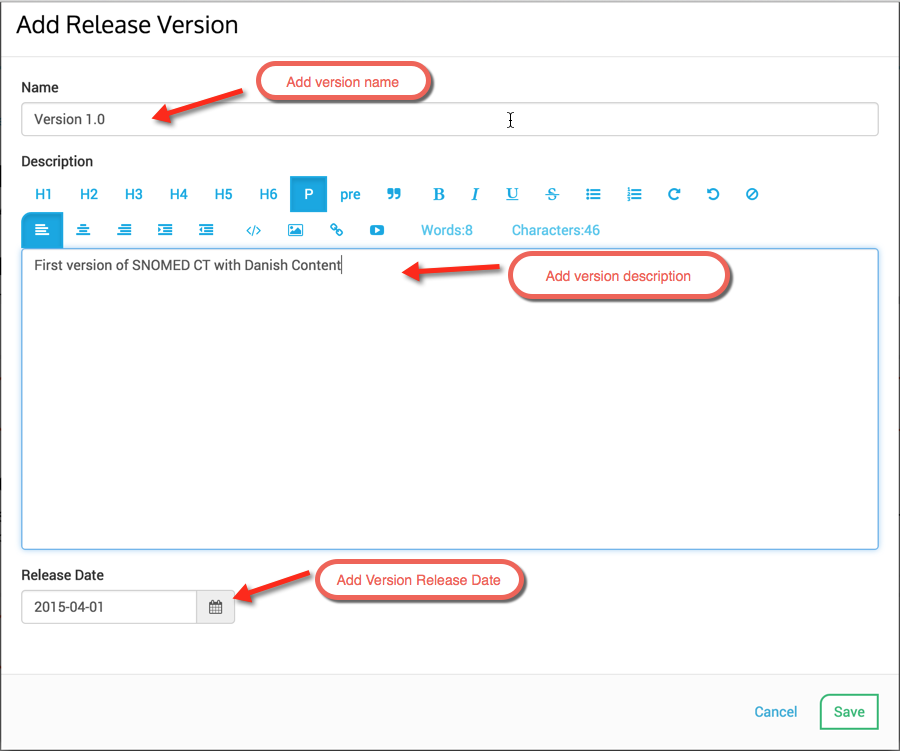
### ADD Version Option - Add information as directed below and press save.

<figure><img src="https://969927579-files.gitbook.io/~/files/v0/b/gitbook-x-prod.appspot.com/o/spaces%2FLYgfgtQAEX6IwigniPM1%2Fuploads%2Fgit-blob-6f2c32d4ff38446a0a50b7e29dbb634e2c517ed8%2F6849144.png?alt=media" alt=""><figcaption></figcaption></figure>

### Publishing a Release Package

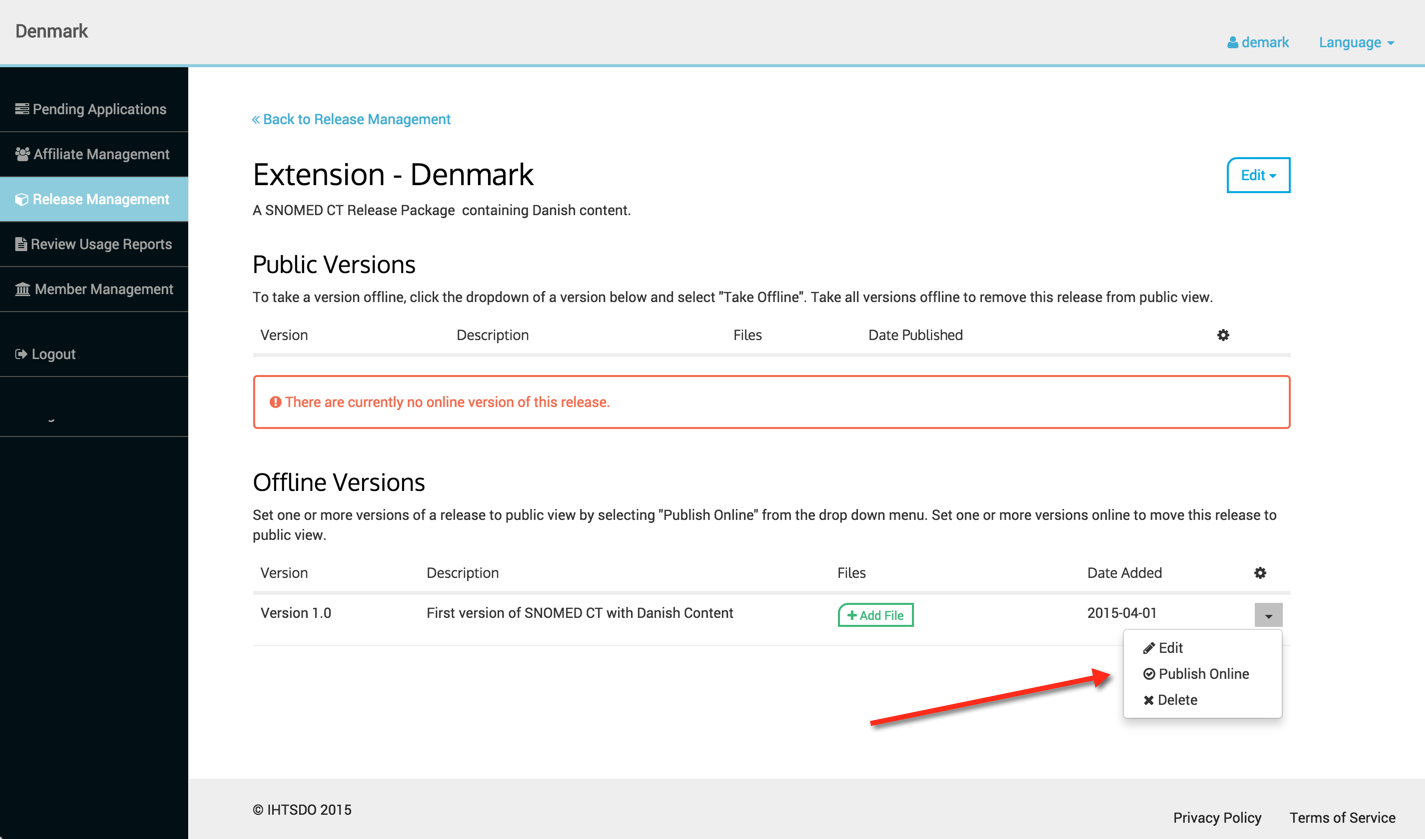
Once the end user has added the Release Package, and added at least one version, they must Publish the Release Package in order for it to be Public.

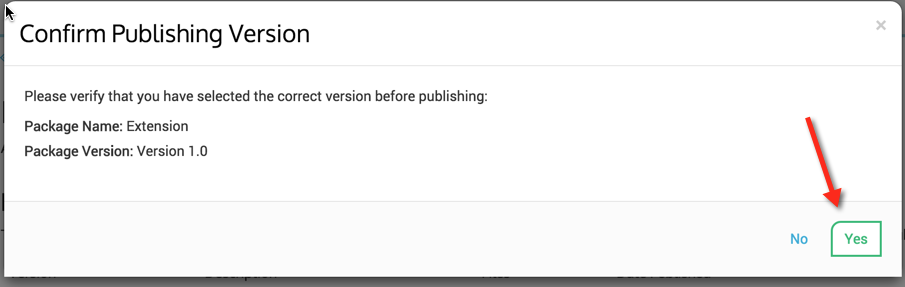
<figure><img src="https://969927579-files.gitbook.io/~/files/v0/b/gitbook-x-prod.appspot.com/o/spaces%2FLYgfgtQAEX6IwigniPM1%2Fuploads%2Fgit-blob-1fbad13414342f9bdb743e5f3934484fc452335b%2F6849150.png?alt=media" alt=""><figcaption><p>Click on Publish Online menu option and then Confirm Publishing message will appear, if it is the correct version to publish click Yes.</p></figcaption></figure>

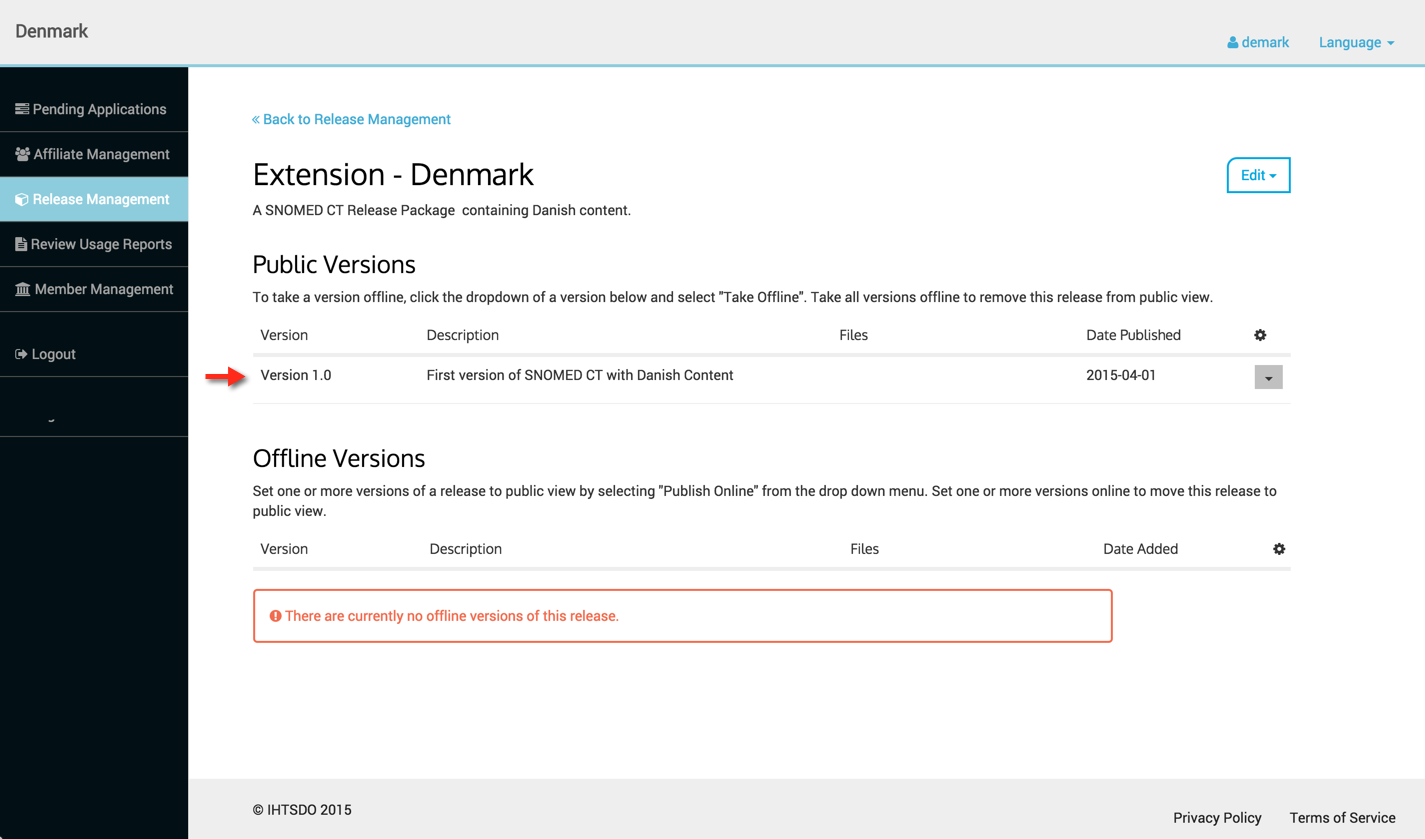
<figure><img src="https://969927579-files.gitbook.io/~/files/v0/b/gitbook-x-prod.appspot.com/o/spaces%2FLYgfgtQAEX6IwigniPM1%2Fuploads%2Fgit-blob-b5cab59c35739a1a480f7cb93b35023edcdbd640%2F6849153.png?alt=media" alt=""><figcaption><p>The version now appears under the <strong>Public Versions</strong> listing and is no longer Offline or NOT Public. Affiliates can now apply to access this Release Package.</p></figcaption></figure>

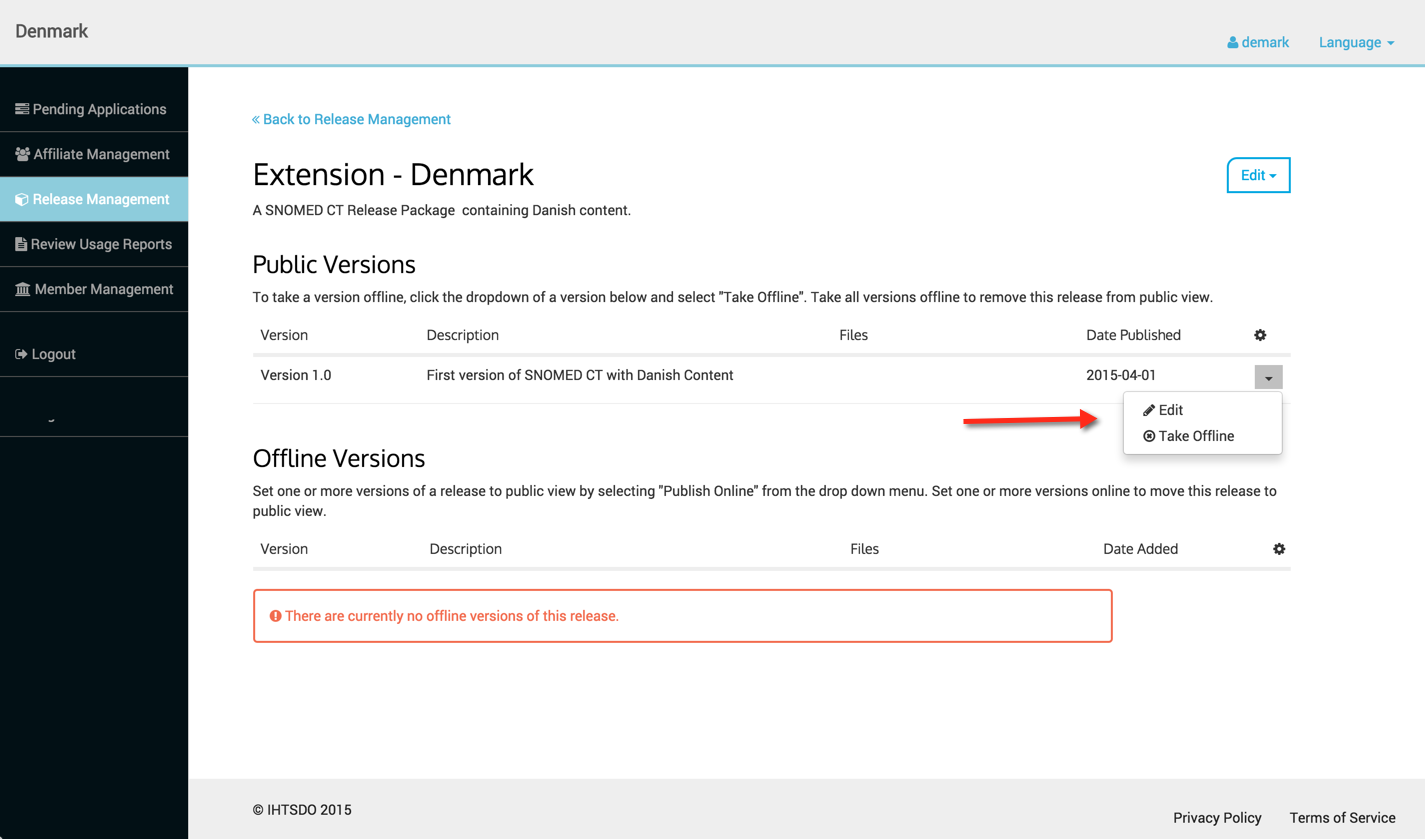
<figure><img src="https://969927579-files.gitbook.io/~/files/v0/b/gitbook-x-prod.appspot.com/o/spaces%2FLYgfgtQAEX6IwigniPM1%2Fuploads%2Fgit-blob-2ad96722c6e60fbed070dcad3b2b50149883379d%2F6849154.png?alt=media" alt=""><figcaption><p>New menu options are now available for under the <strong>Public Versions</strong> section</p></figcaption></figure>

* Edit - enables editing of Release Package name, description and release date
* Take Offline - enables the version to be removed from Public Access,

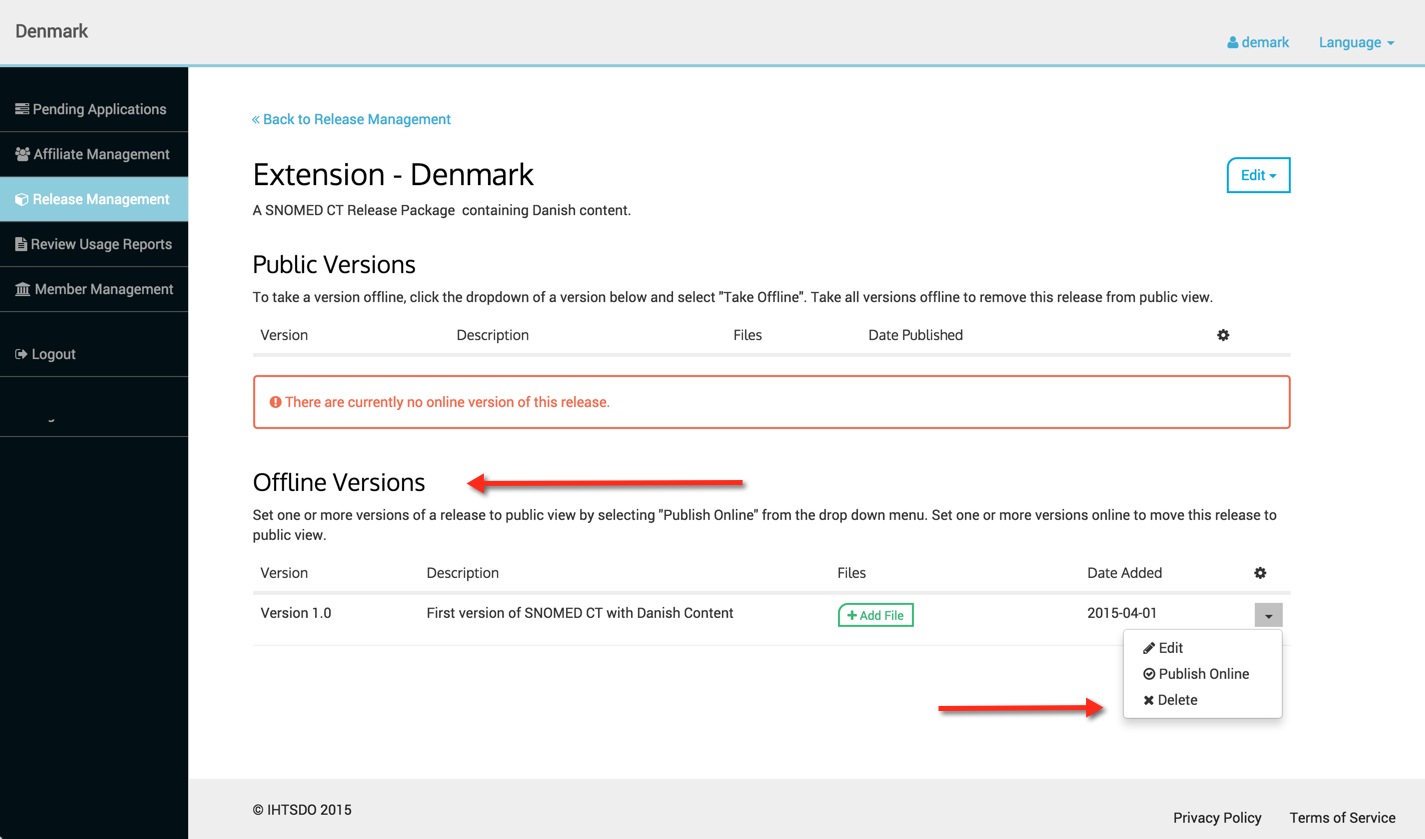
<figure><img src="https://969927579-files.gitbook.io/~/files/v0/b/gitbook-x-prod.appspot.com/o/spaces%2FLYgfgtQAEX6IwigniPM1%2Fuploads%2Fgit-blob-2113dbbec12cf9462e6f50e006f1805841097bff%2F6849158.png?alt=media" alt=""><figcaption><p>Once a version is "Taken Offline" it can remain offline or it can be deleted if desired by using the Delete option in the <strong>Offline Versions</strong> menu.</p></figcaption></figure>

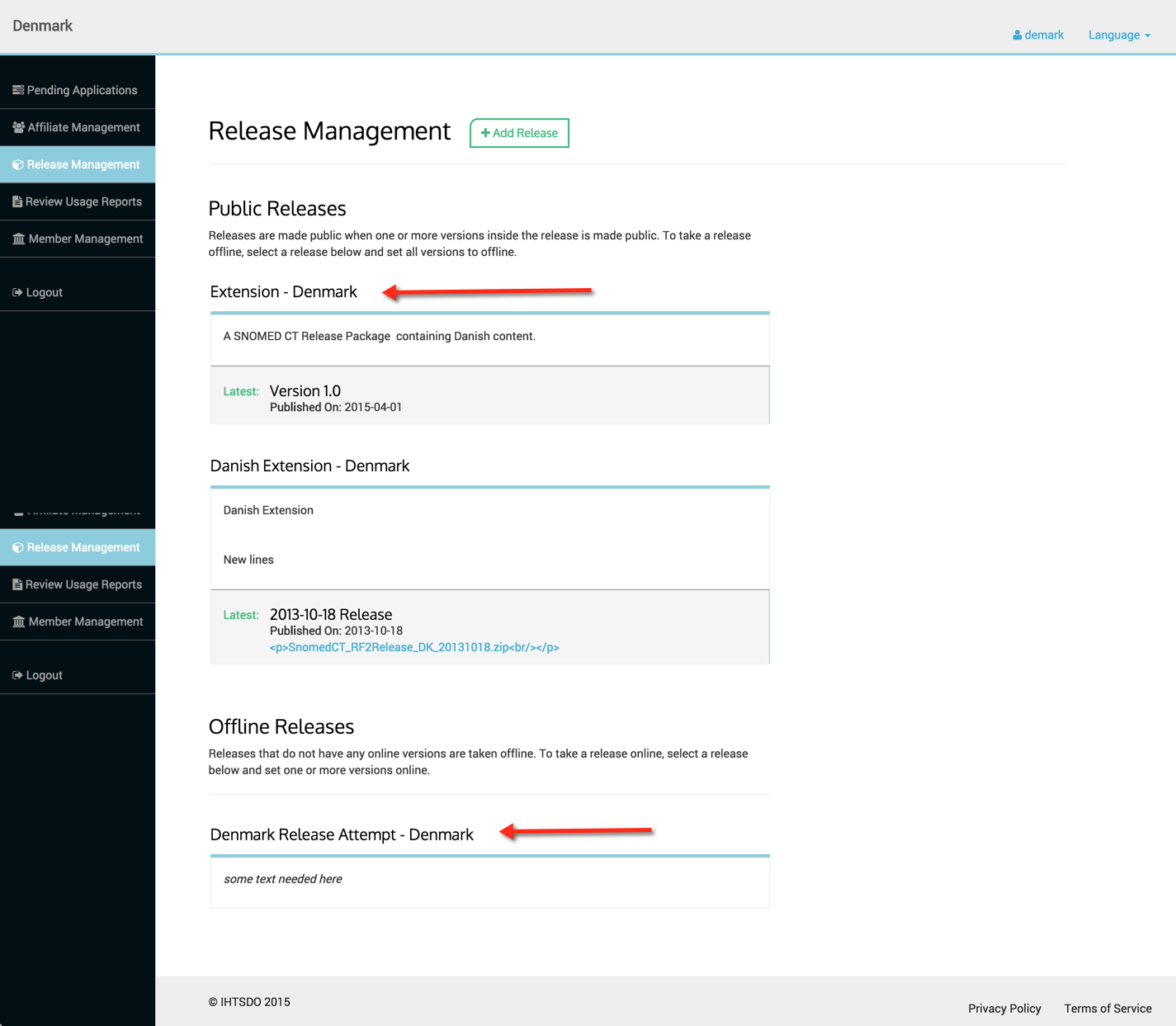
<figure><img src="https://969927579-files.gitbook.io/~/files/v0/b/gitbook-x-prod.appspot.com/o/spaces%2FLYgfgtQAEX6IwigniPM1%2Fuploads%2Fgit-blob-b9aa78a9af6b66c1d51f1fd7362a727c0de3db61%2F6849159.png?alt=media" alt=""><figcaption><p>To access menus and options regarding Release Packages on the Release Management page, simply click on the Release Package name.</p></figcaption></figure>

<figure><img src="https://969927579-files.gitbook.io/~/files/v0/b/gitbook-x-prod.appspot.com/o/spaces%2FLYgfgtQAEX6IwigniPM1%2Fuploads%2Fgit-blob-85e799dbac944c88527ac78b632ef6967f9ca3be%2F6849163.png?alt=media" alt=""><figcaption></figcaption></figure>

### Adding a file

To add a file, see the [Release Management Technical Details](https://github.com/SNOMED-Documents/snomed-mlds-guide/blob/main/Release-Management-Technical-Details_3833906.html) page for more details.

**Page At A Glance**