# Maintenance workflow

Snap2SNOMED supports maintenance of maps that have been created within the tool and also allows upload of simple maps in a defined format for maintenance.

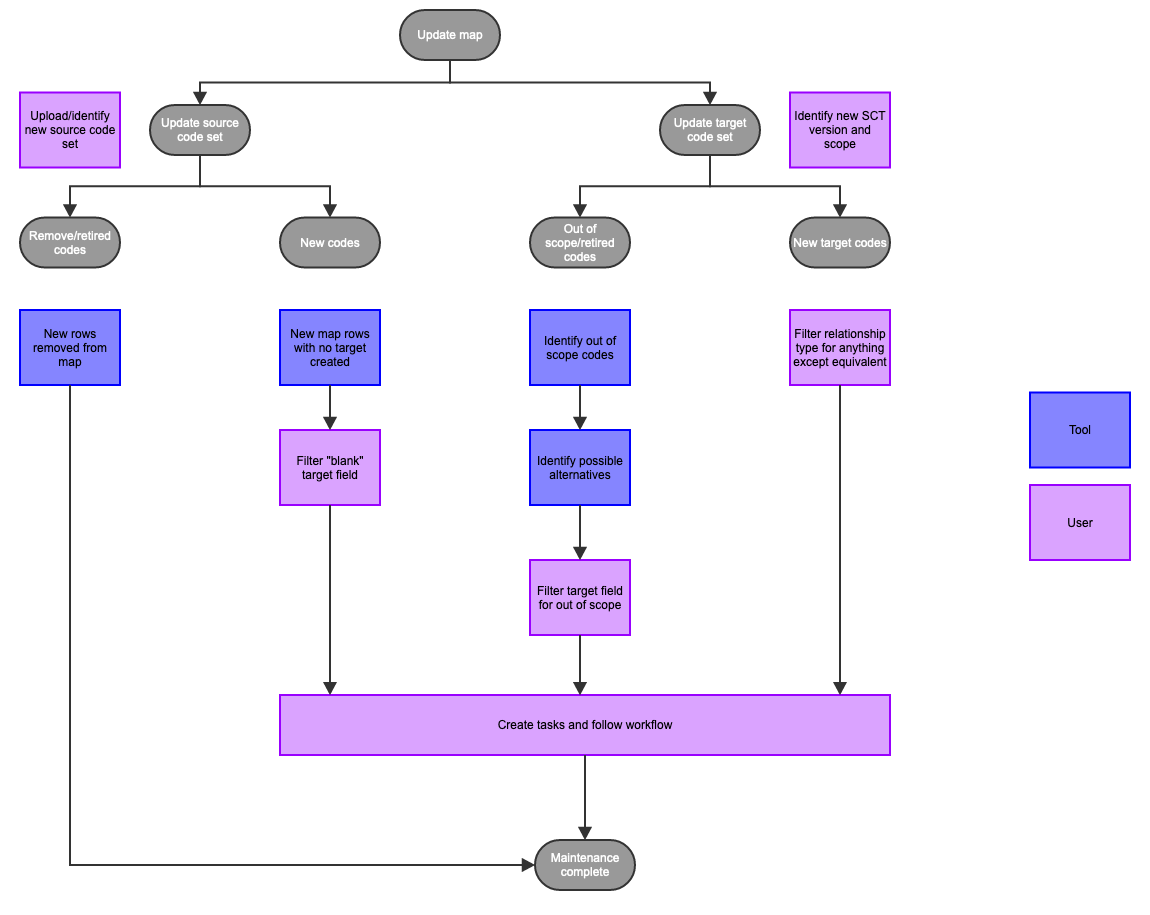
Maintenance is supported through the following workflows

<table data-full-width="true"><thead><tr><th width="308.36798095703125">Action</th><th>Description</th></tr></thead><tbody><tr><td>Create new version of an existing map, update source scope (code system), target scope (code system) and migrate existing map rows</td><td><p>A new version of an existing map in the tool can be created through the project list by selecting the version to be copied and then creating a new version.</p><ul><li><p>For map rows that are copied, the tool will migrate</p><ul><li>source</li><li>target</li><li>relationship</li><li>status (e.g. DRAFT, MAPPED, ACCEPTED, etc.)</li><li>last author/reviewer data</li></ul></li></ul></td></tr><tr><td>Identify changes in map due to change in source scope</td><td><p>Removed or retired codes in the source</p><ul><li>tool will remove the rows from the map</li></ul><p>New codes in the source</p><ul><li>tool will create rows for the new source codes, with an empty target</li><li>Owners or members can filter empty target fields to create a task to complete mapping process</li></ul></td></tr><tr><td>Identify changes in map due to change in target scope</td><td><p>Out of scope or retired codes in the target</p><ul><li>Owners can use VALIDATE function in tool to identify out of scope codes</li><li>Owners or members can filter identified rows to create a task to update map targets and complete mapping process<br></li></ul><p>New target codes in code system</p><ul><li>Owners or members can filter relationship type for any type except for equivalent to create a task to review and update map targets and complete mapping process</li></ul></td></tr><tr><td>Upload existing map</td><td>An existing map can be uploaded into the tool to then be updated.</td></tr></tbody></table>

<div data-full-width="true"><figure><img src="/files/2EaL1BMMzJOYuHqK6B3A" alt=""><figcaption></figcaption></figure></div>

<a href="https://docs.google.com/forms/d/e/1FAIpQLScTmbZIf0UEQwYDkY27EEWBkaiYkHSbR0_9DmFrMLXoQLyL7Q/viewform?usp=pp_url&#x26;entry.1767247133=snap2snomed+User+Guide&#x26;entry.670899847=Maintenance%20workflow" class="button primary">Provide Feedback</a>


---

# Agent Instructions: Querying This Documentation

If you need additional information that is not directly available in this page, you can query the documentation dynamically by asking a question.

Perform an HTTP GET request on the current page URL with the `ask` query parameter:

```
GET https://docs.snomed.org/snomed-ct-user-guides/snap2snomed-user-guide/how-to-.../3-mapping-with-snap2snomed/3.1-workflow/3.1.4-maintenance-workflow.md?ask=<question>
```

The question should be specific, self-contained, and written in natural language.
The response will contain a direct answer to the question and relevant excerpts and sources from the documentation.

Use this mechanism when the answer is not explicitly present in the current page, you need clarification or additional context, or you want to retrieve related documentation sections.
