# Status

Status denotes the state of the mapping of a **source** code (not specifically to the targets).

<table data-full-width="true"><thead><tr><th width="121.0302734375">Status</th><th width="320.6961669921875">Definition</th><th>Description</th></tr></thead><tbody><tr><td>UNMAPPED</td><td>Source code has neither a target or "No map" flag assigned</td><td><p>This is the default status when a map has been created and a target is yet to be assigned.</p><p>It will also occur when a "No map" flag has been removed.</p></td></tr><tr><td>DRAFT</td><td>Source code has one or more target codes or a "No map" flag assigned and is in a draft state.</td><td><p>The status will automatically change to draft when a map row has been edited.</p><p>Examples:</p><ul><li>when a target code has been added to source code with a status of UNMAPPED</li><li>when a target code is changed for a source code with a status of MAPPED</li><li>when a No Map flag is added to a source code</li></ul></td></tr><tr><td>MAPPED</td><td>Source code has one or more target codes or a "No map" flag assigned and is in a completed map state.</td><td><p>This is a manual status change by an author to denote when the authoring of a mapping of a source code is complete and ready for review (if a review process is being used).</p><p>When a source code has this status, it can be reviewed if required</p></td></tr><tr><td>IN REVIEW</td><td>Source code and its mapping(s) is currently being reviewed</td><td>This is a manual status change by a reviewer to lock the source code from any changes by an author.</td></tr><tr><td>ACCEPTED</td><td>Source code and its mapping(s) have been accepted by the reviewer and mapping is complete.</td><td>This is a manual status change by a reviewer to reject the mapping and should be remapped by an author.</td></tr><tr><td>REJECTED</td><td>Source code and its mapping(s) have been rejected by the reviewer and needs remapping by an author</td><td>This is a manual status change by a reviewer to reject the mapping and should be remapped by an author.</td></tr></tbody></table>

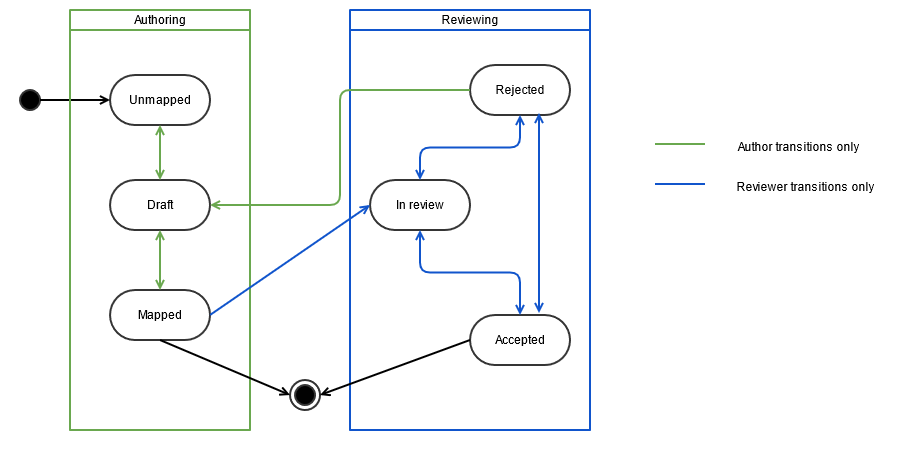
The statuses used in this tool are split between the two task types, mapping and reviewing.

* Mapping statuses are UNMAPPED, DRAFT and MAPPED.
* Reviewing statuses are IN REVIEW, ACCEPTED and REJECTED.

In a mapping task, a user is able to transition a source code's status between UNMAPPED, DRAFT and MAPPED and where a source code has been rejected by a reviewer, the user can also change REJECTED to DRAFT or MAPPED. If a review process is being used, a status of MAPPED can also be considered the same as "ready for review".

In a review task, a user is able to transition a MAPPED source code to IN REVIEW, ACCEPTED and REJECTED. The IN REVIEW status is designed to be like a lock for the source code so no further changes can be made by the author. A reviewer can choose to bulk change all the status of the valid rows in their task to IN REVIEW if they wish to lock them while they are working.

<div data-full-width="true"><figure><img src="https://4073150387-files.gitbook.io/~/files/v0/b/gitbook-x-prod.appspot.com/o/spaces%2FhhAMcxzclQGXKlrJY7Lj%2Fuploads%2Fgit-blob-e008303a4889850d78f87e4a865961ce7c6e9268%2F137248764.png?alt=media" alt=""><figcaption></figcaption></figure></div>

<a href="https://docs.google.com/forms/d/e/1FAIpQLScTmbZIf0UEQwYDkY27EEWBkaiYkHSbR0_9DmFrMLXoQLyL7Q/viewform?usp=pp_url&#x26;entry.1767247133=snap2snomed+User+Guide&#x26;entry.670899847=Status" class="button primary">Provide Feedback</a>


---

# Agent Instructions: Querying This Documentation

If you need additional information that is not directly available in this page, you can query the documentation dynamically by asking a question.

Perform an HTTP GET request on the current page URL with the `ask` query parameter:

```
GET https://docs.snomed.org/snomed-ct-user-guides/snap2snomed-user-guide/how-to-.../3-mapping-with-snap2snomed/3.6-status.md?ask=<question>
```

The question should be specific, self-contained, and written in natural language.
The response will contain a direct answer to the question and relevant excerpts and sources from the documentation.

Use this mechanism when the answer is not explicitly present in the current page, you need clarification or additional context, or you want to retrieve related documentation sections.
