> For the complete documentation index, see [llms.txt](https://docs.snomed.org/llms.txt). Markdown versions of documentation pages are available by appending `.md` to page URLs; this page is available as [Markdown](https://docs.snomed.org/snomed-ct-user-guides/snomed-ct-browser-guide/how-to/browse-snomed-ct-local-extension-concepts.md).
# Browse SNOMED CT local extension concepts
| Steps | References |
| ------------------------------------------------------------------------------------------------------------------------------------------------------------------------------------------------------------------------------------------------------------------------------------------------------------------------------------------------------------------------------------------------------------------------------------------------------------------------------------------------------------------------------------------------------------------------------------------------------------------------------------------------------------------------------------------------------------------ | --------------------------------------------------------------------------------------------------------------------------------------------------------------------------------------------------------------------------------------------------------------------------- |
|
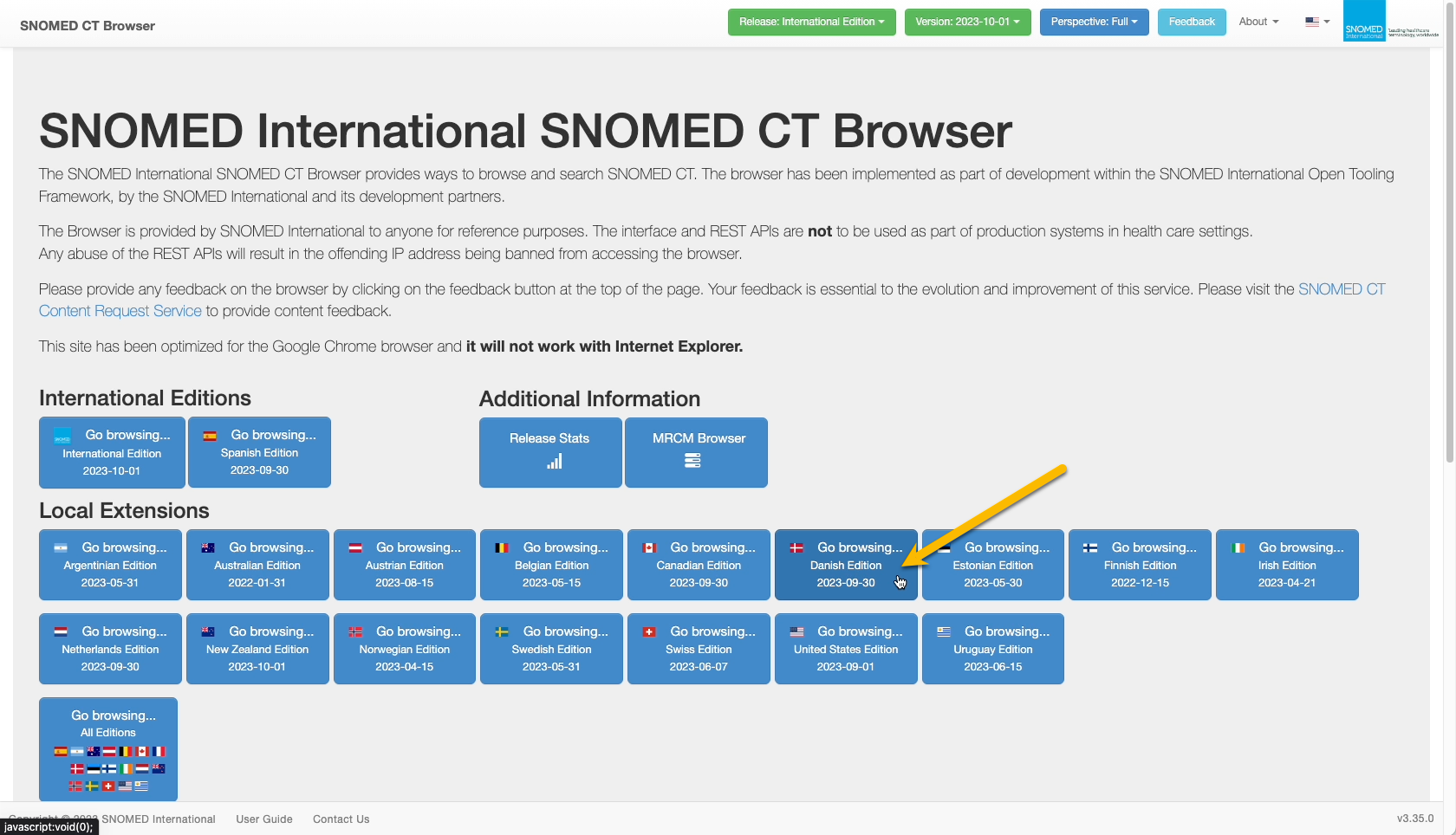
EITHER Within the International Editions section of the landing page, press Go browsing... \ for one of the available extensions (the date stamp shows the current latest Published version of SNOMED CT for the selected extension)
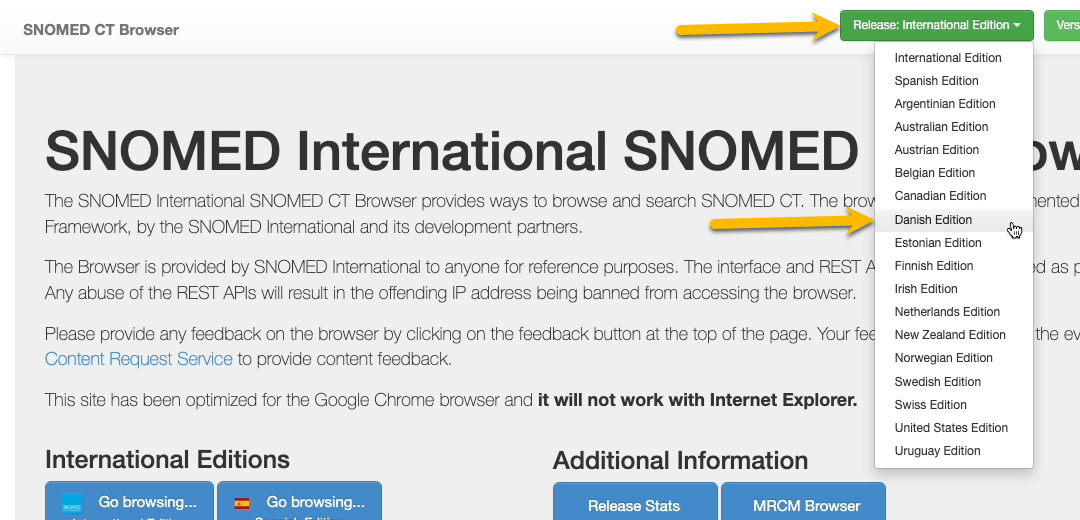
OR Select the desired local extension from the header bar Release drop-down selector.
|
|
|
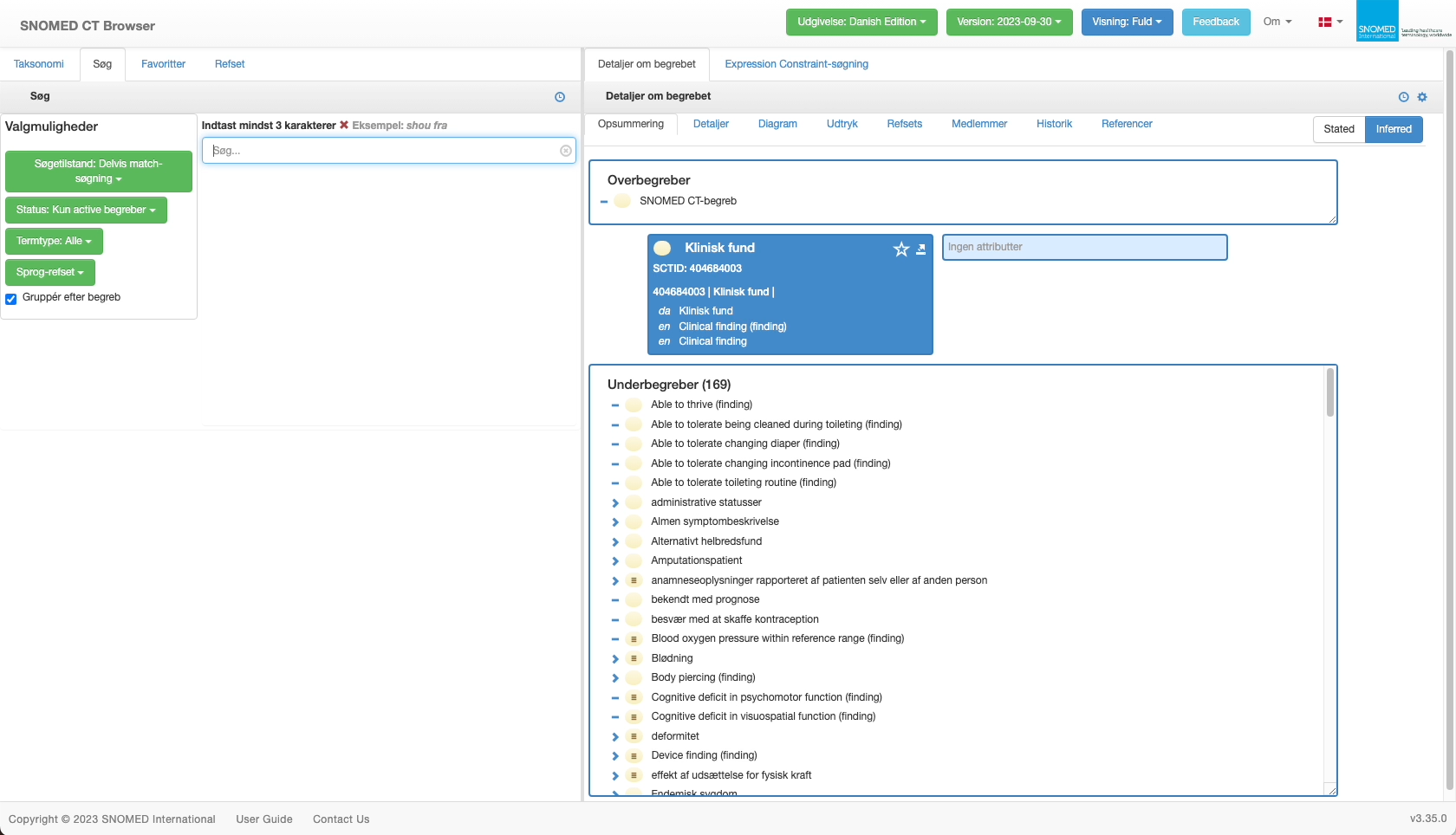
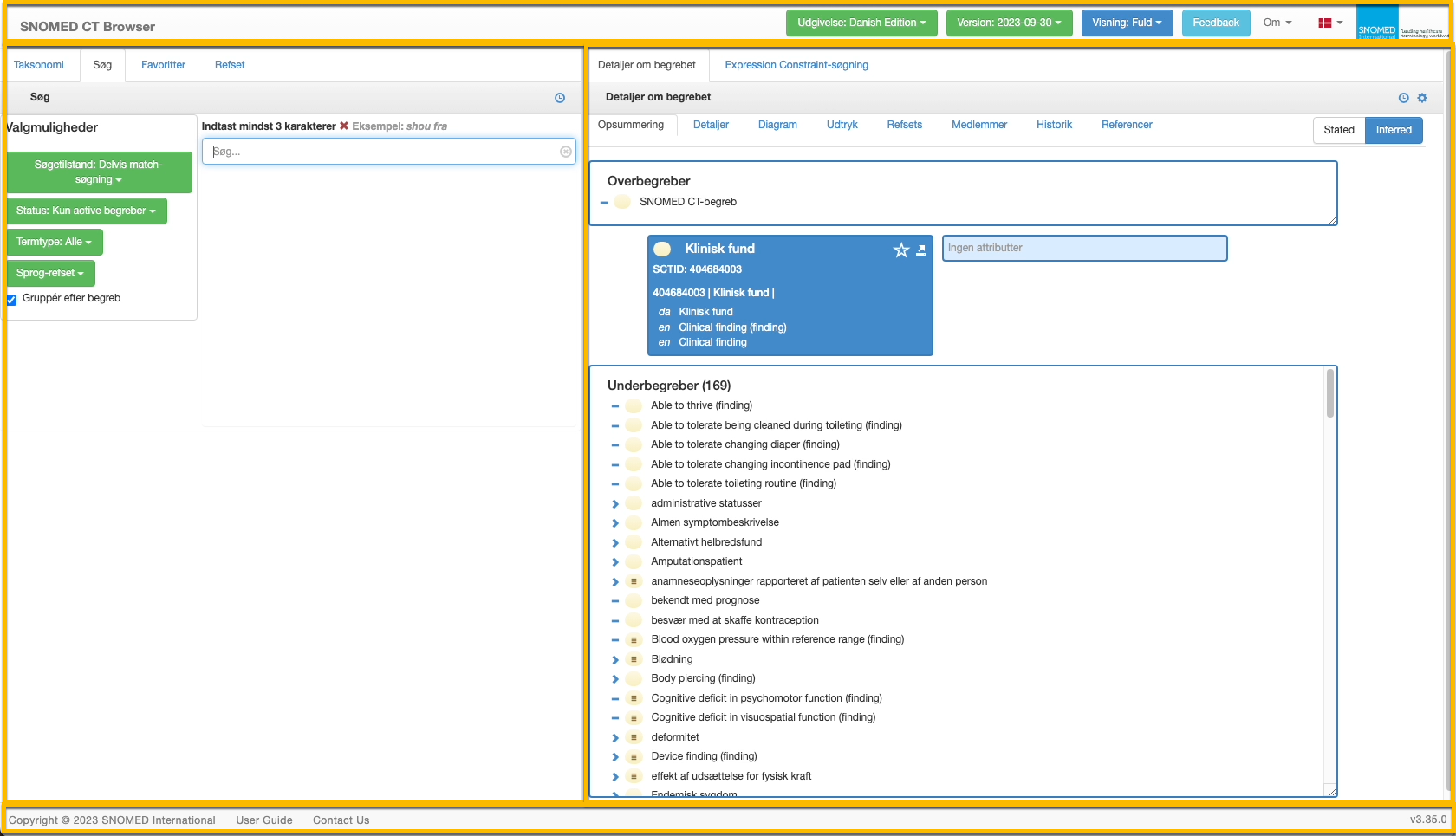
The SCT Browser *Full* perspective is presented, with the relevant default SNOMED CT content language for the selected local extension, and the following primary content panels:
* **Page header** containing:
* `Site Title` (link back to the SCT Browser Landing Page).
* `Release: Edition` drop-down selector.
* `Version` drop-down selector.
* `Perspective` drop-down selector.
* `Feedback` button.
* `About` drop-down sub-menu (links to SNOMED International Privacy policy, GitHub open source code repository, SNOMED International website Tooling page, and SNOMED International website Home page).
* `Language` drop-down selector (SCT Browser presentation content labeling only - SNOMED CT content language depends on the selected edition or local extension).
* `SNOMED International brand mark` (link to the SNOMED International website Home page).
* **Left-hand navigation and browsing context panel** with the following context tabs:
* `Taxonomy` - supporting a hierarchical browsing view of SNOMED CT based on proximal parent is-a relationships.
* `Search` - supporting text based content querying with filtering by query word order, concept status, description type and language refset.
* `Favorites` - supporting "starring" of particular concepts for personalised subsequent rapid viewing.
* `Refset` - supporting browsing of SNOMED CT reference set members.
* **Right-hand content panel**, with tabs for:
* `Concept Details` (with sub-panel tabbed navigation for `Summary`, `Details`, `Diagram`, `Expression`, `Refsets`, `Members`, `History` and `References` related to the currently in-focus concept) in either the `Stated` or `Inferred` model view.
* `Expression Constraint Queries` - supporting advanced querying of SNOMED CT content using the *Expression Constraint Language (ECL)*.
* **Page footer** containing:
* `Copyright notice.`
* `User Guide` link.
* `Contact Us` link.
* `Version number` (of the user interface application module).
The *Full* perspective first opens to the *Search* tab in the left-hand context panel, with the *Concept Details - Summary* tab for [404684003 | Clinical finding (finding) |](http://snomed.info/id/404684003) shown in the right-hand content panel.
The default presentation language is that defined for the local extension (for instance, dk for the Danish Edition), and the concept details default to showing the preferred language reference set FSN and synonyms for the extension (eg dk for the Danish Edition).
Some local extensions use the International default US English for the presentation language, although the concept details show their preferred language reference set FSN and synonyms.
{% hint style="info" %}
**Searching and browsing**
From the Full perspective view, the selected local extension content can be browsed and searched as described in [Browse SNOMED CT International Edition concepts](/snomed-ct-user-guides/snomed-ct-browser-guide/how-to/browse-snomed-ct-international-edition-concepts.md). The SCT Browser functionality is identical whichever version of SNOMED CT is being browsed; the differences are the default presentation language and the content itself which is from the selected local extension. Whilst the application display language (navigational elements and labelling) can be switched to any of the options in the header dropdown list, the local extension content itself will always show in the preferred language of the extension (where International terms are used but not yet translated, they will show the International US English term).
{% endhint %}
|
|
---
# Agent Instructions
This documentation is published with GitBook. GitBook is the documentation platform designed so that both humans and AI agents can read, navigate, and reason over technical content effectively. Learn more at gitbook.com.
## Querying This Documentation
If you need additional information that is not directly available in this page, you can query the documentation by asking a question.
Perform an HTTP GET request on the following URL with the `ask` and `goal` query parameters:
```
GET https://docs.snomed.org/snomed-ct-user-guides/snomed-ct-browser-guide/how-to/browse-snomed-ct-local-extension-concepts.md?ask=&goal=
```
`ask` is the immediate question: it should be specific, self-contained, and written in natural language.
`goal` is what the user is ultimately trying to achieve, the reason they need the answer. Sharing it helps GitBook give you a better, more relevant answer. A goal is most helpful when it describes the outcome the user wants rather than restating the question. For example, with `ask=how do I create an API token`, a goal like `automate deployments from our CI pipeline` lets GitBook tailor the answer to that use case.
The response will contain a direct answer to the question and relevant excerpts and sources from the documentation.
Use this mechanism when the answer is not explicitly present in the current page, you need clarification or additional context, or you want to retrieve related documentation sections.