# Compare the details of two SNOMED CT concepts

| Steps                                                                                                                                                                                                                                                                                                                                                                                                                                                                                                                                                                                                                                                                                                                                                                                                                                                                                                                                                                                                                                                                                                                                                                                           | References                                                                                                                                                                                                                                                                  |
| ----------------------------------------------------------------------------------------------------------------------------------------------------------------------------------------------------------------------------------------------------------------------------------------------------------------------------------------------------------------------------------------------------------------------------------------------------------------------------------------------------------------------------------------------------------------------------------------------------------------------------------------------------------------------------------------------------------------------------------------------------------------------------------------------------------------------------------------------------------------------------------------------------------------------------------------------------------------------------------------------------------------------------------------------------------------------------------------------------------------------------------------------------------------------------------------------- | --------------------------------------------------------------------------------------------------------------------------------------------------------------------------------------------------------------------------------------------------------------------------- |
| <p>From any view in the SCT Browser, press <i class="fa-chevron-dwn">:chevron-dwn:</i> >on the<code>Perspective</code> button in the header bar to see a drop-down options list of available perspectives:<br></p><ul><li><code>Full</code></li><li><code>Comparing</code></li><li><code>Comparing hierarchy</code></li><li><code>Responsive (tablets, phones)</code></li></ul>                                                                                                                                                                                                                                                                                                                                                                                                                                                                                                                                                                                                                                                                                                                                                                                                                 | <div><figure><img src="https://4047345178-files.gitbook.io/~/files/v0/b/gitbook-x-prod.appspot.com/o/spaces%2F1kHdBxHtH99oJ85gNaa3%2Fuploads%2Fgit-blob-844659c58a9149e7ee373efb0171e72fb2ae58f8%2F167511533.png?alt=media" alt=""><figcaption></figcaption></figure></div> |
| Select `Comparing` to switch the presentation.                                                                                                                                                                                                                                                                                                                                                                                                                                                                                                                                                                                                                                                                                                                                                                                                                                                                                                                                                                                                                                                                                                                                                  | <div><figure><img src="https://github.com/SNOMED-Documents/snomedct-browser-user-guide/blob/main/how-to/images/167511534.png" alt=""><figcaption></figcaption></figure></div>                                                                                               |
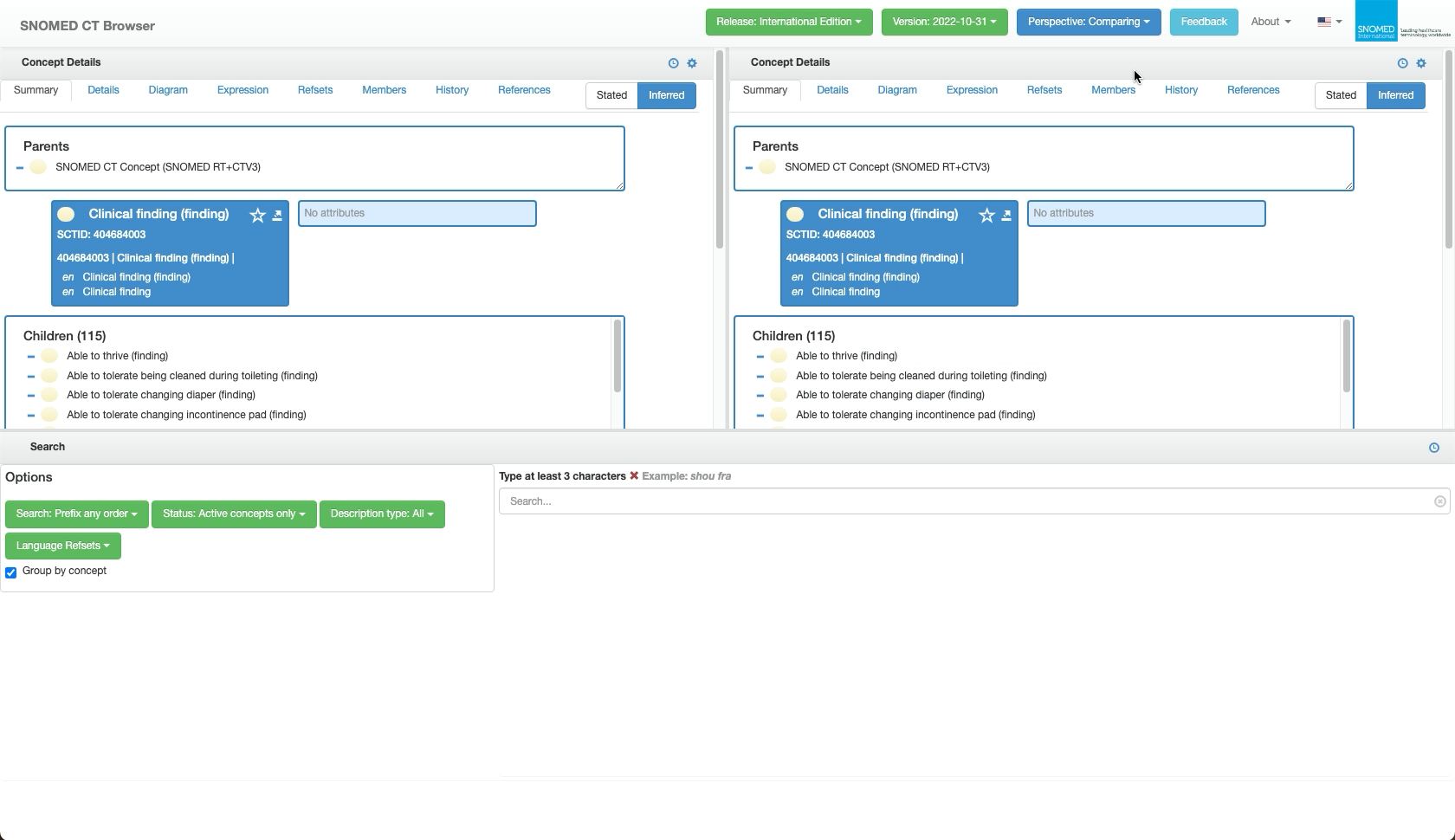
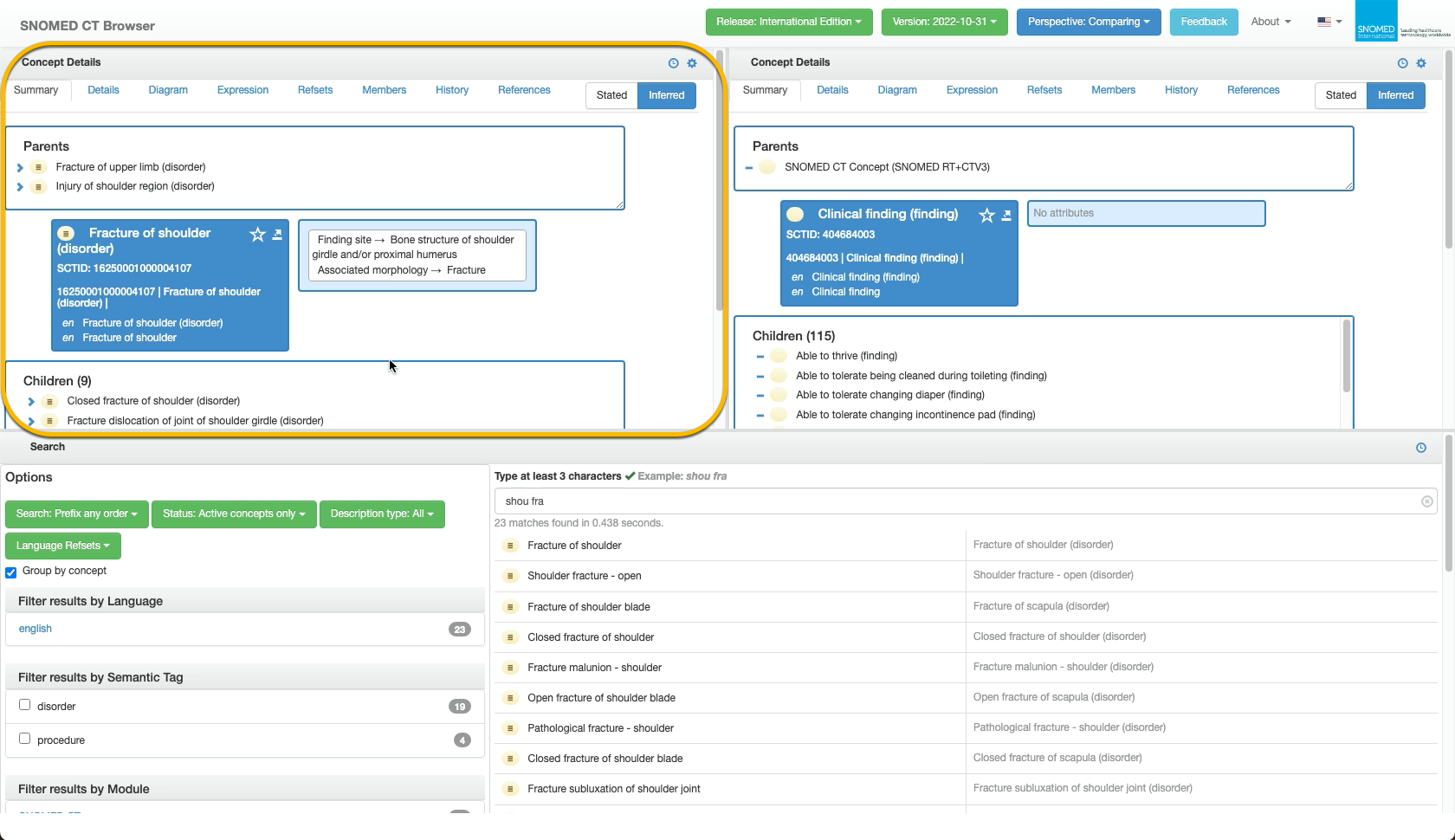
| <p><code>Perspective: Comparing</code> maintains the browser header bar, but changes to show two side-by-side <em>Concept Details</em> panels, with a full-width <em>Search</em> panel below them.<br></p><p>The <em>Search</em> panel is simply an expanded full-width version of the <em>Search</em> panel in <code>Perspective: Full</code>, with identical features and behaviour, for the purpose of populating the two <em>Concept Details</em> panels.<br></p><div data-gb-custom-block data-tag="hint" data-style="warning" class="hint hint-warning"><p><strong>Reloading clears Perspective: Comparing</strong><br></p><p>Reloading the page will reset the SCT Browser to the <code>Perspective: Full</code> default presentation.</p></div>                                                                                                                                                                                                                                                                                                                                                                                                                                         | <div><figure><img src="https://4047345178-files.gitbook.io/~/files/v0/b/gitbook-x-prod.appspot.com/o/spaces%2F1kHdBxHtH99oJ85gNaa3%2Fuploads%2Fgit-blob-072e51b7887c81723891b2b250fd4f83f64a1b57%2F167511535.png?alt=media" alt=""><figcaption></figcaption></figure></div> |
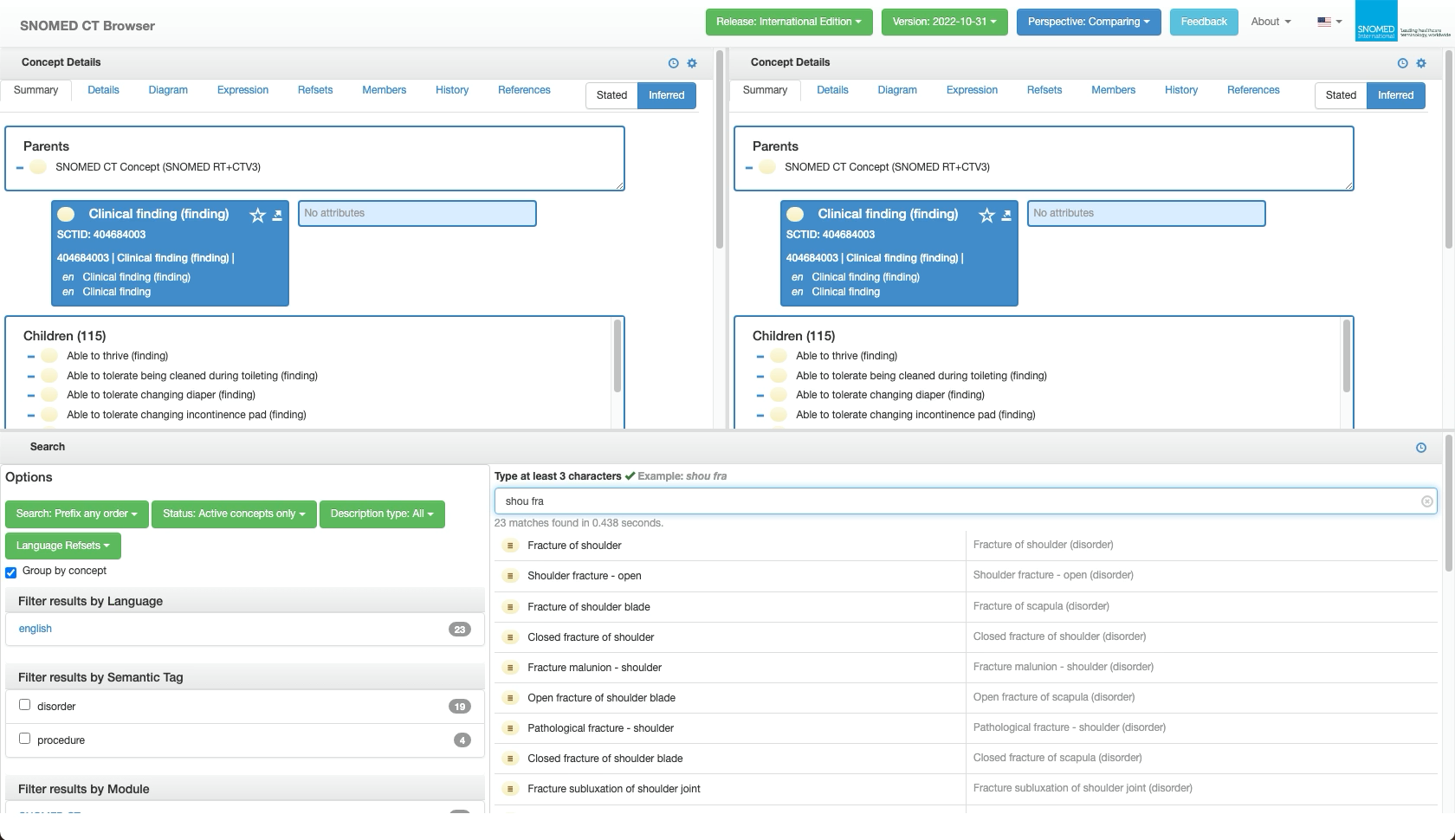
| In the *Search panel, find the first concept to be compared (as described in* [*Find the SCTID for a known concept term*](https://docs.snomed.org/snomed-ct-user-guides/snomed-ct-browser-guide/how-to/find-the-sctid-for-a-known-concept-term) *or* [*Find the FSN or PT for a known concept SCTID*](https://docs.snomed.org/snomed-ct-user-guides/snomed-ct-browser-guide/how-to/find-the-fsn-or-pt-for-a-known-concept-sctid)*).*                                                                                                                                                                                                                                                                                                                                                                                                                                                                                                                                                                                                                                                                                                                                                            | <div><figure><img src="https://4047345178-files.gitbook.io/~/files/v0/b/gitbook-x-prod.appspot.com/o/spaces%2F1kHdBxHtH99oJ85gNaa3%2Fuploads%2Fgit-blob-6b97b076bb8b6ec4c80d3954e38117f4842ad944%2F167511538.png?alt=media" alt=""><figcaption></figcaption></figure></div> |
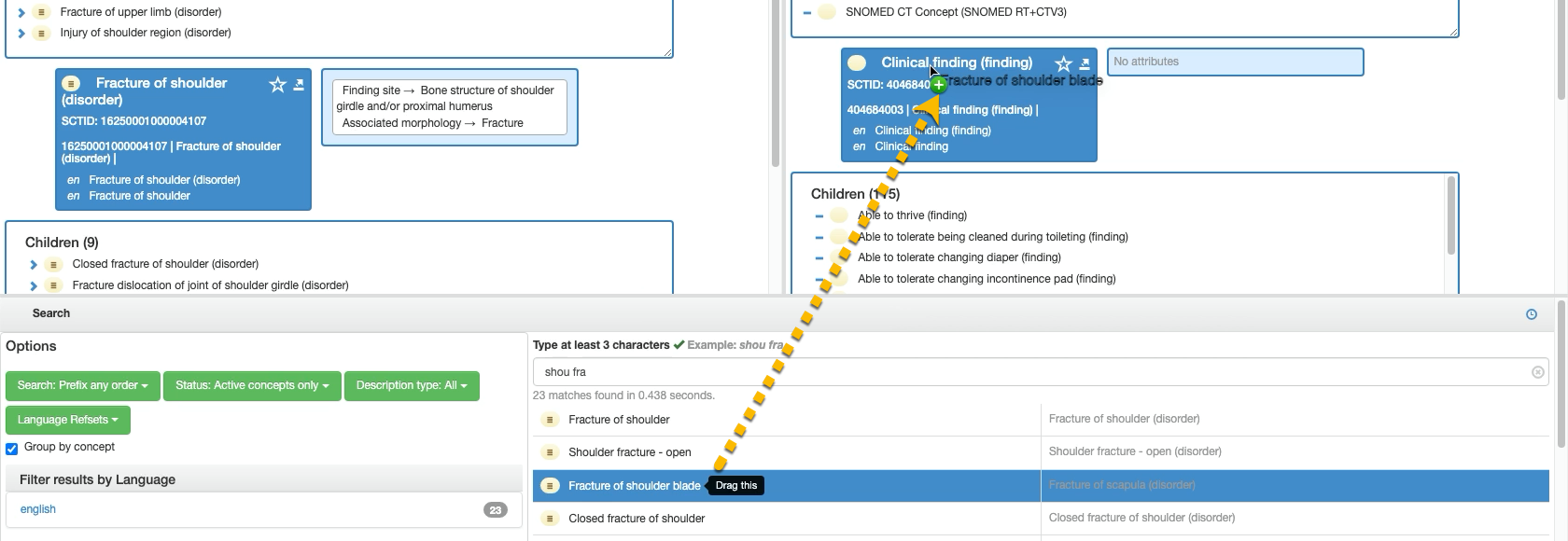
| <p>In the <em>Search Results list, press and hold the result row for the first concept to be compared.</em><br></p><p><em>The selected row will be highlighted in blue, and a "Drag this" tooltip will appear.</em></p>                                                                                                                                                                                                                                                                                                                                                                                                                                                                                                                                                                                                                                                                                                                                                                                                                                                                                                                                                                         | <div><figure><img src="https://github.com/SNOMED-Documents/snomedct-browser-user-guide/blob/main/how-to/images/167511539.png" alt=""><figcaption></figcaption></figure></div>                                                                                               |
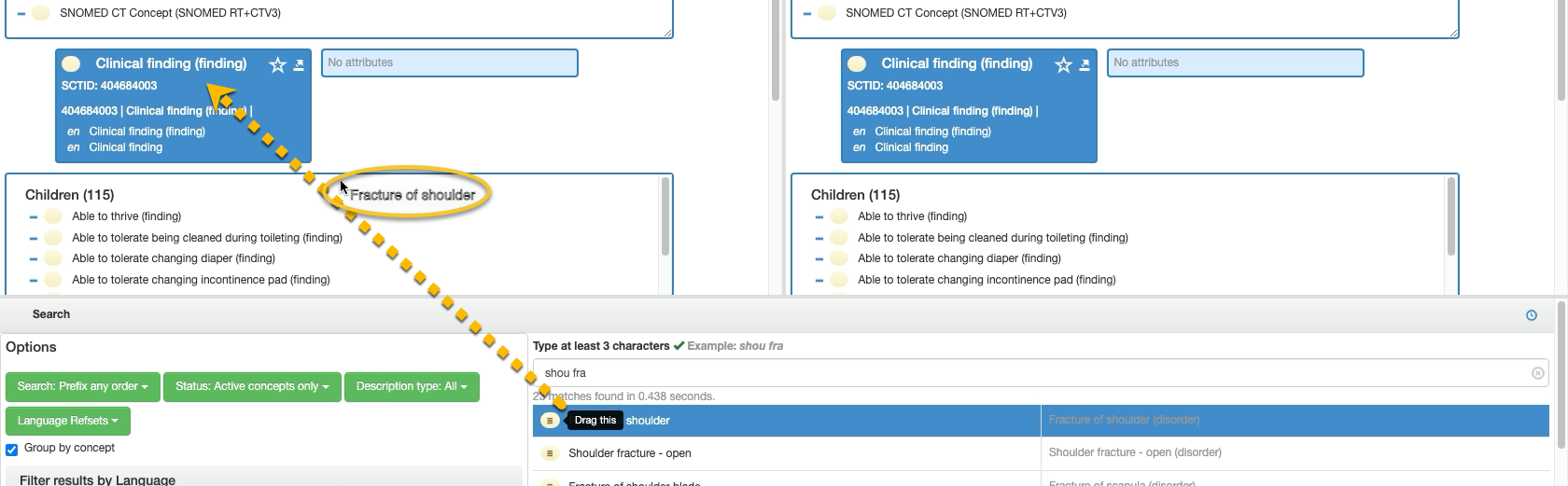
| <p>Whilst holding the cursor selection, drag the selected item onto the concept <code>Summary</code> <em>FSN label in the blue details box in the left-hand Concept Details panel <code>Summary</code> tab.</em><br></p><p><em>Whilst dragging, the concept FSN term will appear alongside the cursor arrow.</em></p>                                                                                                                                                                                                                                                                                                                                                                                                                                                                                                                                                                                                                                                                                                                                                                                                                                                                           | <div><figure><img src="https://4047345178-files.gitbook.io/~/files/v0/b/gitbook-x-prod.appspot.com/o/spaces%2F1kHdBxHtH99oJ85gNaa3%2Fuploads%2Fgit-blob-7d5b26065a41a218a5bbbc1ac346e7127dffb3d3%2F167511540.png?alt=media" alt=""><figcaption></figcaption></figure></div> |
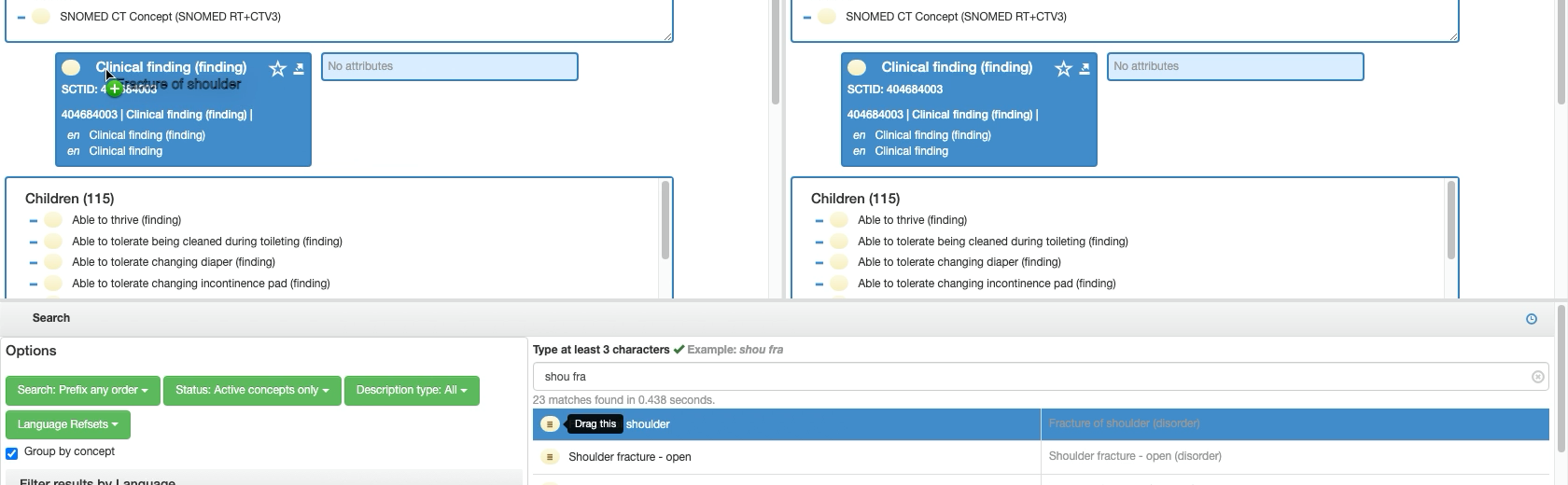
| <p>When the cursor is over the <code>Summary</code> <em>FSN label "drop-zone" a drop-target</em> <i class="fa-circle-plus">:circle-plus:</i> <em>symbol will appear.</em><br></p><p><em>Release the cursor hold to "drop" the concept.</em><br><em><strong>Following a search result link also sets the first comparison focus</strong></em><br><em>The left-hand Concept Details can also be populated by simply clicking on a search result.</em></p>                                                                                                                                                                                                                                                                                                                                                                                                                                                                                                                                                                                                                                                                                                                                         | <div><figure><img src="https://4047345178-files.gitbook.io/~/files/v0/b/gitbook-x-prod.appspot.com/o/spaces%2F1kHdBxHtH99oJ85gNaa3%2Fuploads%2Fgit-blob-b509f350be5c5919856aa20af6ec578a43ba67a6%2F167511542.png?alt=media" alt=""><figcaption></figcaption></figure></div> |
| The left-hand panel will now show the *Concept Details* `Summary` tab for the dropped concept, and all the other context tabs can be navigated within the left-hand panel whilst maintaining the dropped concept focus.                                                                                                                                                                                                                                                                                                                                                                                                                                                                                                                                                                                                                                                                                                                                                                                                                                                                                                                                                                         | <div><figure><img src="https://4047345178-files.gitbook.io/~/files/v0/b/gitbook-x-prod.appspot.com/o/spaces%2F1kHdBxHtH99oJ85gNaa3%2Fuploads%2Fgit-blob-ad7b2903936a3d95decacbd09d0e7d2920e5b535%2F167511543.png?alt=media" alt=""><figcaption></figcaption></figure></div> |
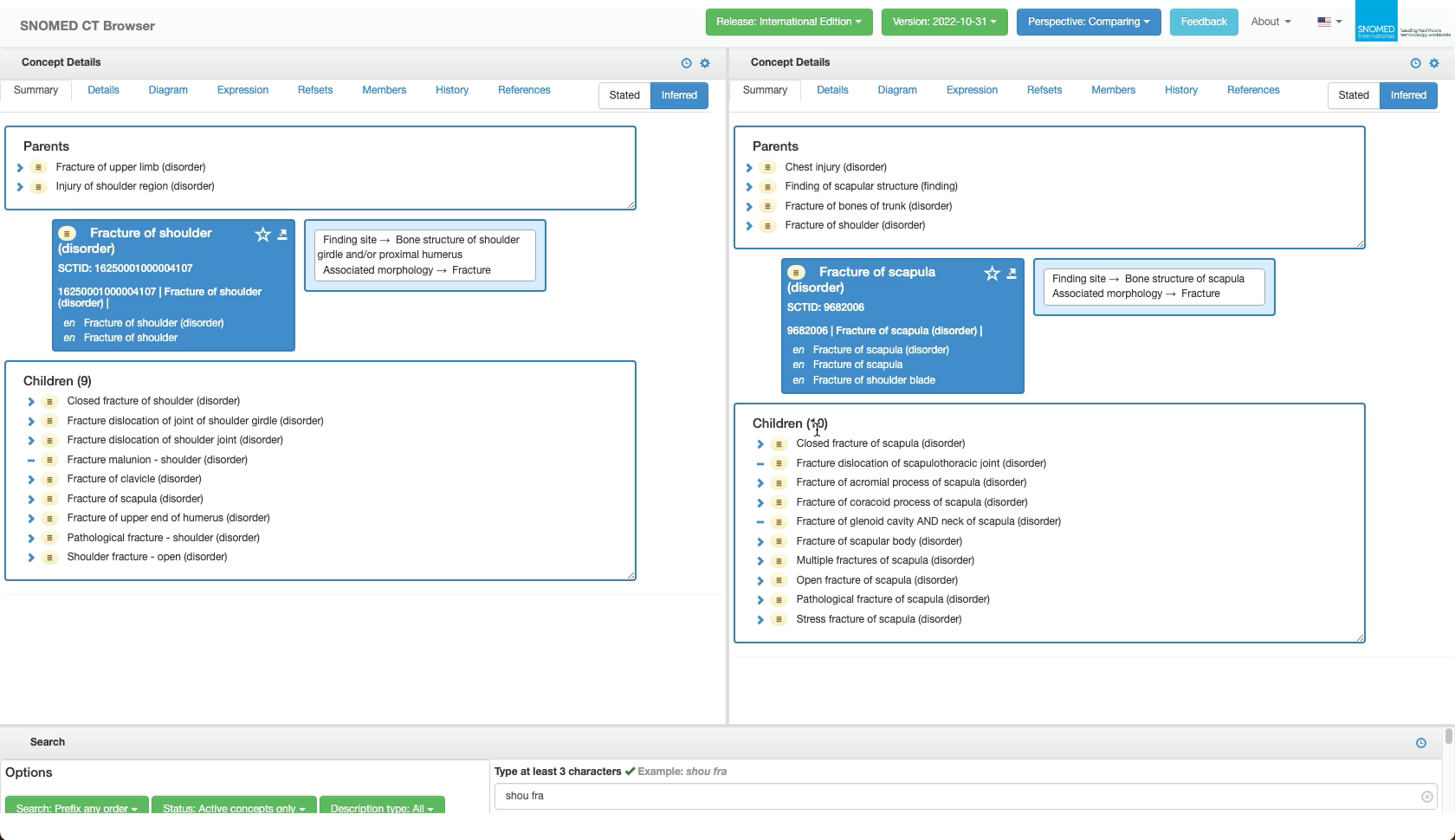
| <p>Now use the <em>Search</em> panel again to find the desired comparison concept, and repeat the same steps to select, drag and drop, but this time drag the comparison concept to the <code>Summary</code> box of the right-hand <em>Concept Details panel.</em><br></p><p><em><strong>Following a search result link will not set the second comparison focus concept</strong></em><br><em>The right-hand Concept Details can only be populated by drag and drop from the results list.</em><br><em>Pressing a search result will only populate the left-hand Concept Details panel, which could lose focus on a comparison concept already placed there.<strong>Drag and drop works from any selected concept link in view</strong></em><br><em>As well as using search results entries, each Concept Details can also be populated by drag and drop from the FSN label link in the other Concept Details, to show the same concept in each.</em><br><em>This is an alternative way to set up</em> <a href="compare-historical-versions-of-a-snomed-ct-concept"><em>side-by-side comparison of historical versions</em></a> <em>if already in <code>Perspective: Comparing</code>.</em></p> | <div><figure><img src="https://4047345178-files.gitbook.io/~/files/v0/b/gitbook-x-prod.appspot.com/o/spaces%2F1kHdBxHtH99oJ85gNaa3%2Fuploads%2Fgit-blob-46c0446f5c67ecfb7b2035c3ce8f7f292f6a6407%2F167511544.png?alt=media" alt=""><figcaption></figcaption></figure></div> |
| <p>The two <em>Concept Details context tabs can now be compared side-by-side.</em></p><p><em><strong>Panel sizes can be adjusted</strong></em><br><em>The relative sizes of the three panels can be adjusted by pressing and dragging their gray border bars.</em><br><em>This can be useful to minimize the Search panel height once concepts are loaded for comparison, as shown in the adjacent screenshot.</em></p>                                                                                                                                                                                                                                                                                                                                                                                                                                                                                                                                                                                                                                                                                                                                                                         | <div><figure><img src="https://4047345178-files.gitbook.io/~/files/v0/b/gitbook-x-prod.appspot.com/o/spaces%2F1kHdBxHtH99oJ85gNaa3%2Fuploads%2Fgit-blob-61abbe4bc245c90c98af2907847040d4e143e195%2F167511549.png?alt=media" alt=""><figcaption></figcaption></figure></div> |
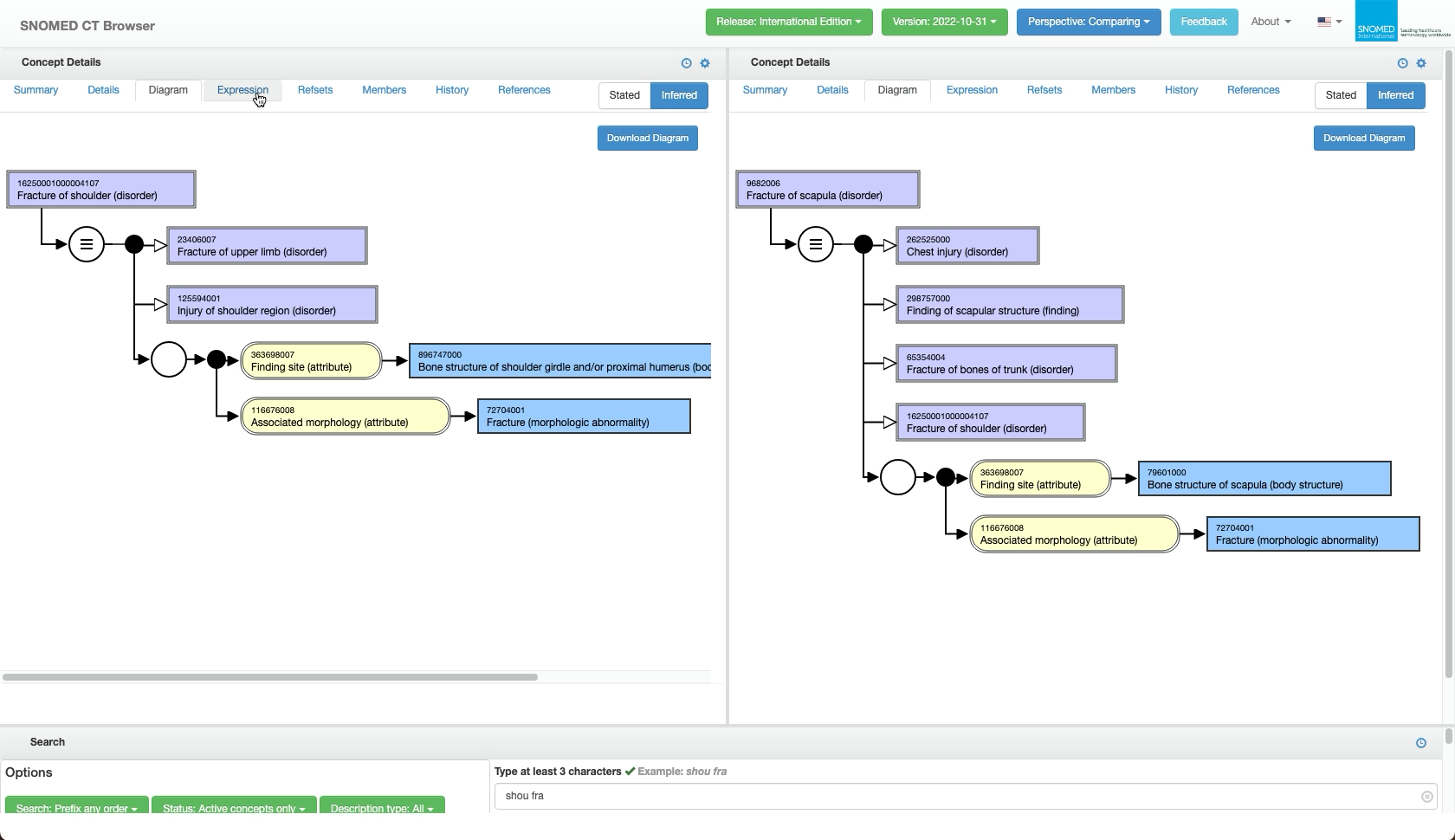
| The two *Concept Details* context tabs can be navigated independently whilst retaining their focus concept for side-by-side comparisons of the information in each context tab.                                                                                                                                                                                                                                                                                                                                                                                                                                                                                                                                                                                                                                                                                                                                                                                                                                                                                                                                                                                                                 | <div><figure><img src="https://4047345178-files.gitbook.io/~/files/v0/b/gitbook-x-prod.appspot.com/o/spaces%2F1kHdBxHtH99oJ85gNaa3%2Fuploads%2Fgit-blob-9fca571af1095c7dff8cc94df2b7c0c6f1170dba%2F167511550.png?alt=media" alt=""><figcaption></figcaption></figure></div> |
| Once done with comparisons, select `Full` in the header bar `Perspective` button drop-down options list to switch back to `Perspective: Full`.                                                                                                                                                                                                                                                                                                                                                                                                                                                                                                                                                                                                                                                                                                                                                                                                                                                                                                                                                                                                                                                  | <div><figure><img src="https://4047345178-files.gitbook.io/~/files/v0/b/gitbook-x-prod.appspot.com/o/spaces%2F1kHdBxHtH99oJ85gNaa3%2Fuploads%2Fgit-blob-3079f526bfe15cc9a11bcb815bb43ffc5d60d006%2F167511551.png?alt=media" alt=""><figcaption></figcaption></figure></div> |

<a href="https://docs.google.com/forms/d/e/1FAIpQLScTmbZIf0UEQwYDkY27EEWBkaiYkHSbR0_9DmFrMLXoQLyL7Q/viewform?usp=pp_url&#x26;entry.1767247133=Browser+User+Guide&#x26;entry.670899847=Compare%20the%20details%20of%20two%20SNOMED%20CT%20concepts" class="button primary">Provide Feedback</a>


---

# Agent Instructions: Querying This Documentation

If you need additional information that is not directly available in this page, you can query the documentation dynamically by asking a question.

Perform an HTTP GET request on the current page URL with the `ask` query parameter:

```
GET https://docs.snomed.org/snomed-ct-user-guides/snomed-ct-browser-guide/how-to/compare-the-details-of-two-snomed-ct-concepts.md?ask=<question>
```

The question should be specific, self-contained, and written in natural language.
The response will contain a direct answer to the question and relevant excerpts and sources from the documentation.

Use this mechanism when the answer is not explicitly present in the current page, you need clarification or additional context, or you want to retrieve related documentation sections.