# View the history of a SNOMED CT concept

| Steps                                                                                                                                                                                                                                                                                                                                                                                                                                                                                                                                                                                                            | References                                                                                                                                                                                                                                                                  |
| ---------------------------------------------------------------------------------------------------------------------------------------------------------------------------------------------------------------------------------------------------------------------------------------------------------------------------------------------------------------------------------------------------------------------------------------------------------------------------------------------------------------------------------------------------------------------------------------------------------------- | --------------------------------------------------------------------------------------------------------------------------------------------------------------------------------------------------------------------------------------------------------------------------- |
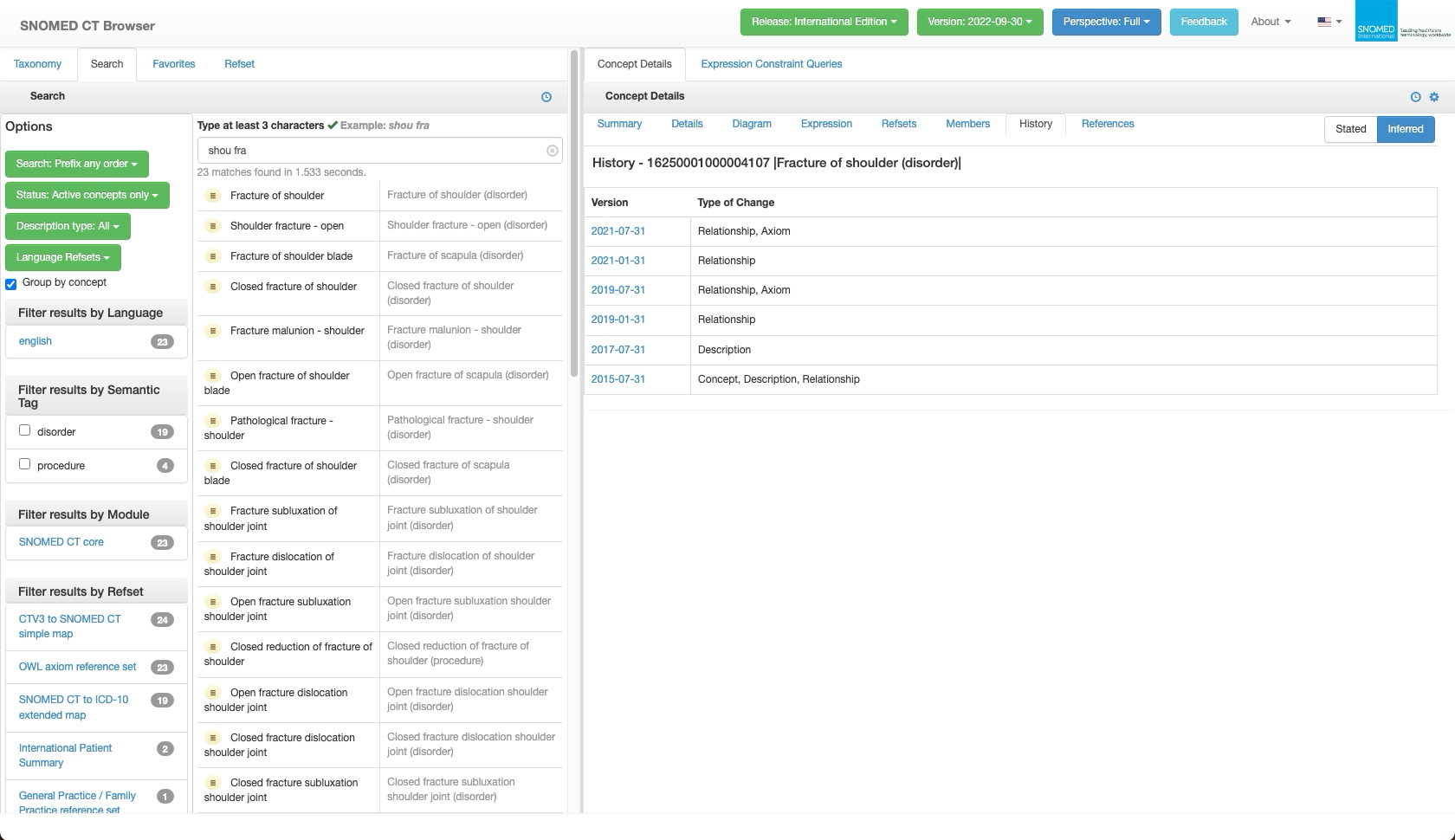
| In the SCT Browser *Full* perspective, press the `History` tab in the *Concept Details* panel.                                                                                                                                                                                                                                                                                                                                                                                                                                                                                                                   | <div><figure><img src="https://4047345178-files.gitbook.io/~/files/v0/b/gitbook-x-prod.appspot.com/o/spaces%2F1kHdBxHtH99oJ85gNaa3%2Fuploads%2Fgit-blob-33dc0e83e8c1337ef1f0f5ff301e23c34f173baf%2F167511418.png?alt=media" alt=""><figcaption></figcaption></figure></div> |
| <p>The <em>Concept Details</em> panel updates to show a chronological listing (by SNOMED CT version date) of published versions of the focus concept.<br></p><p>Each list row shows:<br></p><ul><li><code>Version</code> (date in YYYY-MM-DD format).</li><li><em>Type of Change</em>, showing what type of concept details were modified in that version.</li></ul>                                                                                                                                                                                                                                             | <div><figure><img src="https://4047345178-files.gitbook.io/~/files/v0/b/gitbook-x-prod.appspot.com/o/spaces%2F1kHdBxHtH99oJ85gNaa3%2Fuploads%2Fgit-blob-0de90d9a6bc805fbbd7437630a8f6ebd6977008a%2F167511419.png?alt=media" alt=""><figcaption></figcaption></figure></div> |
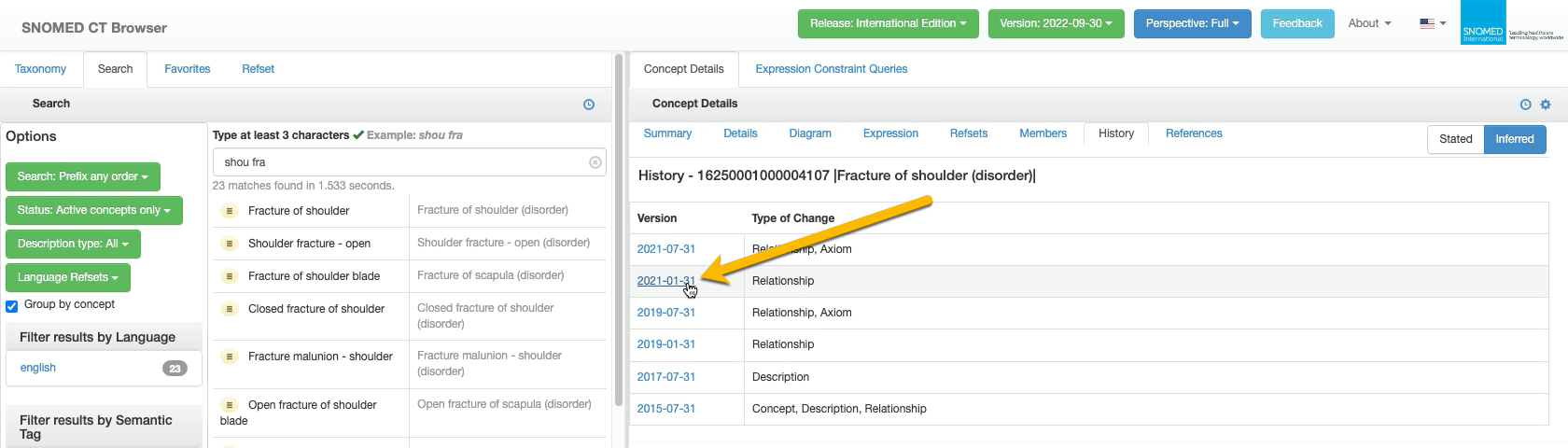
| Press a `Version` entry to switch all Concept Details to those published in that version.                                                                                                                                                                                                                                                                                                                                                                                                                                                                                                                        | <div><figure><img src="https://4047345178-files.gitbook.io/~/files/v0/b/gitbook-x-prod.appspot.com/o/spaces%2F1kHdBxHtH99oJ85gNaa3%2Fuploads%2Fgit-blob-6997de1fd988867a77ec972fb797aab1890a1041%2F167511435.png?alt=media" alt=""><figcaption></figcaption></figure></div> |
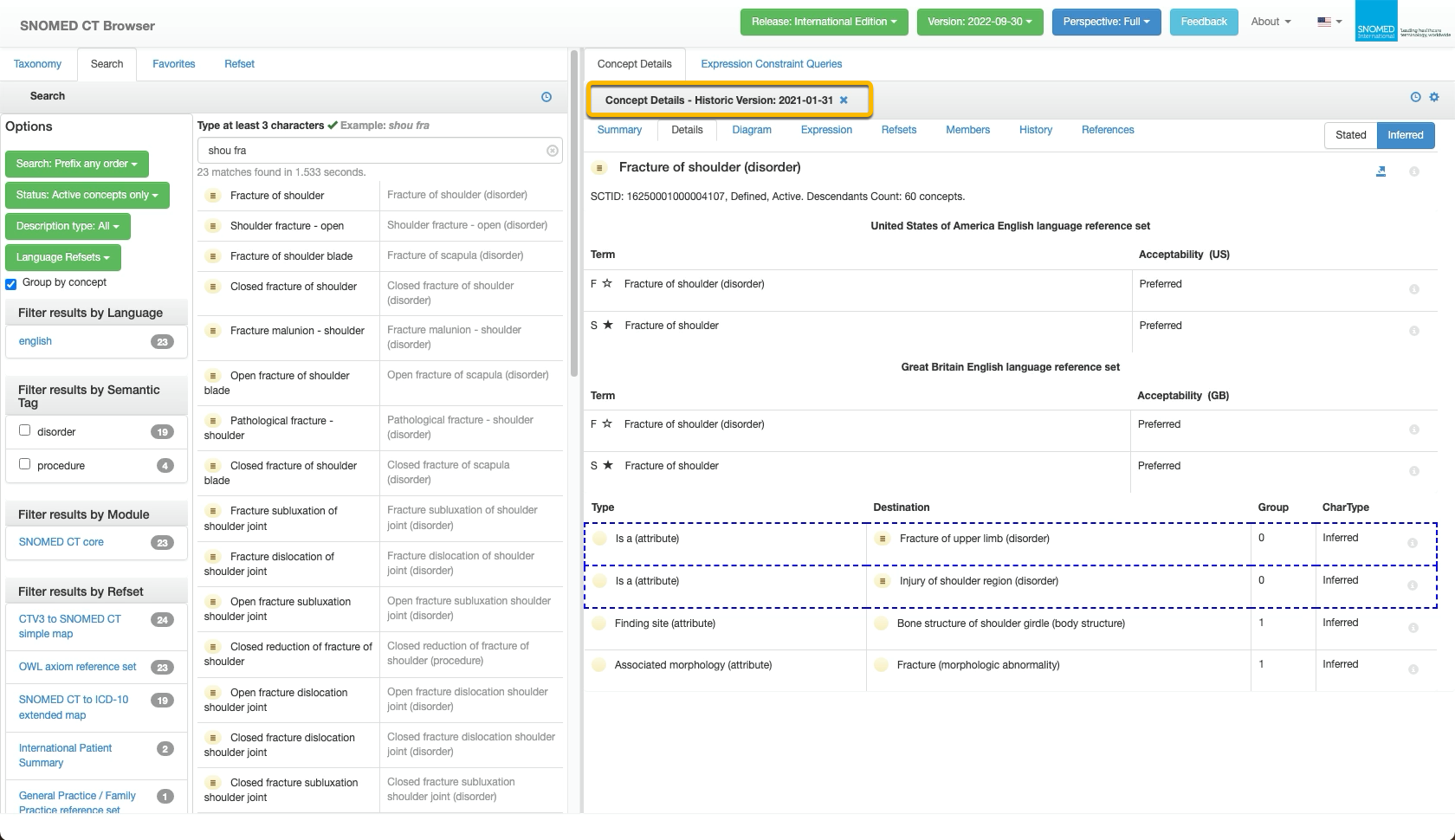
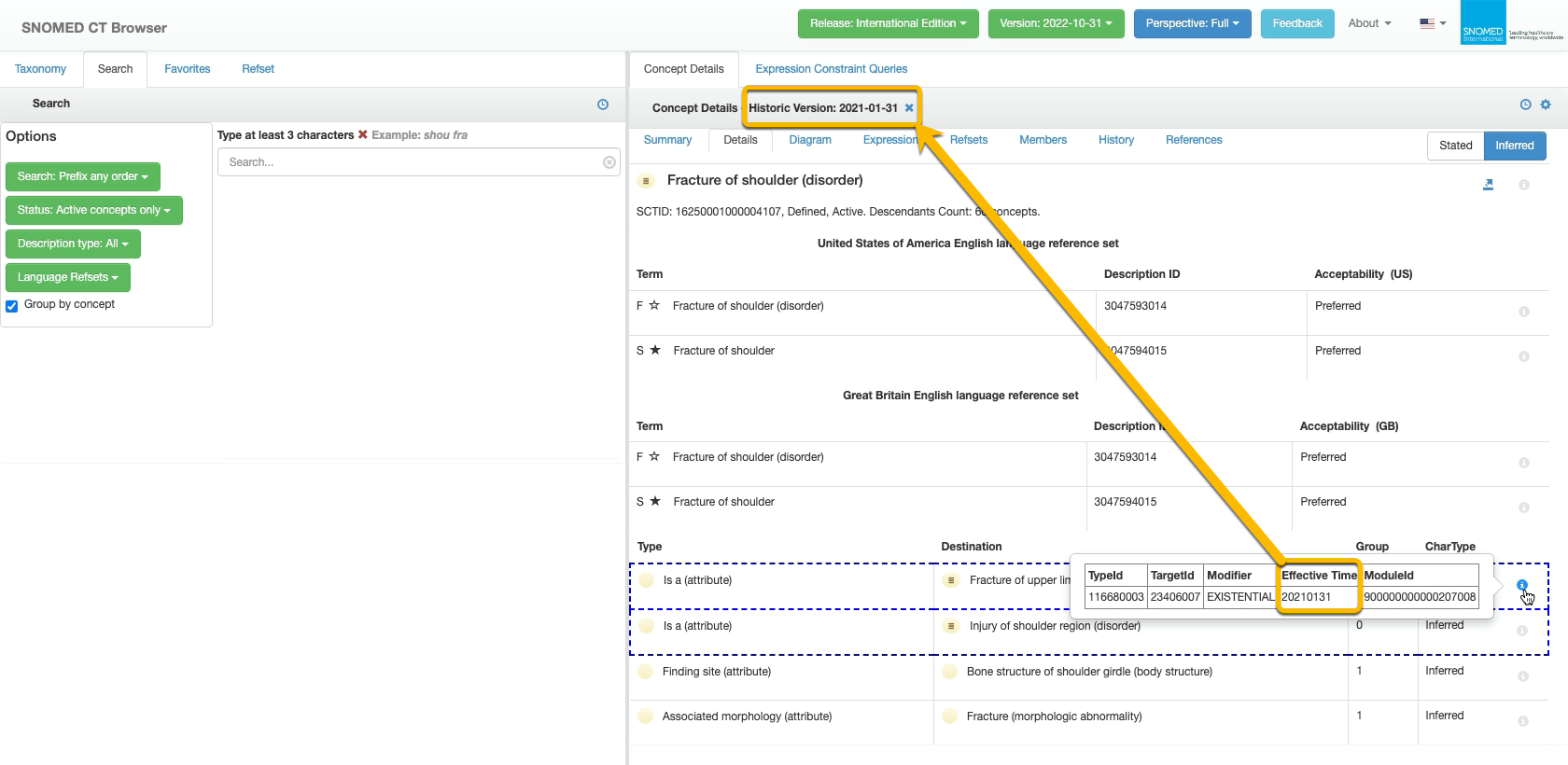
| <p>An additional label including the version date is appended to the <em>Concept Details</em> panel title to maintain context whilst browsing the historical details.<br></p><p>Navigate around the historical details as needed using the <em>Concept Details</em> panel context tabs.<br></p><div data-gb-custom-block data-tag="hint" data-style="info" class="hint hint-info"><p><strong>Changed items highlighting</strong><br></p><p>When viewing the Details tab, an item that is highlighted with a blue dotted border means that item change was first published in the version being viewed.</p></div> | <div><figure><img src="https://4047345178-files.gitbook.io/~/files/v0/b/gitbook-x-prod.appspot.com/o/spaces%2F1kHdBxHtH99oJ85gNaa3%2Fuploads%2Fgit-blob-ce32291ce577bedd393eaeaf561e7b37680bcb18%2F167511432.png?alt=media" alt=""><figcaption></figcaption></figure></div> |
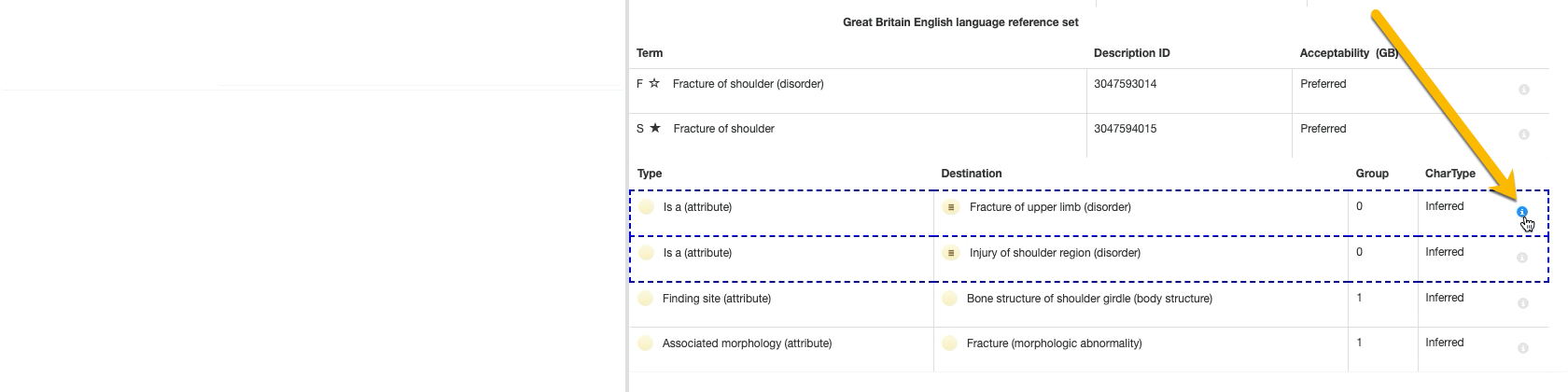
| <p>In the <code>Details</code> tab, additional metadata can be viewed for each item via the grey <i class="fa-circle-info">:circle-info:</i> icon buttons to the right of the relevant item row.<br></p><p>Moving the cursor over the button will highlight it in blue.</p>                                                                                                                                                                                                                                                                                                                                      | <div><figure><img src="https://4047345178-files.gitbook.io/~/files/v0/b/gitbook-x-prod.appspot.com/o/spaces%2F1kHdBxHtH99oJ85gNaa3%2Fuploads%2Fgit-blob-be378591e45419c9cf968e2794ebe49feba0677b%2F167511460.png?alt=media" alt=""><figcaption></figcaption></figure></div> |
| <p>In the <code>Details</code> tab, when highlighted, press <i class="fa-circle-info">:circle-info:</i> to see a pop-over table of information for that item, including its <em>Effective Time</em> (publication change date).<br></p><p>The <em>Effective Time</em> of highlighted items will match the historical version currently being viewed.</p>                                                                                                                                                                                                                                                          | <div><figure><img src="https://4047345178-files.gitbook.io/~/files/v0/b/gitbook-x-prod.appspot.com/o/spaces%2F1kHdBxHtH99oJ85gNaa3%2Fuploads%2Fgit-blob-41f611eae38ae350f896991bef4c4b3e741da179%2F167511463.png?alt=media" alt=""><figcaption></figcaption></figure></div> |
| <p>Press <i class="fa-xmark">:xmark:</i> at the end of the <em>Concept Details</em> panel title when viewing a historical version to restore the panel contents to the latest published version (the additional label will be cleared).<br></p><div data-gb-custom-block data-tag="hint" data-style="info" class="hint hint-info"><p><strong>Changing focus also resets to latest version</strong><br></p><p>Historical details will also be cleared if the Concept Details focus concept is changed.</p></div>                                                                                                  | <div><figure><img src="https://4047345178-files.gitbook.io/~/files/v0/b/gitbook-x-prod.appspot.com/o/spaces%2F1kHdBxHtH99oJ85gNaa3%2Fuploads%2Fgit-blob-af129952aa8baf15981362254f4e958f994f296f%2F167511464.png?alt=media" alt=""><figcaption></figcaption></figure></div> |

<a href="https://docs.google.com/forms/d/e/1FAIpQLScTmbZIf0UEQwYDkY27EEWBkaiYkHSbR0_9DmFrMLXoQLyL7Q/viewform?usp=pp_url&#x26;entry.1767247133=Browser+User+Guide&#x26;entry.670899847=View%20the%20history%20of%20a%20SNOMED%20CT%20concept" class="button primary">Provide Feedback</a>


---

# Agent Instructions: Querying This Documentation

If you need additional information that is not directly available in this page, you can query the documentation dynamically by asking a question.

Perform an HTTP GET request on the current page URL with the `ask` query parameter:

```
GET https://docs.snomed.org/snomed-ct-user-guides/snomed-ct-browser-guide/how-to/view-the-history-of-a-snomed-ct-concept.md?ask=<question>
```

The question should be specific, self-contained, and written in natural language.
The response will contain a direct answer to the question and relevant excerpts and sources from the documentation.

Use this mechanism when the answer is not explicitly present in the current page, you need clarification or additional context, or you want to retrieve related documentation sections.