# View the reference sets for a SNOMED CT concept

| Steps                                                                                                                                                                                                                                                                                                                                                                                                                                                                                                                                                                     | References                                                                                                                                                                                                                                                                                                                                                                                                                                                                                                                                             |
| ------------------------------------------------------------------------------------------------------------------------------------------------------------------------------------------------------------------------------------------------------------------------------------------------------------------------------------------------------------------------------------------------------------------------------------------------------------------------------------------------------------------------------------------------------------------------- | ------------------------------------------------------------------------------------------------------------------------------------------------------------------------------------------------------------------------------------------------------------------------------------------------------------------------------------------------------------------------------------------------------------------------------------------------------------------------------------------------------------------------------------------------------ |
| In the SCT Browser *Full* perspective, press the `Refsets` tab in the *Concept Details* panel.                                                                                                                                                                                                                                                                                                                                                                                                                                                                            | <div><figure><img src="https://4047345178-files.gitbook.io/~/files/v0/b/gitbook-x-prod.appspot.com/o/spaces%2F1kHdBxHtH99oJ85gNaa3%2Fuploads%2Fgit-blob-7e185c8d4bb261a7e79870c5cca23096c8759369%2F162728134.png?alt=media" alt=""><figcaption></figcaption></figure></div>                                                                                                                                                                                                                                                                            |
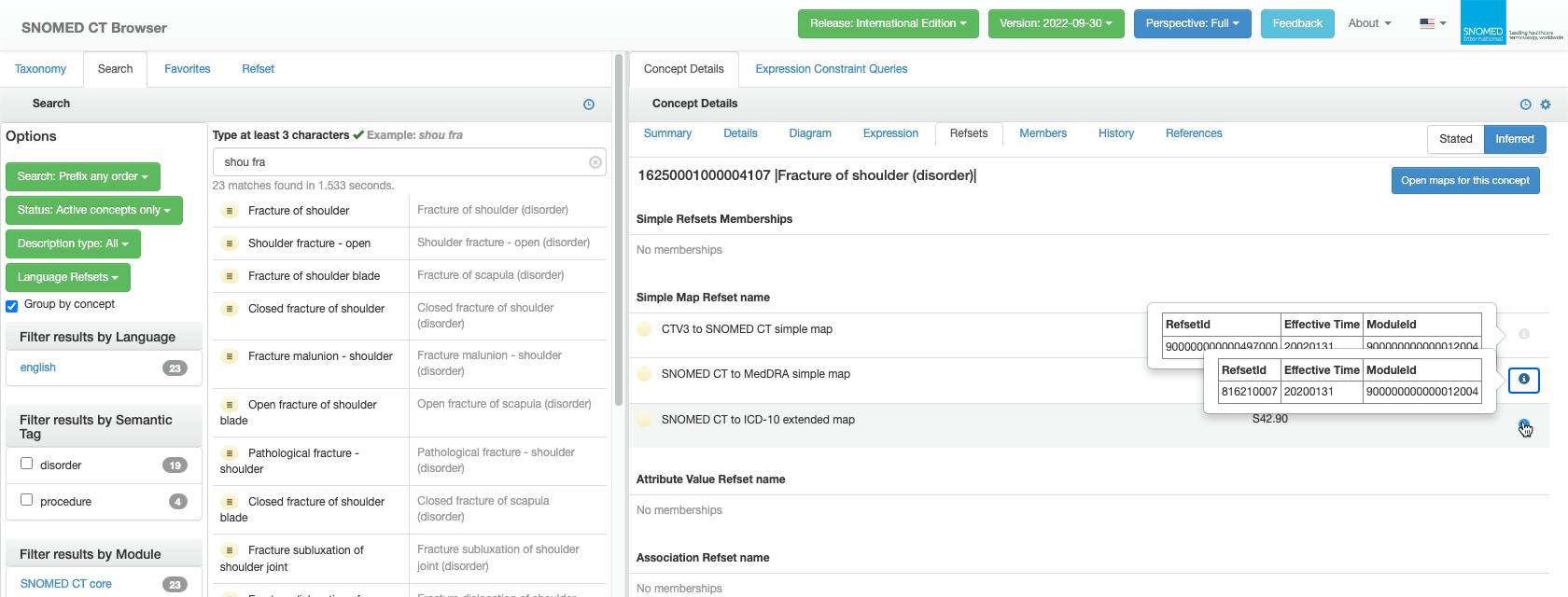
| <p>The <em>Concept Details</em> panel updates to show the following:<br></p><ul><li>Concept <em>SCTID</em> and <em>FSN</em>.</li><li><code>Open maps for this concept</code> button.</li><li><p>Listings by type of all SNOMED CT Reference Sets of which the concept is a member. Each list entry contains the following:<br></p><ul><li><em>Definition Status</em> icon and <em>Reference Set</em> name.</li><li><em>Map Refset</em> identifier (only if applicable; blank if not).</li><li><i class="fa-circle-info">:circle-info:</i>icon button.</li></ul></li></ul> | <div><figure><img src="https://4047345178-files.gitbook.io/~/files/v0/b/gitbook-x-prod.appspot.com/o/spaces%2F1kHdBxHtH99oJ85gNaa3%2Fuploads%2Fgit-blob-84dd35903ec2ec5489972a19646e1548eab7421d%2F162728135.png?alt=media" alt=""><figcaption></figcaption></figure></div>                                                                                                                                                                                                                                                                            |
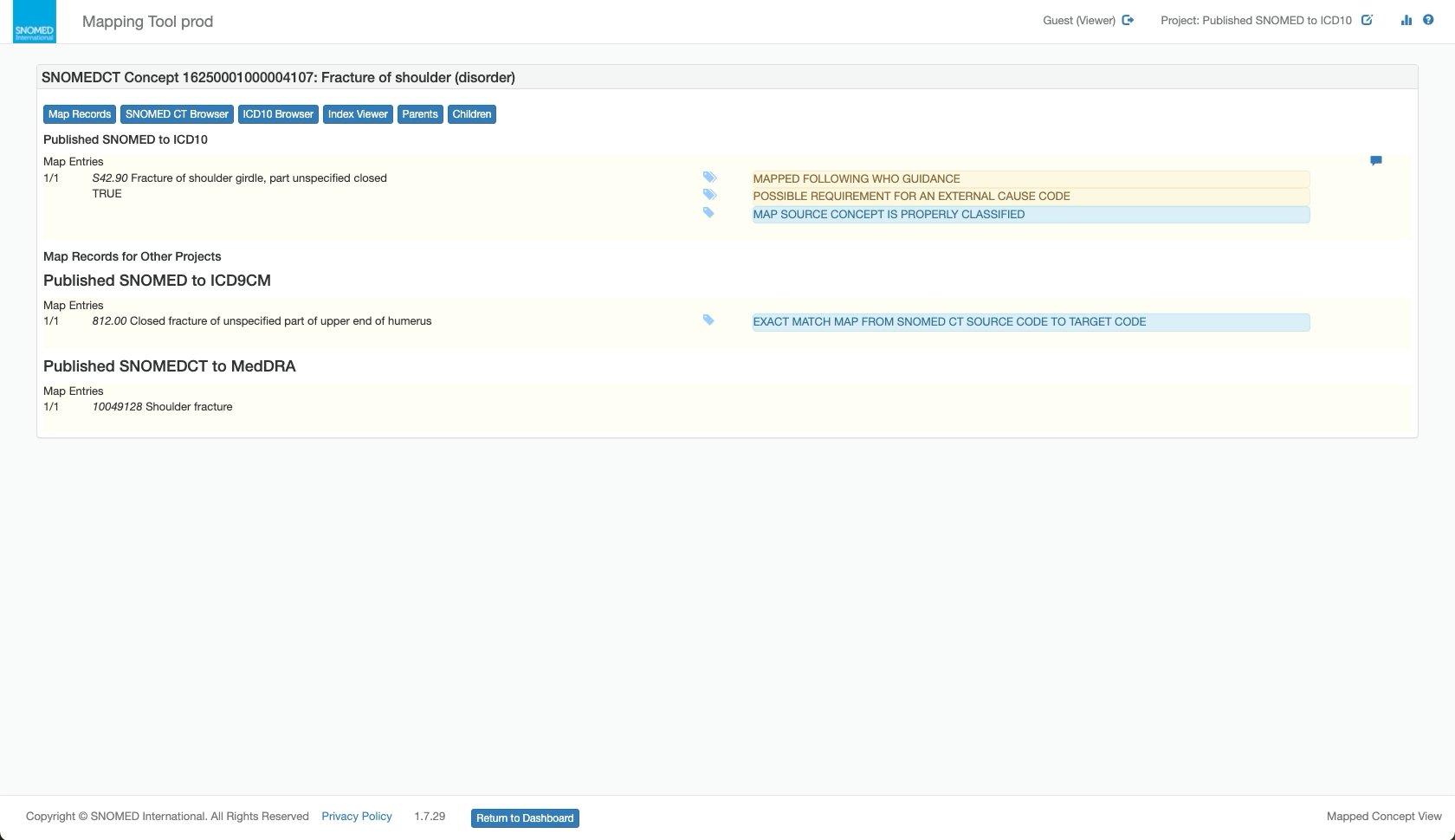
| Press `Open maps for this concept` to open the \_SNOMED CT Mapping Tool (in a new web browser tab/window) focused on the concept, showing to see any relevant published map records.                                                                                                                                                                                                                                                                                                                                                                                      | <div><figure><img src="https://4047345178-files.gitbook.io/~/files/v0/b/gitbook-x-prod.appspot.com/o/spaces%2F1kHdBxHtH99oJ85gNaa3%2Fuploads%2Fgit-blob-fa61bfdd18bb5c3ff5dc905a13a97b090b161c8b%2F162728136.png?alt=media" alt=""><figcaption></figcaption></figure></div><div><figure><img src="https://4047345178-files.gitbook.io/~/files/v0/b/gitbook-x-prod.appspot.com/o/spaces%2F1kHdBxHtH99oJ85gNaa3%2Fuploads%2Fgit-blob-e175a6d90c41b851b4f6ba98b41e87104b4fd7d4%2F162728137.png?alt=media" alt=""><figcaption></figcaption></figure></div> |
| <p>Press <i class="fa-circle-info">:circle-info:</i> on a listing row to see a pop-up overlay with the following additional details:</p><ul><li><em>RefsetId</em></li><li><em>EffectiveTime</em></li><li><em>ModuleId</em>.<br></li></ul><p>Multiple overlays can be opened at the same time.<br></p><p>Press anywhere within the <em>Concept Details</em> panel outside a pop-up overlay to close <strong>all</strong> open overlays.</p>                                                                                                                                | <div><figure><img src="https://4047345178-files.gitbook.io/~/files/v0/b/gitbook-x-prod.appspot.com/o/spaces%2F1kHdBxHtH99oJ85gNaa3%2Fuploads%2Fgit-blob-7e8ba367d538b3bb48e4c3dcea58e7a5303a4066%2F162728138.png?alt=media" alt=""><figcaption></figcaption></figure></div>                                                                                                                                                                                                                                                                            |

<a href="https://docs.google.com/forms/d/e/1FAIpQLScTmbZIf0UEQwYDkY27EEWBkaiYkHSbR0_9DmFrMLXoQLyL7Q/viewform?usp=pp_url&#x26;entry.1767247133=Browser+User+Guide&#x26;entry.670899847=View%20the%20reference%20sets%20for%20a%20SNOMED%20CT%20concept" class="button primary">Provide Feedback</a>


---

# Agent Instructions: Querying This Documentation

If you need additional information that is not directly available in this page, you can query the documentation dynamically by asking a question.

Perform an HTTP GET request on the current page URL with the `ask` query parameter:

```
GET https://docs.snomed.org/snomed-ct-user-guides/snomed-ct-browser-guide/how-to/view-the-reference-sets-for-a-snomed-ct-concept.md?ask=<question>
```

The question should be specific, self-contained, and written in natural language.
The response will contain a direct answer to the question and relevant excerpts and sources from the documentation.

Use this mechanism when the answer is not explicitly present in the current page, you need clarification or additional context, or you want to retrieve related documentation sections.