# Browse the taxonomy to locate concepts

| Steps                                                                                                                                                                                                                                                                                                                                                                                                                                                                                                                                                                                                                                                                                                        | References                                                                                                                                                                                                                                                                                                                                                                                                                                                                                                                                           |                                                                                                                                                                                                                                                                                                                                                                     |                                                                                                                                                                                                                                                                            |
| ------------------------------------------------------------------------------------------------------------------------------------------------------------------------------------------------------------------------------------------------------------------------------------------------------------------------------------------------------------------------------------------------------------------------------------------------------------------------------------------------------------------------------------------------------------------------------------------------------------------------------------------------------------------------------------------------------------ | ---------------------------------------------------------------------------------------------------------------------------------------------------------------------------------------------------------------------------------------------------------------------------------------------------------------------------------------------------------------------------------------------------------------------------------------------------------------------------------------------------------------------------------------------------- | ------------------------------------------------------------------------------------------------------------------------------------------------------------------------------------------------------------------------------------------------------------------------------------------------------------------------------------------------------------------- | -------------------------------------------------------------------------------------------------------------------------------------------------------------------------------------------------------------------------------------------------------------------------- |
| Press the `Taxonomy` tab in the *Task View - Context Panel* tabs list.                                                                                                                                                                                                                                                                                                                                                                                                                                                                                                                                                                                                                                       | <div><figure><img src="https://956592758-files.gitbook.io/~/files/v0/b/gitbook-x-prod.appspot.com/o/spaces%2FO8kNzHFIgz2UFgwrcB08%2Fuploads%2Fgit-blob-94bb77bfcda55b94148d715d391447c028e5a8b3%2F100892718.png?alt=media" alt=""><figcaption></figcaption></figure></div>                                                                                                                                                                                                                                                                           |                                                                                                                                                                                                                                                                                                                                                                     |                                                                                                                                                                                                                                                                            |
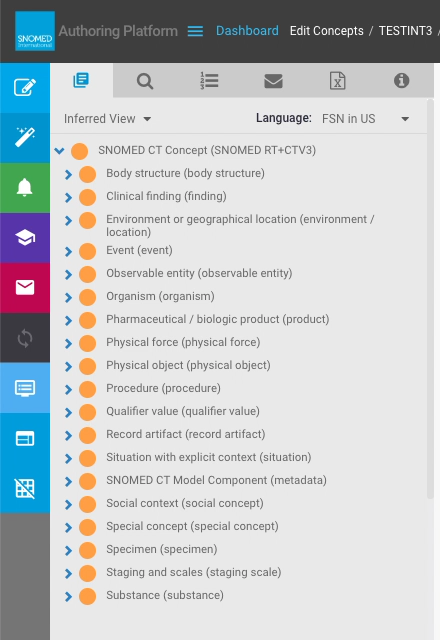
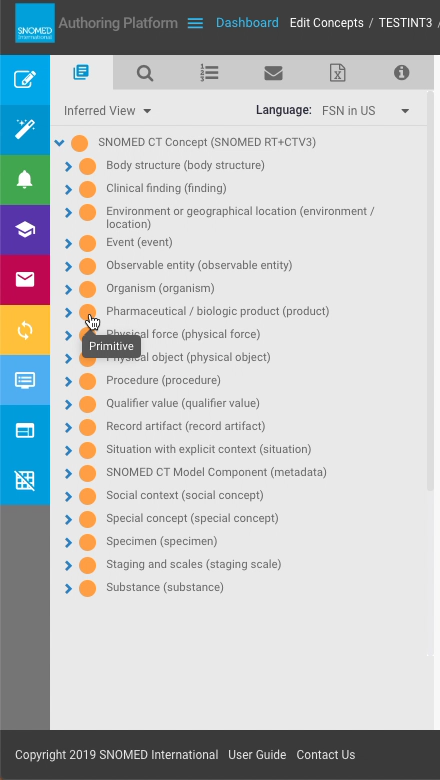
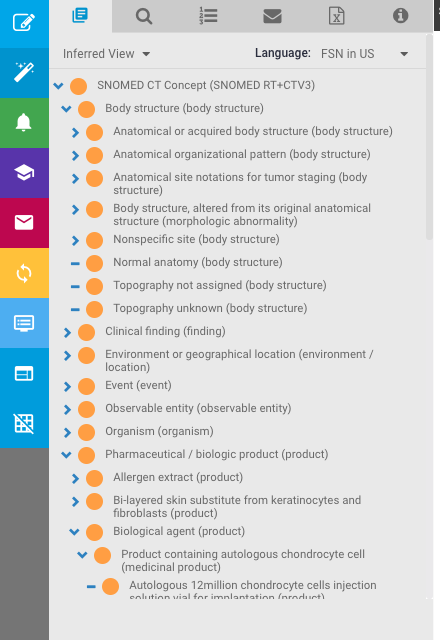
| <p>The <em>Task View - Context Panel</em> switches to the <em>Taxonomy</em> view with a hierarchical tree-node representation of SNOMED CT concepts, based on their parent-child (<code>Is-a</code>) relationships.<br></p><p>Each row in this view represents a hierarchy node, and is preceded by one of two icon buttons:<br></p><ul><li><i class="fa-chevron-down">:chevron-down:</i> (child nodes expanded)</li><li><i class="fa-chevron-right">:chevron-right:</i> (child nodes collapsed)</li></ul><p>Pressing <i class="fa-chevron-down">:chevron-down:</i> or <i class="fa-chevron-right">:chevron-right:</i> toggles from one state to the other.<br></p><p>The initial view shows <code>138875005 | SNOMED CT Concept (SNOMED RT+CTV3)                                                                                                                                                                                                                                                                                                                                                                                                                                                                                                                   | </code> at the top of the listing, in its expanded presentation, revealing the SNOMED CT top level concepts.<br></p><p>Each taxonomy row also has the following:<br></p><ul><li><code>Primitive</code> or <code>Fully Defined</code> definition status icon</li><li>Text label showing either the concept FSN or Preferred Term (PT) in the en-US dialect</li></ul> | <div><figure><img src="https://956592758-files.gitbook.io/~/files/v0/b/gitbook-x-prod.appspot.com/o/spaces%2FO8kNzHFIgz2UFgwrcB08%2Fuploads%2Fgit-blob-3a453c231e267af6a2c06773d84d92b3a9802ec0%2F100892719.png?alt=media" alt=""><figcaption></figcaption></figure></div> |
| Press `Primitive` or `Fully Defined` to open a *Concept Details* pop-up box as described in [View concept details when browsing the taxonomy](https://docs.snomed.org/snomed-ct-user-guides/authoring-user-guide/how-to/task-taxonomy-and-concept-search/view-concept-details-when-browsing-the-taxonomy).                                                                                                                                                                                                                                                                                                                                                                                                   | <div><figure><img src="https://956592758-files.gitbook.io/~/files/v0/b/gitbook-x-prod.appspot.com/o/spaces%2FO8kNzHFIgz2UFgwrcB08%2Fuploads%2Fgit-blob-a01e785a7eb2dd810c7ac6dab3ead0f7e829aaee%2F100893638.png?alt=media" alt=""><figcaption></figcaption></figure></div><div><figure><img src="https://956592758-files.gitbook.io/~/files/v0/b/gitbook-x-prod.appspot.com/o/spaces%2FO8kNzHFIgz2UFgwrcB08%2Fuploads%2Fgit-blob-d3ef664821745be6857da5914e982b5893a2a4bf%2F100893639.png?alt=media" alt=""><figcaption></figcaption></figure></div> |                                                                                                                                                                                                                                                                                                                                                                     |                                                                                                                                                                                                                                                                            |
| Single-press a node label to load that concept into the edit panel.                                                                                                                                                                                                                                                                                                                                                                                                                                                                                                                                                                                                                                          | <div><figure><img src="https://956592758-files.gitbook.io/~/files/v0/b/gitbook-x-prod.appspot.com/o/spaces%2FO8kNzHFIgz2UFgwrcB08%2Fuploads%2Fgit-blob-882c1c981b3b271f753b3096d50aee0253e56d94%2F100893640.png?alt=media" alt=""><figcaption></figcaption></figure></div>                                                                                                                                                                                                                                                                           |                                                                                                                                                                                                                                                                                                                                                                     |                                                                                                                                                                                                                                                                            |
| <p>Double-press a node label to change the focus of the taxonomy tree to that concept.<br></p><p>This presents the same view as opening a concept in the taxonomy from a <em>Task View - Search</em> result (see <a href="act-on-concept-search-results">Act on concept search results</a>) or <em>Task View - Saved List</em> entry (see <a href="../task-saved-list/add-a-concept-to-my-task-saved-list-and-act-on-saved-concepts">Add a concept to my task Saved List and act on saved concepts</a>).</p>                                                                                                                                                                                                 | <div><figure><img src="https://956592758-files.gitbook.io/~/files/v0/b/gitbook-x-prod.appspot.com/o/spaces%2FO8kNzHFIgz2UFgwrcB08%2Fuploads%2Fgit-blob-f0f9afc33b254bed68ef3904af6235e61adb73c2%2F100893641.png?alt=media" alt=""><figcaption></figcaption></figure></div>                                                                                                                                                                                                                                                                           |                                                                                                                                                                                                                                                                                                                                                                     |                                                                                                                                                                                                                                                                            |
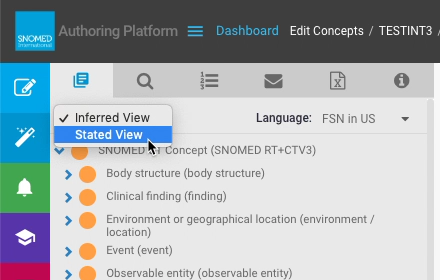
| <p>Above the taxonomy listing are two presentation controls:<br></p><ul><li>Switch between <code>Inferred View</code> (default) and <code>Stated View</code></li><li>Switch between <code>FSN in US</code> (default) and <code>PT in US</code> for the node label text</li></ul>                                                                                                                                                                                                                                                                                                                                                                                                                             | <div><figure><img src="https://956592758-files.gitbook.io/~/files/v0/b/gitbook-x-prod.appspot.com/o/spaces%2FO8kNzHFIgz2UFgwrcB08%2Fuploads%2Fgit-blob-ca53be6c6558fccdf3f94ee7e4d9c26f2854820b%2F100892720.png?alt=media" alt=""><figcaption></figcaption></figure></div><div><figure><img src="https://956592758-files.gitbook.io/~/files/v0/b/gitbook-x-prod.appspot.com/o/spaces%2FO8kNzHFIgz2UFgwrcB08%2Fuploads%2Fgit-blob-bf981a465f1997e017a0084349c5de0338529abe%2F100892721.png?alt=media" alt=""><figcaption></figcaption></figure></div> |                                                                                                                                                                                                                                                                                                                                                                     |                                                                                                                                                                                                                                                                            |
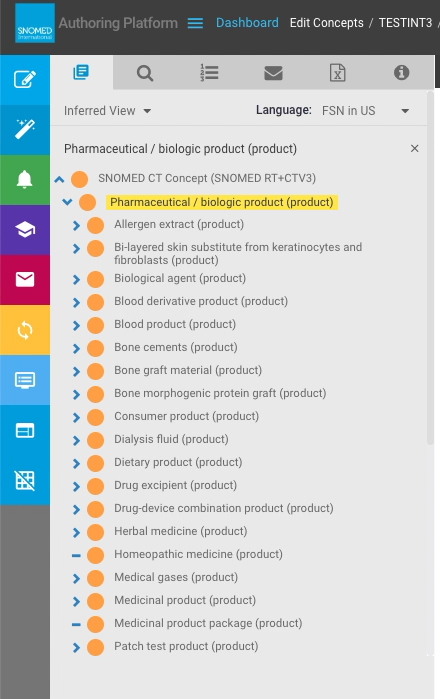
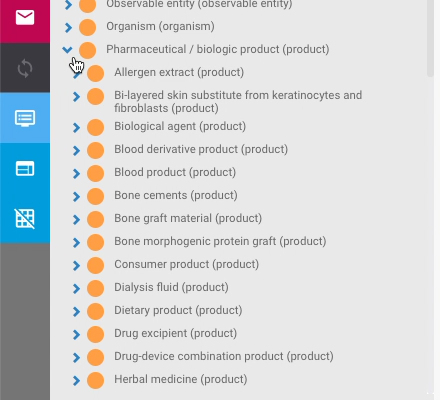
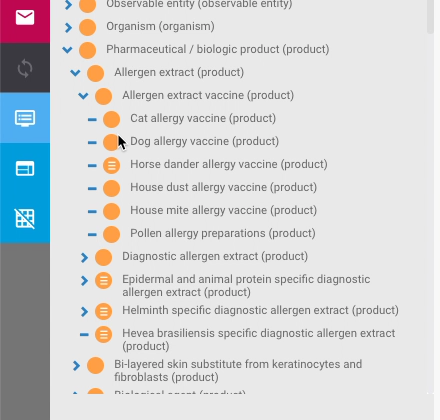
| Navigate down the taxonomy nodes by successively expanding selective child nodes.                                                                                                                                                                                                                                                                                                                                                                                                                                                                                                                                                                                                                            | <div><figure><img src="https://956592758-files.gitbook.io/~/files/v0/b/gitbook-x-prod.appspot.com/o/spaces%2FO8kNzHFIgz2UFgwrcB08%2Fuploads%2Fgit-blob-f977f62e295893f8e215b3ae0beb9bfd54ba11b9%2F100892725.png?alt=media" alt=""><figcaption></figcaption></figure></div><div><figure><img src="https://956592758-files.gitbook.io/~/files/v0/b/gitbook-x-prod.appspot.com/o/spaces%2FO8kNzHFIgz2UFgwrcB08%2Fuploads%2Fgit-blob-9298563073523b7be643874db4c5af66a3cf070a%2F100892726.png?alt=media" alt=""><figcaption></figcaption></figure></div> |                                                                                                                                                                                                                                                                                                                                                                     |                                                                                                                                                                                                                                                                            |
| When a concept is reached that has no child concepts (ie it is a taxonomy "leaf" node), the row entry is preceded with a <i class="fa-minus">:minus:</i> icon, indicating that no further expansion is possible.                                                                                                                                                                                                                                                                                                                                                                                                                                                                                             | <div><figure><img src="https://956592758-files.gitbook.io/~/files/v0/b/gitbook-x-prod.appspot.com/o/spaces%2FO8kNzHFIgz2UFgwrcB08%2Fuploads%2Fgit-blob-611366d3b7c267fabef08cd5408ec7fff72d3a8a%2F100892727.png?alt=media" alt=""><figcaption></figcaption></figure></div>                                                                                                                                                                                                                                                                           |                                                                                                                                                                                                                                                                                                                                                                     |                                                                                                                                                                                                                                                                            |
| Any taxonomy node that is visible can be expanded or collapsed independently of the others. Changing one node does not affect others previously expanded or collapsed at that level or above - only direct descendants are affected.                                                                                                                                                                                                                                                                                                                                                                                                                                                                         | <div><figure><img src="https://956592758-files.gitbook.io/~/files/v0/b/gitbook-x-prod.appspot.com/o/spaces%2FO8kNzHFIgz2UFgwrcB08%2Fuploads%2Fgit-blob-debe3890fd7723705311ce449d6fdcd5d274a41b%2F100893636.png?alt=media" alt=""><figcaption></figcaption></figure></div>                                                                                                                                                                                                                                                                           |                                                                                                                                                                                                                                                                                                                                                                     |                                                                                                                                                                                                                                                                            |

<a href="https://docs.google.com/forms/d/e/1FAIpQLScTmbZIf0UEQwYDkY27EEWBkaiYkHSbR0_9DmFrMLXoQLyL7Q/viewform?usp=pp_url&#x26;entry.1767247133=AP+UG&#x26;entry.670899847=Browse%20the%20taxonomy%20to%20locate%20concepts" class="button primary">Provide Feedback</a>


---

# Agent Instructions: Querying This Documentation

If you need additional information that is not directly available in this page, you can query the documentation dynamically by asking a question.

Perform an HTTP GET request on the current page URL with the `ask` query parameter:

```
GET https://docs.snomed.org/snomed-ct-user-guides/authoring-user-guide/how-to/task-taxonomy-and-concept-search/browse-the-taxonomy-to-locate-concepts.md?ask=<question>
```

The question should be specific, self-contained, and written in natural language.
The response will contain a direct answer to the question and relevant excerpts and sources from the documentation.

Use this mechanism when the answer is not explicitly present in the current page, you need clarification or additional context, or you want to retrieve related documentation sections.