# Add Relationship in an Extension

## Purpose

Relationships may be added in an extension for various reasons including:

* Specifying the defining characteristics of new extension concepts
* Improving the definition of an existing extension concept
* In exceptional cases, it may be permissible to add defining relationships to
  * Concepts which belong to the International Edition
  * Concepts which belong to another module on which the extension depends

## Principles

### Overview

A SNOMED CT relationship involves three main concepts - the source concept, the destination concept, and the relationship type concept (also known as the 'attribute'). Each of the concepts in an extension relationship may belong to either a module from the extension itself, or a module upon which the extension depends (e.g. an international module).

When adding new relationships in an extension, the following principles apply:

* **Source Concept** : Except in exceptional cases (noted below), the relationship must represent a defining characteristic of a concept in a module for which the extension producer is responsible.
  * This means that the sourceId of the relationship should refer to a concept in the extension.

{% hint style="info" %}
In cases in which it is necessary to meet legitimate clinical needs or to correct identified clinical issues, an extension producer may add additional defining relationships to a concept which belongs to an International module (or a module on which the extension module depends). However, this should be done with extreme caution due to the potential impact on the classification results. If these situations arise, SNOMED International (or the module owner) must be notified.
{% endhint %}

* **Attribute** : The type of relationship should usually be represented by an attribute concept which is part of the SNOMED International Edition.
  * When using an attribute from the International Edition, concept model rules and editorial guidance should be followed. For example, relationships should comply with the rules stated in the [MRCM](https://docs.snomed.org/snomed-ct-practical-guides/snomed-ct-extension-guide/5-key-steps/5.4-authoring/5.4.4-authoring-relationships/broken-reference).
  * In some cases, new attribute concepts may be added to an extension. While this is permitted, new attributes should be applied with caution, and concept model rules and editorial guidance should be clearly documented by the extension provider.

{% hint style="info" %}
Attributes added in an extension can lead to inconsistent classification, where attributes overlap with or interact with attributes in the SNOMED International Edition. Furthermore, attributes created in an extension may not be well aligned with new attributes covering similar characteristics that may be included in future releases of the International Edition. Therefore, care should be exercised when adding attributes in an extension. In particular, the rationale for creating each new attribute should be well documented, with clear guidance on its consistent use. Ideally additions should also be made to the MRCM reference sets to capture the associated concept model rules in a machine processable way. If similar attributes are later added to the International Edition, the extension producer should plan to align with the International Edition as soon as possible.
{% endhint %}

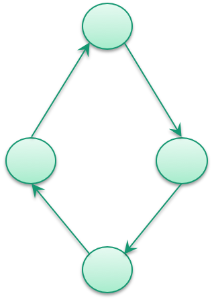
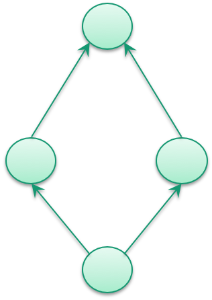
* **Destination Concept** : The target of the relationship may belong to the extension module, or any module on which the extension module depends (including an international module). However, care should be taken to avoid intermediate concepts as described in [Add Concept in an Extension](https://docs.snomed.org/snomed-ct-practical-guides/snomed-ct-extension-guide/5-key-steps/5.4-authoring/5.4.2-authoring-concepts/5.4.2.1-add-concept-in-an-extension)). Additionally, it is important to ensure that the added relationships do not induce any cycles, i.e. it should be ensured that the added relationships retain the SNOMED CT hierarchy as a Directed Acyclic Graph.

|                                                                                                                                        Cyclic Graph                                                                                                                                        |                                                                                                                                   Directed Acyclic Graph                                                                                                                                   |
| :----------------------------------------------------------------------------------------------------------------------------------------------------------------------------------------------------------------------------------------------------------------------------------------: | :----------------------------------------------------------------------------------------------------------------------------------------------------------------------------------------------------------------------------------------------------------------------------------------: |
|                                                                                                                         <mark style="color:red;">NOT ALLOWED</mark>                                                                                                                        |                                                                                                                           <mark style="color:red;">ALLOWED</mark>                                                                                                                          |
| <div><figure><img src="https://3979592733-files.gitbook.io/~/files/v0/b/gitbook-x-prod.appspot.com/o/spaces%2F3RKZIWpWFT0ocCgNT16E%2Fuploads%2FMJ6yc0ctzWUK0ceaj2Zk%2Fimage.png?alt=media&#x26;token=8973821f-54cd-4473-bab4-68d590b11790" alt=""><figcaption></figcaption></figure></div> | <div><figure><img src="https://3979592733-files.gitbook.io/~/files/v0/b/gitbook-x-prod.appspot.com/o/spaces%2F3RKZIWpWFT0ocCgNT16E%2Fuploads%2FJWcwKcWvTBkhZBwUfVi4%2Fimage.png?alt=media&#x26;token=98fd6f6d-b78b-4ffb-9aa1-b713a3f2bf02" alt=""><figcaption></figcaption></figure></div> |

## Process

The table below provides a summary of the process to follow when adding a new relationship to an extension.

<table><thead><tr><th width="193.85546875">File Type</th><th>Process</th></tr></thead><tbody><tr><td><strong>Stated Axiom</strong></td><td>A prerequisite for generating the relationships in the relationship file is that concepts have been authored and the defining properties stated and classified together with the SNOMED CT content it belongs to. Please see <a href="../5.4.2-authoring-concepts/5.4.2.1-add-concept-in-an-extension">Add Concept in an Extension</a>.</td></tr><tr><td><strong>Relationship</strong></td><td>Once authoring is complete, the contents of the extension modules, together with every module on which these depend, are classified.The resulting set of inferred relationships (i.e. the output of the classification process) is added to the Relationship file.</td></tr><tr><td></td><td>A new row is added to the Relationship file for every inferred relationship that results from the classification process.</td></tr><tr><td></td><td><p></p><p>The attributes of the inferred relationships are set as follows:</p><ul><li><em>id</em> is set to a new relationship identifier allocated within the extension namespace.</li><li><em>effectiveTime</em> is set to the date the extension will be published</li><li><em>active</em> is set to '1' to indicate that the new relationship will be active at the time of publication</li><li><em>moduleId</em> is set to identify a module concept from the extension</li><li><em>sourceId</em> is set to the source concept in the relationship. This will usually belong to the extension module.</li><li><em>destinationId</em> is set to the destination concept in the relationship</li><li><em>relationshipGroup</em> is set to a number that indicates which relationships with the same sourceId are logically grouped together</li><li><em>typeId</em> is set to an attribute concept that represents the type of the relationship</li><li><em>characteristicTypeId</em> is usually set to <a href="http://snomed.info/id/900000000000011006">900000000000011006 |Inferred relationship|</a></li><li><em>modifierId</em> is usually set to <a href="http://snomed.info/id/900000000000451002">900000000000451002 |Existential restriction modifier|</a></li></ul></td></tr></tbody></table>

<a href="https://docs.google.com/forms/d/e/1FAIpQLScTmbZIf0UEQwYDkY27EEWBkaiYkHSbR0_9DmFrMLXoQLyL7Q/viewform?usp=pp_url&#x26;entry.1767247133=Extension+Guide&#x26;entry.670899847=5.4.4.1%20Add%20Relationship%20in%20an%20Extension" class="button primary">Provide Feedback</a>


---

# Agent Instructions: Querying This Documentation

If you need additional information that is not directly available in this page, you can query the documentation dynamically by asking a question.

Perform an HTTP GET request on the current page URL with the `ask` query parameter:

```
GET https://docs.snomed.org/snomed-ct-practical-guides/snomed-ct-extension-guide/5-key-steps/5.4-authoring/5.4.4-authoring-relationships/5.4.4.1-add-relationship-in-an-extension.md?ask=<question>
```

The question should be specific, self-contained, and written in natural language.
The response will contain a direct answer to the question and relevant excerpts and sources from the documentation.

Use this mechanism when the answer is not explicitly present in the current page, you need clarification or additional context, or you want to retrieve related documentation sections.